Thumbnails in a Task Report? | Community
Skip to main content
AndyKent
March 4, 2024
Solved

Thumbnails in a Task Report?

  • March 4, 2024
  • 1 reply
  • 1242 views

Hi,


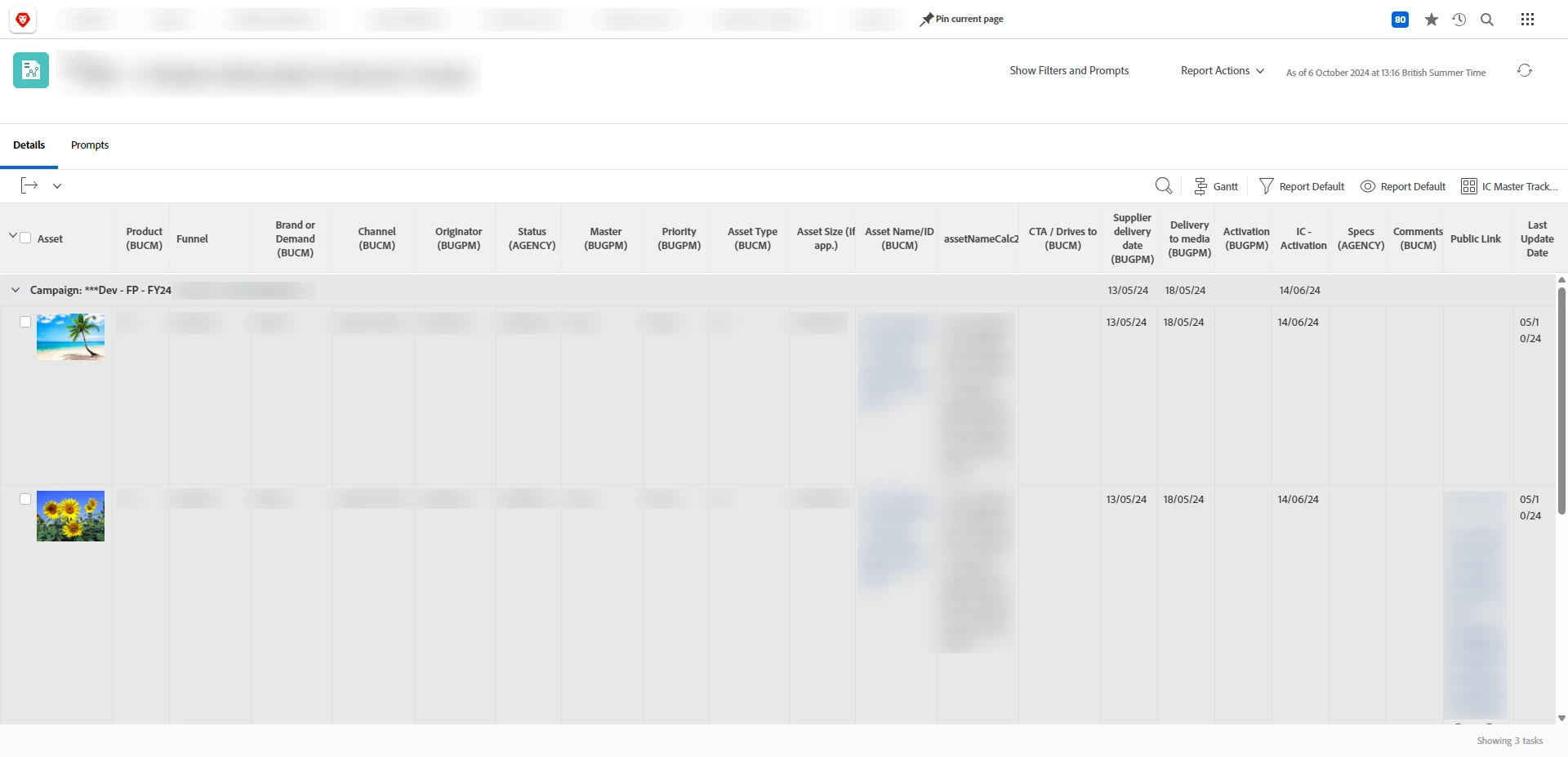
I have a stakeholder asking for a largethumbnail of an asset (attached to a task) within a Task Report (I get this is simple using a Doc Report 😊) but their tracker is a Task Report and fairly complex as it's integrated with Fusion and don't really want to go rebuilding it again.


I've looked all over Experience League, found a few posts from a while back but wondering if anyone has had any luck?


Thanks

Andy

This post is no longer active and is closed to new replies. Need help? Start a new post to ask your question.
Best answer by Sven-iX

Hi @andykent 


Since a task can have 1...N documents, you can't reference "the thumbnail" on a task report. 


Possible solution:

  1. create a hidden (admin-only) field on the task "docID+versionID"
  2. Use Fusion to update the field when an asset/version is uploaded
    e.g. documentVersionID=6656b8840067f89bfcb9d87a6d3909c0&ID=6656b8840067f89a51b07f37539d83a8
  3. In the task report, create a compound column


column.0.sharecol=true column.0.valueformat=HTML column.0.textmode=true column.0.valueexpression=if(isblank({DE:test asset}),'','<im') column.0.displayname=Column column.1.valueexpression=if(isblank({DE:test asset}),'','g src=/internal/document/thumbnail?build=&size=DOCUMENT_SHARE&'+{DE:test asset}+' />') column.1.displayname=Thumbnail column.1.textmode=true column.1.valueformat=HTML


See screenshot


1 reply

Sven-iX
Community Advisor
Sven-iXCommunity AdvisorAccepted solution
Community Advisor
October 5, 2024

Hi @andykent 


Since a task can have 1...N documents, you can't reference "the thumbnail" on a task report. 


Possible solution:

  1. create a hidden (admin-only) field on the task "docID+versionID"
  2. Use Fusion to update the field when an asset/version is uploaded
    e.g. documentVersionID=6656b8840067f89bfcb9d87a6d3909c0&ID=6656b8840067f89a51b07f37539d83a8
  3. In the task report, create a compound column


column.0.sharecol=true column.0.valueformat=HTML column.0.textmode=true column.0.valueexpression=if(isblank({DE:test asset}),'','<im') column.0.displayname=Column column.1.valueexpression=if(isblank({DE:test asset}),'','g src=/internal/document/thumbnail?build=&size=DOCUMENT_SHARE&'+{DE:test asset}+' />') column.1.displayname=Thumbnail column.1.textmode=true column.1.valueformat=HTML


See screenshot


AndyKent
AndyKentAuthor
October 6, 2024

Thank you @sven-ix 

I couldn't achieve the thumbnail using your expression as it looks as if there's an abrupt ending on line 4 BUT with some working out, I did get a thumbnail to appear. {DE:IC - docID+versionID} being my text field.


valueexpression=if(isblank({DE:IC - docID+versionID}),'','<img src="/internal/document/thumbnail?build=&size=DOCUMENT_SHARE&'+{DE:IC - docID+versionID}+'" />')


In my Fusion scenario I already had the public link being posted to the description field so just adding the documentVersionID=XXX&ID=XXX was simple.


Screenshot of my task report below:


Sven-atClient
October 8, 2024

Hi @andykent 
Nice! 

RE: the "abrupt" ending - I have two separate cols so I can split the "<img" tag - i sometimes do that so workfront doesn't strip my HTML - looks like in this case I didn't need to!