TASK REPORT - Customizing the Assign To: ID Name | Community
Skip to main content
Level 2
September 7, 2023
Question

TASK REPORT - Customizing the Assign To: ID Name

  • September 7, 2023
  • 3 replies
  • 1091 views

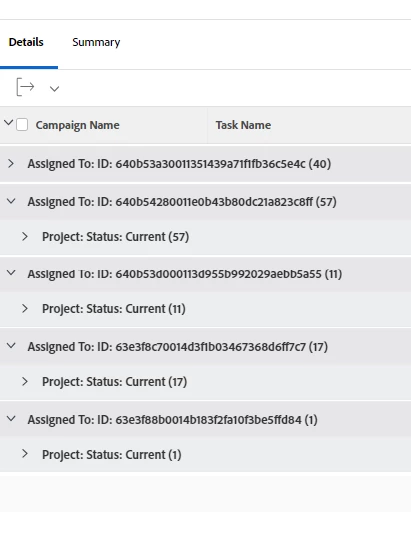
I am creating a report that is grouped by each individual and their project status. I need help customizing the lines from "Assigned To:ID........" with each individual names. I am assuming that this needs to be done with backend coding. 


For example, "Assigned To: ID640b4c...." should be named "Jessica" 


This post is no longer active and is closed to new replies. Need help? Start a new post to ask your question.

3 replies

Richard_Carlson
Community Advisor
Community Advisor
September 7, 2023

If you are creating a user report it should be fairly straightforward to pull up a field that will display the user name.


If you are creating a different type of report it can be difficult to report on certain objects which reside more than 2 levels away from the object without text mode.

Madalyn_Destafney
Community Advisor
Community Advisor
September 7, 2023

If you go to your groupings, standard mode, type ‘assigned to name’ to get the name field instead of ID. Not sure what type of report you’re in - if you don’t see that option, then keep the ID one, then change it to text mode and replace wherever you see AssignedToID (not on my laptop so it may be called something else like AssignedID) and change just the ‘ID’ bit to ‘:name’. You’ll do this on a couple lines of the text mode. Then save.

If this helped you, please mark correct to help others : )
Level 2
September 8, 2023

Thank you for the input and it was a task report.

Rafal_Bainie
Community Advisor
Community Advisor
September 8, 2023

This seems like a copy of recent question which I have answered, so I'll just link it:
https://experienceleaguecommunities.adobe.com/t5/workfront-questions/change-of-company-id-to-company-name-in-document-report/td-p/617364

text mode is included in my answer, it just requires adjusting to your usecase. Not knowing report type used it is hard to provide exact code

Level 2
September 8, 2023

Thank you for the help and it was task report I was creating.