Change of Company ID to Company Name in Document Report ? | Community
Skip to main content
Kundanism
Level 10
September 6, 2023
Solved

Change of Company ID to Company Name in Document Report ?

  • September 6, 2023
  • 1 reply
  • 639 views

Hi

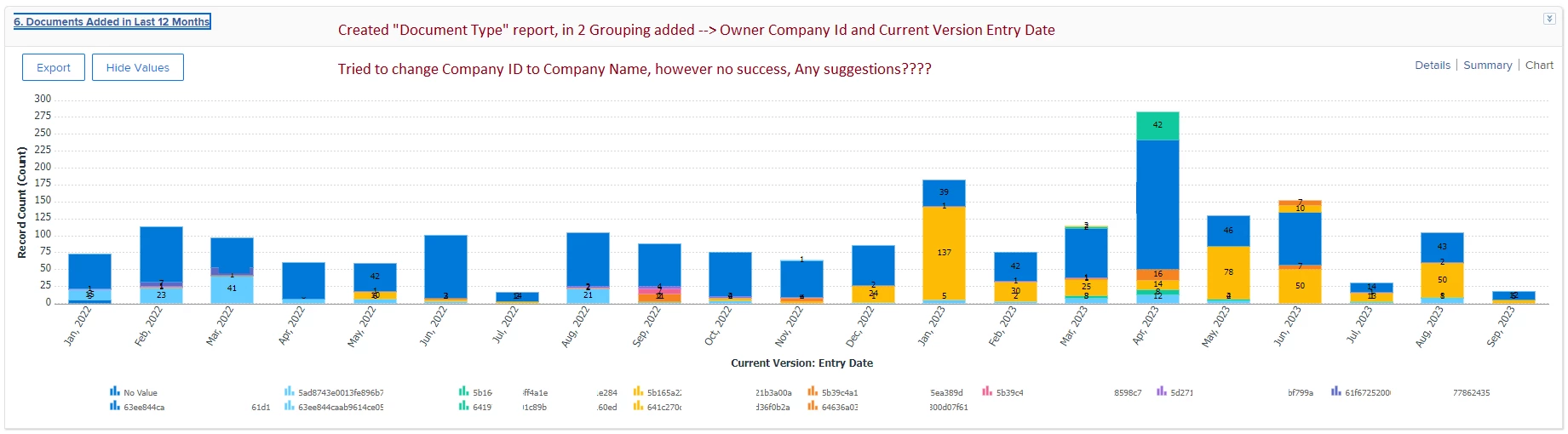
Created "Document Type" report, in 2 Grouping added --> Owner Company Id and Current Version Entry Date

Tried to change Company ID to Company Name, however no success, Any suggestions????

Even I tried to change in text mode under grouping from companyid to company name, but no success.

Adding here for your kind reference;


Best regards,

 

This post is no longer active and is closed to new replies. Need help? Start a new post to ask your question.
Best answer by Rafal_Bainie

as a workaround:

add calculated custom field on user object:

{company}.{name}

use this newly created field for grouping.


To make this answer more complete, while text mode groupings are available, they won't work in charts (I'm 99% sure I've asked support about this).

If you don't want or cannot use custom field you can try this text mode grouping:

group.0.groupdatesby=WY group.0.linkedname=direct group.0.namekey=entryDate group.0.notime=false group.0.valuefield=entryDate group.0.valueformat=atDateAsWeekString group.1.name= group.1.valueexpression={owner}.{company}.{name} group.1.valueformat=string textmode=true

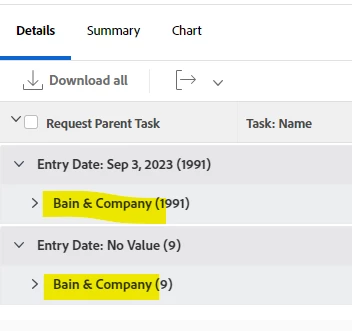
with this as a result:

in chart you will still see company ID unfortunately.


1 reply

Rafal_Bainie
Community Advisor
Rafal_BainieCommunity AdvisorAccepted solution
Community Advisor
September 6, 2023

as a workaround:

add calculated custom field on user object:

{company}.{name}

use this newly created field for grouping.


To make this answer more complete, while text mode groupings are available, they won't work in charts (I'm 99% sure I've asked support about this).

If you don't want or cannot use custom field you can try this text mode grouping:

group.0.groupdatesby=WY group.0.linkedname=direct group.0.namekey=entryDate group.0.notime=false group.0.valuefield=entryDate group.0.valueformat=atDateAsWeekString group.1.name= group.1.valueexpression={owner}.{company}.{name} group.1.valueformat=string textmode=true

with this as a result:

in chart you will still see company ID unfortunately.


Kundanism
KundanismAuthor
Level 10
September 6, 2023

Thanks Rafal

It works in detail, as you mentioned it does not work in chart. Still trying to figure out this one. Thanks again for sharing this text mode. 🙂