Return milestone name in different field and renaming the information | Community
Skip to main content
January 27, 2025
Solved

Return milestone name in different field and renaming the information

  • January 27, 2025
  • 2 replies
  • 695 views

Dear all,


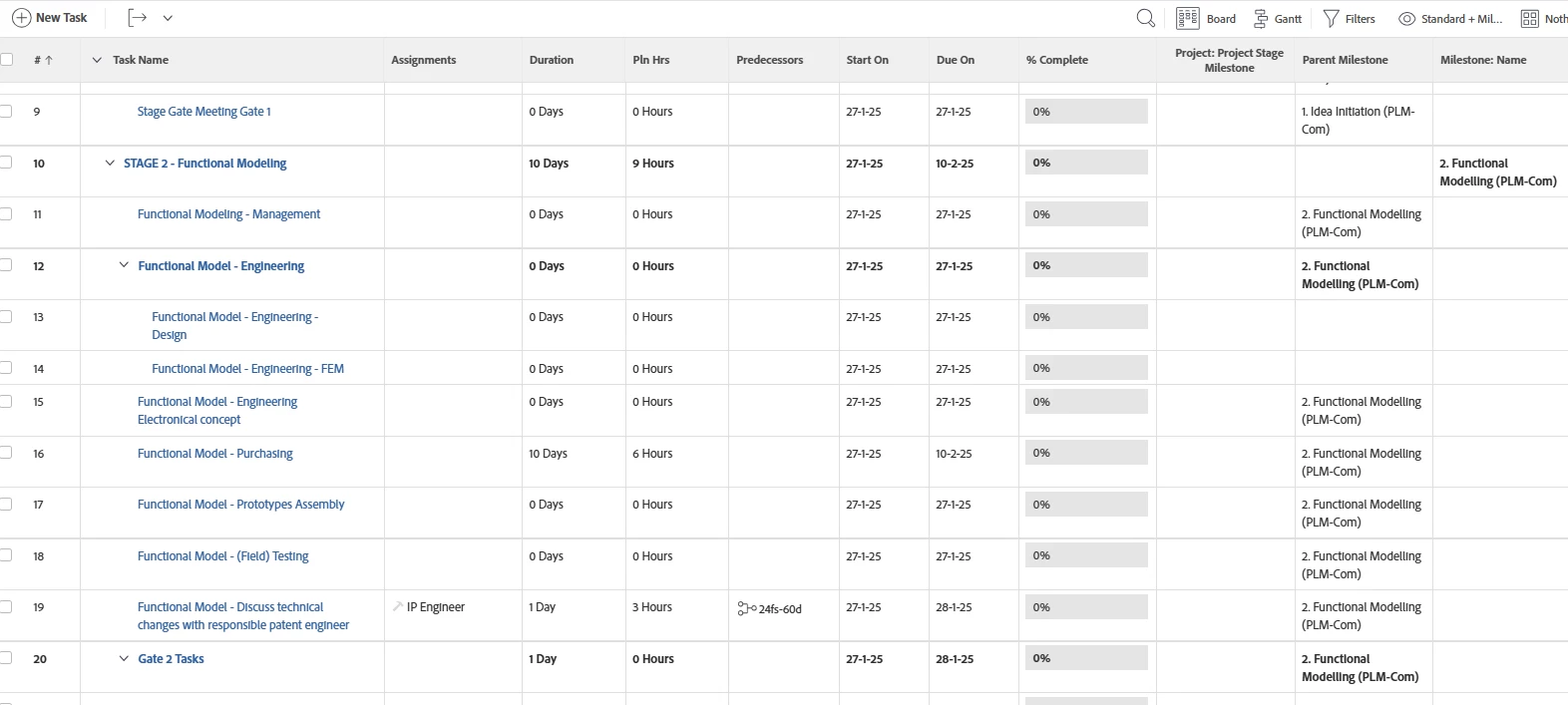
my goal is to return the information from the field Milestone: name to Parent milestone in each line (also in lines that are new created in projects)

ive managed this for 1 parent level deep but not to level 2,3 etc... as shown below:

i created this by using the code:

textmode=true
valuefield=parent:milestone:name
valueformat=


in addition to this i would like to Rename the information automatically.


can any one help me out?


Best answer by KellieGardner

thanks a lot this is in the right way but i prefer just 1 column with the information. is this possible?


You can do an expression that will combine them. 


This will have to be a series depending on how deep you go on your parent task structure. Also, this will combine them all - so if you have a task that has a milestone and then also it lives under a parent task that has a milestone it will include both. 


Feel free to edit based on your needs


displayname=Parent Milestones textmode=true valueexpression=CONCAT({milestone}.{name}," ",{parent}.{milestone}.{name}," ",{parent}.{parent}.{milestone}.{name})
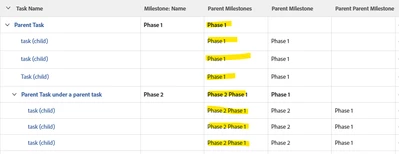


Depending on the complexity of your structure you may want to edit this code a bit to get what you need. Just know that the first "milestone.name" is the actual task milestone if it exists, and then each parent is preceded by the corresponding number of indents with the word "parent" to pull in that parent's milestone if it exists. If you needed to add another indent it would be {parent}.{parent}.{parent}.{milestone}.{name} and so on... 

This is all a little advanced so if you aren't familiar you can learn about advanced reporting here.


Additionally, something I've done previously was to add a custom form to tasks that had a calculated field for parent task milestone on it. This way it would just capture on the form what the milestone name was and then that can be pulled into reporting and views natively.


2 replies

Level 2
January 27, 2025

@mennola - are you only trying to accomplish this in a view or report? Or do you want it to populate somewhere else (like on a custom form)?

MennoLaAuthor
February 3, 2025

in a view, but if its possible to have it in a report then that's also possible

KellieGardner
Community Advisor
Community Advisor
February 3, 2025

The milestone is only stored on the one object in the task list. Because of this you will have to reference that object to get the information. So to get the milestone, it's either on the object, it's parent, it's parent's parent, etc. 


Example with a single milestone tied to only the top parent task


displayname=Parent Milestone linkedname=parent namekey=view.relatedcolumn namekeyargkey.0=parent namekeyargkey.1=milestoneID querysort=parent:milestoneID textmode=true valuefield=parent:milestone:name valueformat=HTMLdisplayname=Parent Parent Milestone linkedname=parent namekey=view.relatedcolumn namekeyargkey.0=parent namekeyargkey.1=milestoneID querysort=parent:milestoneID textmode=true valuefield=parent:parent:milestone:name valueformat=HTML


Data will fill out a little more when you get into a place where you are using multiple milestones in your project as below:


kautuk_sahni
Community Manager
Community Manager
September 1, 2025

@mennola just checking in! Were you able to get this resolved? If one of the replies above helped—whether it completely solved the issue or simply pointed you in the right direction—marking it as accepted can make it much easier for others with the same question to find a solution. And if you found a different way to fix it, sharing your approach would be a great contribution to the community. Your follow-up not only helps close the loop but also ensures others benefit from your experience. Thanks so much for being part of the conversation!

Kautuk Sahni