Reporting on Multi-Select field results | Community
Skip to main content
Level 4
April 20, 2025
Solved

Reporting on Multi-Select field results

  • April 20, 2025
  • 2 replies
  • 712 views

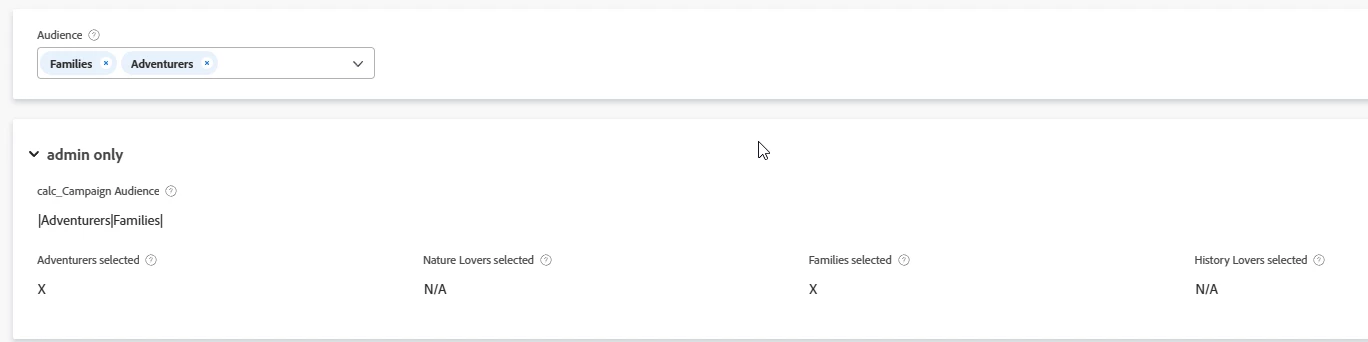
I have a couple multi-select fields that I need to create reports for. I found this documentation- https://experienceleague.adobe.com/en/docs/workfront/using/reporting/reports/custom-view-samples/chart-report-by-multi-select-custom-field which notes that "Rather than building a chart using a multi-select custom field, we recommend that you create separate fields for each option of a multi-select custom field." This may be a good option for the reporting that I need, but I'm not sure how this set up for a multi-select field would look in the request form. The only thing I came up with was to have the multi select field as a separate custom form section and the multi-select field selections show in the custom form section, example shown below:

This would not be very user intuitive in the custom form, so I'm wondering if anyone has any other ideas on this multi-select field options set up as separate custom fields. Thanks


Best answer by Sven-iX

Like I said Im not sure this fits your use case but whether you create one field per the docs or multiple:

You only show the multiselect to users. 


You "hide" the calc'd fields in an admin only section. The calc'd fields will be available for reporting. 


2 replies

Sven-iX
Community Advisor
Community Advisor
April 21, 2025

Hi @cbuckwal 
a little further in the doc it states


You cannot build a chart in a report by referencing a multi-select custom field. Instead, you can create a calculated field that records the values of the multi-select custom field on a given object and group by the calculated field.

So the custom form UI would still have the multi-select. 


The issue is that you can only chart on a grouped value and in order to group it it needs to be a single value.  

The approach documented means that the calculated field has a string representation of the selection, e.g. value1, value4, value 6. So you can chart the grouped selections


Another approach is to create a calculated field for each selection, and you can then chart the individual selections, eg

"valueAselected" = IF( CONTAINS( {DE:My multiselect}, "value A"), "X", "" )

"valueBselected" = IF( CONTAINS( {DE:My multiselect}, "value B"), "X", "" )


CBuckwalAuthor
Level 4
April 22, 2025

Thanks for the explanation and text mode for the calculated field for each multiselect option. If I use the calculated field for each selection option, how can that be displayed in a custom form? As a separate section for the multiselect field question and the multiselect custom field selections shown in the same section? I have a screenshot of this in my original question. It looks very strange, so I'm wondering if there's another way to show the multiselect custom fields.

Sven-iX
Community Advisor
Sven-iXCommunity AdvisorAccepted solution
Community Advisor
April 22, 2025

Like I said Im not sure this fits your use case but whether you create one field per the docs or multiple:

You only show the multiselect to users. 


You "hide" the calc'd fields in an admin only section. The calc'd fields will be available for reporting. 


kautuk_sahni
Community Manager
Community Manager
September 22, 2025

@cbuckwal  we noticed your question and invite you to our [Workfront AMA] Ask Me Anything about Workfront System Smarts & Strategic Starts on Wed, Oct 29, 2025 | 9–10 AM PDT. Experts will answer questions on topics like: day-to-day system tasks, strategic planning, Reporting, Adoption, System Maintenance, Notifications, Governance, Roadmapping, and Custom Forms. Post your questions in advance to ensure they’re answered. Reminder: All AMAs are TEXT-ONLY—no video or recording. RSVP & submit questions in advance here: https://adobe.ly/46xKfHM 

Kautuk Sahni