Quotation marks in the output of a calculated field | Adobe Higher Education
Skip to main content
Level 2
September 12, 2024
Respondido

Quotation marks in the output of a calculated field

  • September 12, 2024
  • 2 respostas
  • 870 Visualizações
 

Does anyone know how to include quotation marks in the output of a calculated field?


For instance, I want the field to display: Say "hello".

The text inside the quotation marks will change based on a custom field.


Here's what I've tried in my calculation:

CONCAT("Say "",{DE:Greeting},""")


This calculation isn't working because Workfront doesn't handle the extra quotation marks properly. Is there a specific value or method to represent quotation marks in the calculation?
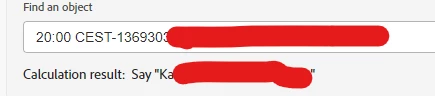
 
Melhor resposta por Rafal_Bainie

this seems to work:

CONCAT('Say ','"',{DE:Designer Name},'"')


2 Respostas

Rafal_Bainie
Community Advisor
Rafal_BainieCommunity AdvisorResposta
Community Advisor
September 13, 2024

this seems to work:

CONCAT('Say ','"',{DE:Designer Name},'"')


Level 2
September 13, 2024

That worked!


I had to remove the apostrophes from the names of any custom fields that I wanted to use. But it was a small price to pay.


Thank you!

Adobe Employee
February 17, 2025

For anyone seeing this answer later, there is another way to do this as Workfront can have issues with Single Quotes in calculated fields.

If you really need to have the quotation marks you can create a single select dropdown with only a single answer available that is the quotation mark ".Then set that as the Default selection and add it to your form.

Or a calculated field with only the calculation of '"'.

Either way you can reference that field in your concat to add the quotation mark in wherever you need it. It's a bit of a hassle but it's reliable as your calculated field gets longer.

I.E.

CONCAT("Say ",{DE:Quote},{DE:Designer Name},{DE:Quote})


Level 2
February 19, 2025

Clever! I'll definitely try that. Thank you!