Proof Automated Workflow - Not able to select a Workflow Template | Community
Skip to main content
Level 5
August 17, 2020
Question

Proof Automated Workflow - Not able to select a Workflow Template

  • August 17, 2020
  • 1 reply
  • 581 views

My users are attempting to create a new proof, and use an existing Workflow automated template, but no templates are showing. This has worked for us in the past.

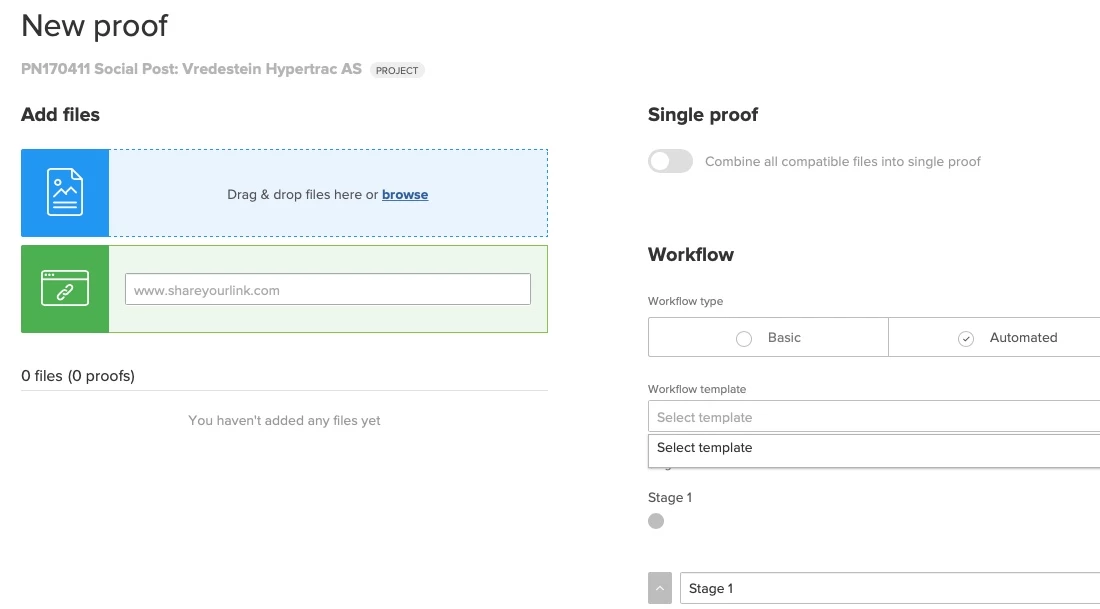
On the Documents tab, they click on "Add new," then Proof.

For "workflow type" they select the "Automated" radio button.

Then in the "Workflow template" dropdown that shows up, the click to select a template but the only option says "Select template."

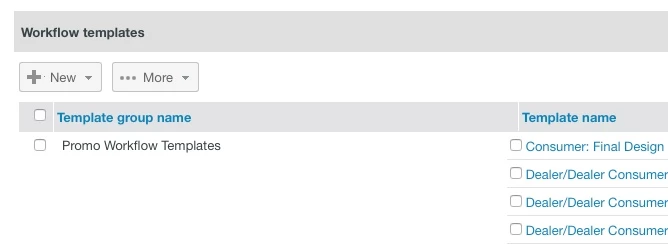
I can go to PHQ login, and see all of the Workflow templates that are available.

Help! What changed and/or what am I missing

Please see the screenshots below:
This post is no longer active and is closed to new replies. Need help? Start a new post to ask your question.

1 reply

Level 10
August 18, 2020

Known bug over the last couple of days, was resolved this morning (at least for us) by a hotfix.

Level 5
August 18, 2020

Yes, thanks! It is resolved now.

Unfortunately, I didn't see anything about it prior to asking my question.

Level 10
August 18, 2020

I'm not bashful about submitting online tickets. I think some not insignificant portion of the support team probably knows who I am. 😎