
Project Level Report to display projects with tasks due this week AND exclude tasks that are in Complete status | Community
Skip to main content
LaurensKr1
Level 2
April 16, 2025
Solved

Project Level Report to display projects with tasks due this week AND exclude tasks that are in Complete status

  • April 16, 2025
  • 1 reply
  • 496 views

Hi, I am working on a unique project level report. I want to display projects on this report that:


1. Have tasks with a plannedCompleteDate within the current week that I open the report.

2. But ONLY if the tasks have not been completed.


I think I got #1 correct by using this exists filter:


But #2, I am not sure. I tried the below on the project level report:

AND:A:EXISTS:A:$$OBJCODE=TASK
AND:A:EXISTS:A:projectID=FIELD:ID
AND:A:EXISTS:A:status=CPL
AND:A:EXISTS:A:status_Mod=notin
AND:A:EXISTS:A:$$EXISTSMOD=NOTEXISTS


I also tried to exclude the notin MOD. So the combined filter looks like this:


EXISTS:A:$$EXISTSMOD=EXISTS
EXISTS:A:$$OBJCODE=TASK
EXISTS:A:plannedCompletionDate=$$TODAYbw
EXISTS:A:plannedCompletionDate_Mod=between
EXISTS:A:plannedCompletionDate_Range=$$TODAYew
EXISTS:A:projectID=FIELD:ID
AND:A:EXISTS:A:$$OBJCODE=TASK
AND:A:EXISTS:A:projectID=FIELD:ID
AND:A:EXISTS:A:status=CPL
AND:A:EXISTS:A:status_Mod=notin
AND:A:EXISTS:A:$$EXISTSMOD=EXISTS


I tried variations of the text mode filter, but I still get projects on the report when the tasks are in CPL status. So I think the plannedCompletionDate filter works, I just need to filter out the task status of CPL (I don't want to see the project on the report if the tasks have been completed even if the planned completion date is due this week). 


I have also tried to remove the exists filter for the task status and replace it with:
tasks:status=CPL

tasks:status=notin
This post is no longer active and is closed to new replies. Need help? Start a new post to ask your question.
Best answer by skyehansen

I love that you are trying both exists and collections filters.


I'd like to give you a different perspective on how best to do this, and hope it helps. It is a 3-step process of thought.


1) You're trying to look at task info in a project report. How would you do this using a task report? 

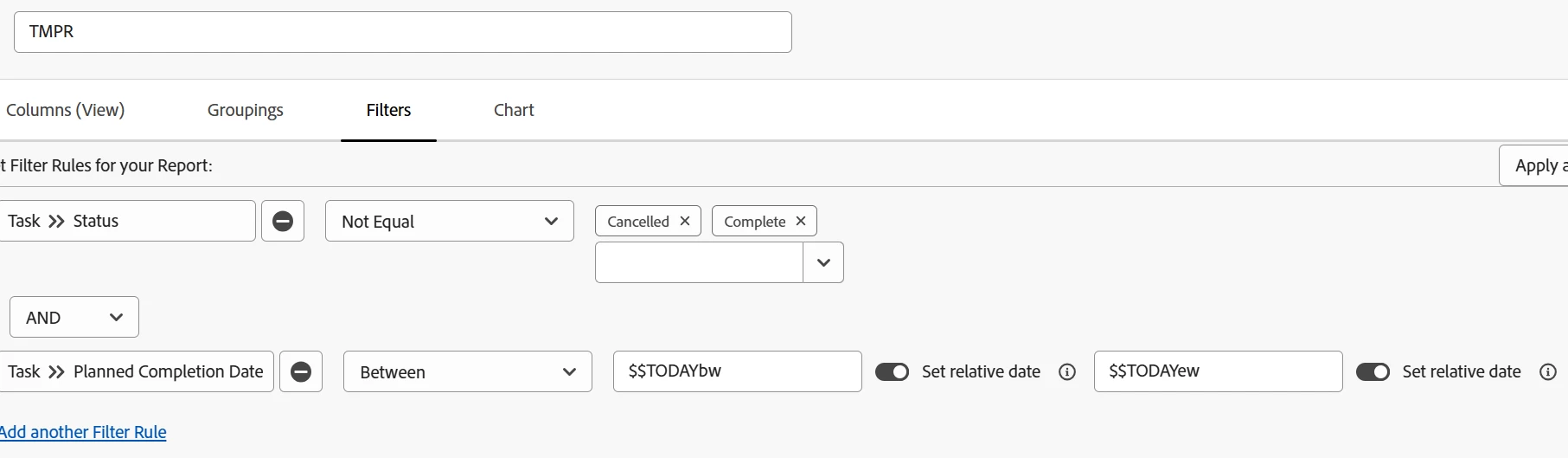
In a task report, you would filter on tasks due this week, status not complete (or cancelled). From the screenshot below, you'll hopefully see that this is pretty intuitive and so simple it can be done in standard mode.


2) Set the filter you would like, up in the task report, and then Switch to Text Mode and copy the text.


3) Go back to the project report, paste the text into the project report, and prepend each line with "tasks:"

(spoiler: it should look like this:

tasks:plannedCompletionDate=$$TODAYbw
tasks:plannedCompletionDate_Mod=between
tasks:plannedCompletionDate_Range=$$TODAYew
tasks:status=CAN CPL
tasks:status_Mod=notin

)

1 reply

skyehansen
Community Advisor and Adobe Champion
skyehansenCommunity Advisor and Adobe ChampionAccepted solution
April 16, 2025

I love that you are trying both exists and collections filters.


I'd like to give you a different perspective on how best to do this, and hope it helps. It is a 3-step process of thought.


1) You're trying to look at task info in a project report. How would you do this using a task report? 

In a task report, you would filter on tasks due this week, status not complete (or cancelled). From the screenshot below, you'll hopefully see that this is pretty intuitive and so simple it can be done in standard mode.


2) Set the filter you would like, up in the task report, and then Switch to Text Mode and copy the text.


3) Go back to the project report, paste the text into the project report, and prepend each line with "tasks:"

(spoiler: it should look like this:

tasks:plannedCompletionDate=$$TODAYbw
tasks:plannedCompletionDate_Mod=between
tasks:plannedCompletionDate_Range=$$TODAYew
tasks:status=CAN CPL
tasks:status_Mod=notin

)

LaurensKr1
Level 2
April 16, 2025

Thank you, this seems to work. 

Now to the next piece I am looking into building out the text column reports. 🙂