Parent Folder Name in Proof Approval Report | Community
Skip to main content
Level 2
March 28, 2025
Solved

Parent Folder Name in Proof Approval Report

  • March 28, 2025
  • 3 replies
  • 628 views

We would like to display a parent Folder name of the document in the Proof Approval report. Does anyone help us on this?


Many thanks,

Karthick N

This post is no longer active and is closed to new replies. Need help? Start a new post to ask your question.
Best answer by skyehansen

Sven, you shouldn't need to -- as long as you use collections, which I know you try to avoid!


I suppose you could do some sort of "if parent.parent.parent.parentID is blank" cascading valueexpression, which I know I try to avoid.


You would just start with that collection and move forward.


listdelimiter=<p>
listmethod=nested(documentVersion.document.folders).lists
type=iterate
valuefield=name
valueformat=HTML

3 replies

Sven-iX
Community Advisor
Community Advisor
March 28, 2025

You can't - traversing from the docVersion to the document works but you cannot go further. 

That means you can get folderIDs and other properties on the document, but cannot follow the reference to folders to get the name.


You shouldn't use folders to "tag" or classify documents - use custom fields instead.

Daniel_Clarke
Community Advisor
Community Advisor
March 28, 2025

Hi @karthickna1

Unfortunately no, from a proof approval report I tested many possible connections on this from the documentVersion, nested(document.folders).lists, docfdr, folderIDs, and more without avail. 

@sven-ix is onto something though for using a custom form / field that could be attached at the document level (and filled through Fusion) that could pull in that identifying information along with additional metadata. 

Ping back if you have any additional questions around that!

skyehansen
Community Advisor
March 31, 2025

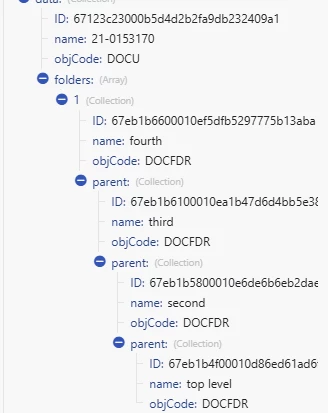
I don't think you can get the parent (the top most folder)? As far as I know, it's only possible to get the folder that contains the file. So if you have a structure like this:


Folder 1>

         Folder 2>

                    File


You can only get "Folder 2"

Sven-iX
Community Advisor
Community Advisor
March 31, 2025

From a DOCU object you can get up to 4 levels folders:parent:parent:parent:name

Bummer is I can't do that (not even the immediate folder) in a calculated field 


skyehansen
Community Advisor
skyehansenCommunity AdvisorAccepted solution
March 31, 2025

Sven, you shouldn't need to -- as long as you use collections, which I know you try to avoid!


I suppose you could do some sort of "if parent.parent.parent.parentID is blank" cascading valueexpression, which I know I try to avoid.


You would just start with that collection and move forward.


listdelimiter=<p>
listmethod=nested(documentVersion.document.folders).lists
type=iterate
valuefield=name
valueformat=HTML