How to show a list of approved issues in report | Community
Skip to main content
March 4, 2025
Solved

How to show a list of approved issues in report

  • March 4, 2025
  • 2 replies
  • 503 views

Hi, is there a way to only filter for approved requests / issues in a report? We would like to use this report for Project Managers to go through before converting the requests to projects. 


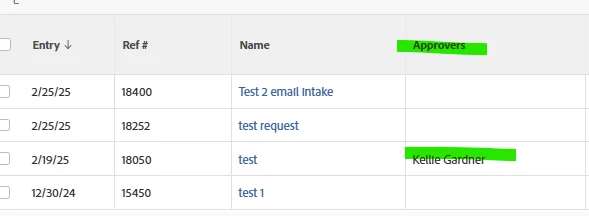
I have also been trying to add a column to show the name of the approver but both approver columns we have in the system is not showing accurately. 


Any kind of help is appreciated. Thank you!
This post is no longer active and is closed to new replies. Need help? Start a new post to ask your question.
Best answer by KellieGardner

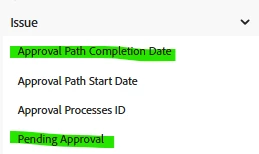
I would suggest using one of these to filter for issues with completed approvals. 


  • Approval path completion date is not blank (null) 
  • Pending approval is false


I'm not sure what column you are using but the column I have on my report populates just fine. You might need to elaborate on what fields you are using.


2 replies

KellieGardner
Community Advisor
KellieGardnerCommunity AdvisorAccepted solution
Community Advisor
March 4, 2025

I would suggest using one of these to filter for issues with completed approvals. 


  • Approval path completion date is not blank (null) 
  • Pending approval is false


I'm not sure what column you are using but the column I have on my report populates just fine. You might need to elaborate on what fields you are using.


jon_chen
Community Manager
Community Manager
March 14, 2025

Did you find the suggestions helpful? Please let us know if you need more information. If a response worked, kindly mark it as correct for posterity; alternatively, if you found a solution yourself, we’d appreciate it if you could share it with the community. Thank you! @taufiqma