
How can I remove the time from a date field in conditional formatting? | Community
Skip to main content
TravisGrogan1
Level 3
December 21, 2021
Question

How can I remove the time from a date field in conditional formatting?

  • December 21, 2021
  • 2 replies
  • 763 views

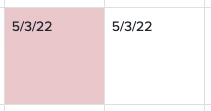
I've got a task report that is using conditional formatting to compare 2 date fields. One of the fields is a project level custom field with no time, the other is the Planned Completion Date of the task. Both dates are present in the report so you can see in the screenshot that there are instances where both dates fall on the same day, but it's still triggering the formatting. I'm assuming this is because Planned Completion Date has time as part of it. How can I correct this?

Here is the text mode I've tried:

displayname=Final Files Requested

linkedname=project

namekey=view.relatedcolumn

namekeyargkey.0=project

namekeyargkey.1=Final File Delivery

querysort=DE:project:Final File Delivery

styledef.case.0.comparison.icon=false

styledef.case.0.comparison.leftmethod=DE:project:Final File Delivery

styledef.case.0.comparison.lefttext=DE:project:Final File Delivery

styledef.case.0.comparison.operator=lt

styledef.case.0.comparison.operatortype=date

styledef.case.0.comparison.rightmethod=CLEARTIME(plannedCompletionDate)

styledef.case.0.comparison.righttext=CLEARTIME(FIELD:plannedCompletionDate)

styledef.case.0.comparison.trueproperty.0.name=bgcolor

styledef.case.0.comparison.trueproperty.0.value=eac6c9

styledef.case.0.comparison.truetext=

textmode=true

valuefield=project:Final File Delivery

valueformat=customDateAsString

Any help is appreciated!
2 replies

SarahNau
Adobe Employee
Adobe Employee
December 22, 2021

Hi Travis,

I believe the only way to do this is to create a custom field on your tasks to remove the time from the planned completion date:

Then, you can use that field as your comparison:

displayname=Final Files Requested

linkedname=project

namekey=view.relatedcolumn

namekeyargkey.0=project

namekeyargkey.1=Final File Delivery

querysort=DE:project:Final File Delivery

styledef.case.0.comparison.icon=false

styledef.case.0.comparison.leftmethod=DE:project:Final File Delivery

styledef.case.0.comparison.lefttext=DE:project:Final File Delivery

styledef.case.0.comparison.operator=lt

styledef.case.0.comparison.operatortype=date

styledef.case.0.comparison.rightmethod=DE:Planned no time

styledef.case.0.comparison.righttext=DE:Planned no time

styledef.case.0.comparison.trueproperty.0.name=bgcolor

styledef.case.0.comparison.trueproperty.0.value=eac6c9

styledef.case.0.comparison.truetext=

textmode=true

valuefield=project:Final File Delivery

valueformat=customDateAsString

Hope that helps!

TravisGrogan1
Level 3
January 4, 2022

Thank you for this, I am hoping to find a way to fix this without creating another custom field if possible. If anyone else has any suggestions, I'm all ears!