
Enforce "Required" fields on custom forms before completion of a task
Idea: Enforce required fields on custom forms and do not allow a task to be completed before they are populated.
There have been several of these ideas in the past but really wanted to bring this back up in a newer idea forum as this is a huge concern coming from a highly regulated industry. I would really anticipate that this impacts almost every organization that uses Workfront as this is really expected behavior when you indicate that a field is required.
- Idea option 1: Required * = field must be populated before status can be moved to complete.
- Idea option 2: Could we potentially add an option for “Required to close” checkbox when designing a custom form field; a second required checkbox option that drives different types of required action. This would mean you could leave the current structure as is, but simply expand to enforce required nature upon the task completion trigger.
Current Functionality: If a form is not opened to edit mode, the application does not review the attached forms to confirm if fields are required or populated; it simply allows a task to close.
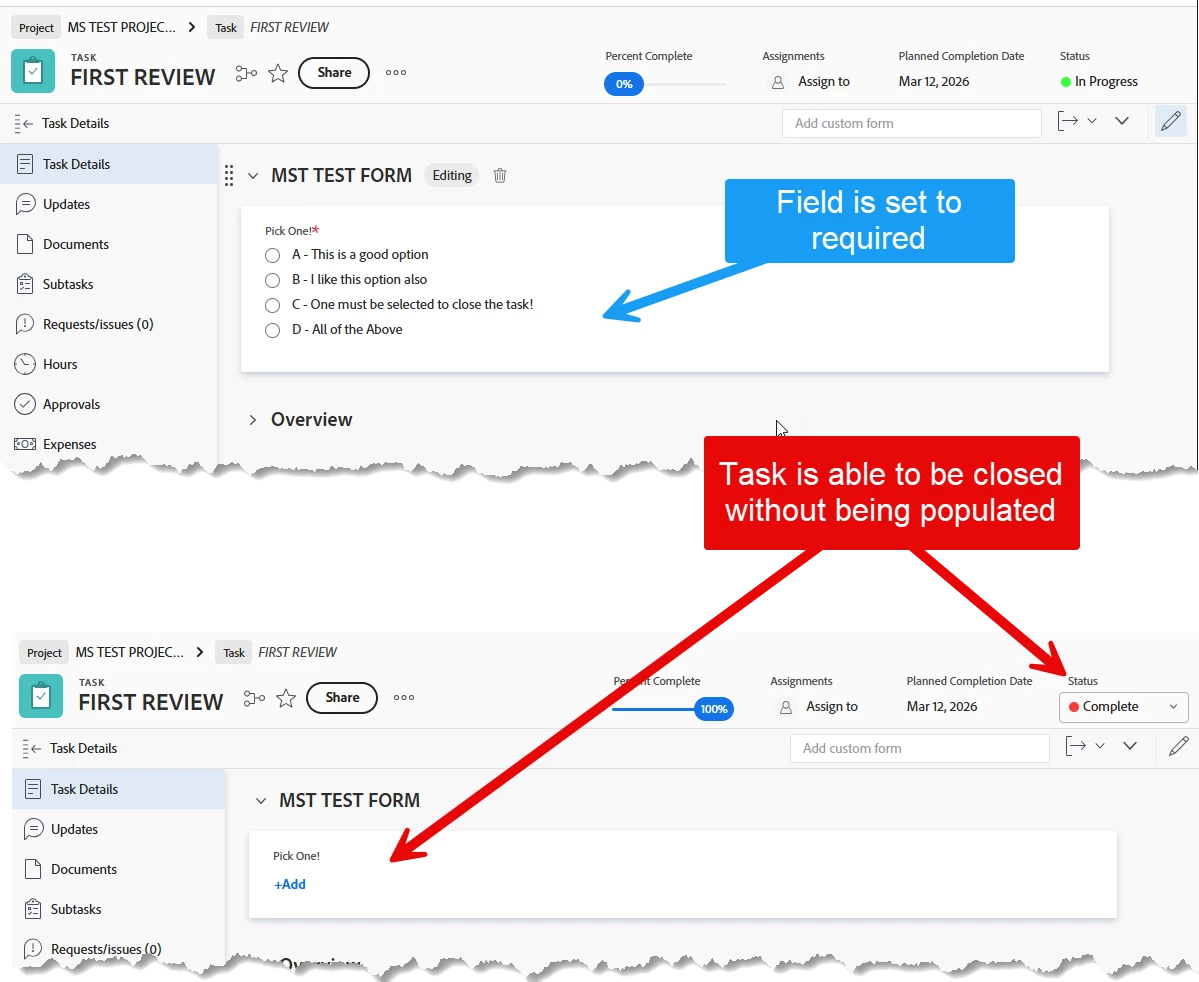
What happens if a field is not populated?
- Manual processing to locate missing information
- Bad user experience requiring rework
- Incomplete and untrusted data
- Automation potential issues from incomplete fields
- Audit and process issues
- Missing sleep due to concern that someone did not fill out a field that is absolutely required! Just me?
Just like all social media content creators love to say…make sure to give this a vote, subscribe and send to everyone you know to get some momentum on this!