
Document "View Icon" as column in Issue / Task / Project type report? Any Text mode? | Community
Skip to main content
Kundanism
Level 10
January 19, 2023
Solved

Document "View Icon" as column in Issue / Task / Project type report? Any Text mode?

  • January 19, 2023
  • 2 replies
  • 1331 views

Hi

Is it possible to add a field "View Icon" as column in Issue / Task / Project type report?

Any idea or Text mode possibility? This column makes easy to download the file.
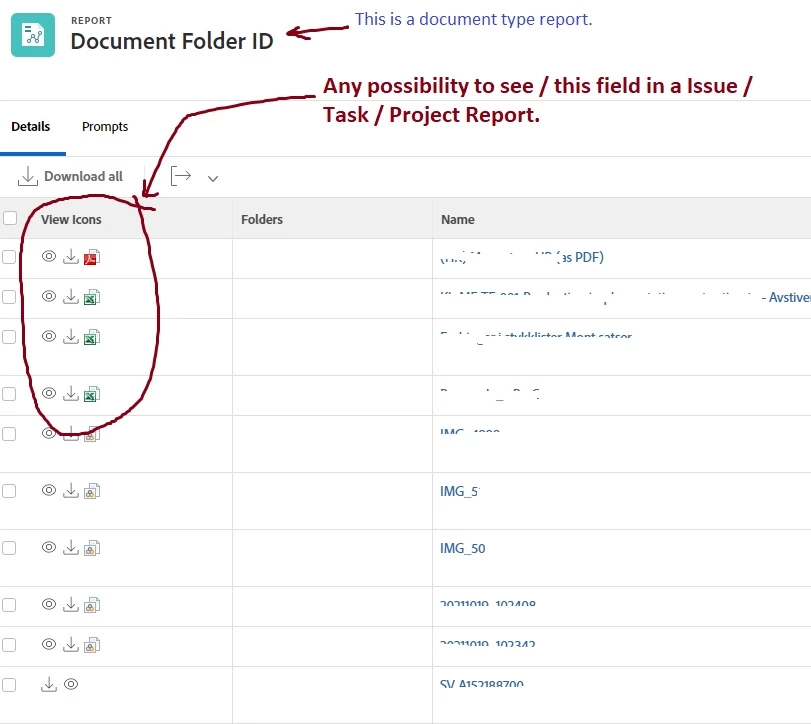
 

The "View Icon" i reffer from Document type report, and do not see in other types, Please refer attached image.

Appreciate any info in this regard.


Best regards,

Kundan.


This post is no longer active and is closed to new replies. Need help? Start a new post to ask your question.
Best answer by Rafal_Bainie

I use following text mode to display download URL in task report. I guess to have an icon instead, the download URL would have to be saved first into a field. I'm not sure if that's an option. 
I think that the fact that document to task relation is many to one is a complication here. That's why below you have list of URLs.

displayname=Supporting Documents listdelimiter=<br> listmethod=nested(documents).lists textmode=true type=iterate valueexpression=CONCAT({name}," - https://bain.my.workfront.com/internal/document/download?versionID=",{currentVersionID},"&ID=",{ID}) valueformat=HTML

2 replies

Rafal_Bainie
Community Advisor
Rafal_BainieCommunity AdvisorAccepted solution
Community Advisor
January 20, 2023

I use following text mode to display download URL in task report. I guess to have an icon instead, the download URL would have to be saved first into a field. I'm not sure if that's an option. 
I think that the fact that document to task relation is many to one is a complication here. That's why below you have list of URLs.

displayname=Supporting Documents listdelimiter=<br> listmethod=nested(documents).lists textmode=true type=iterate valueexpression=CONCAT({name}," - https://bain.my.workfront.com/internal/document/download?versionID=",{currentVersionID},"&ID=",{ID}) valueformat=HTML
Kundanism
KundanismAuthor
Level 10
January 22, 2023

Thank you @rafal_bainie , it works as creating of link. Besides looking any idea of text mode, to make visible of icons as attachment.

I appreciate your sharing and worthy too.


Have a nice day!

Mvh

Kundan.

Rafal_Bainie
Community Advisor
Community Advisor
January 23, 2023

no problem, Kudos should go to someone from the community from whom I did pick this up. Sadly I don't remember where I did found that.
Due to above mentioned relation problem I don't think that modifying list to set of icons will be possible. I don't know how to do that, I did try couple of times, but I failed

Madalyn_Destafney
Community Advisor
Community Advisor
January 25, 2023

Hi, I'm curious what you're wanting to pull in as task/issue icons? Wouldn't they just be URLs? Or are you wanting to just see any documents associated with the task/issue? If the latter is the case, you can add a column to your report with this text mode:

displayname=Documents
listdelimiter=<br>
listmethod=nested(documents).lists
textmode=true
type=iterate
valueexpression=CONCAT({name},".",{currentVersion}.{ext})
valueformat=HTML
If this helped you, please mark correct to help others : )
MeganLe1
Level 2
February 17, 2023

Sorry to hop in on this thread with more questions, but you all have ALMOST exactly what I've been trying to figure out.


Between you ( @madalyn_destafney )and @rafal_bainie  I've got the two components of what I'm looking for. I just want to put them together. I wonder if there is a way to only display the name of the file (or list of names in a project report column), but it's hyperlinked to either download or open the document, rather than the whole URL. That gets to taking up a lot of real estate when there are multiple documents on a project. This would by my ideal world but I'm not having luck with it. Any ideas?

Madalyn_Destafney
Community Advisor
Community Advisor
February 21, 2023

Hi Megan, so you have columns you want and want to see the info in 1 column, correct? You can share columns in text mode of your report columns to combine columns. 
Here is documentation on how to do this (I prefer sharing columns with a line break, that is in this article too). It is simple to do and a game changer for reports : ) 
https://experienceleague.adobe.com/docs/workfront/using/reporting/reports/custom-view-samples/view-merge-columns.html

If this helped you, please mark correct to help others : )