Document Version Report - Show Total Number of Versions per Task | Community
Skip to main content
Level 2
March 4, 2026
Solved

Document Version Report - Show Total Number of Versions per Task

  • March 4, 2026
  • 2 replies
  • 32 views

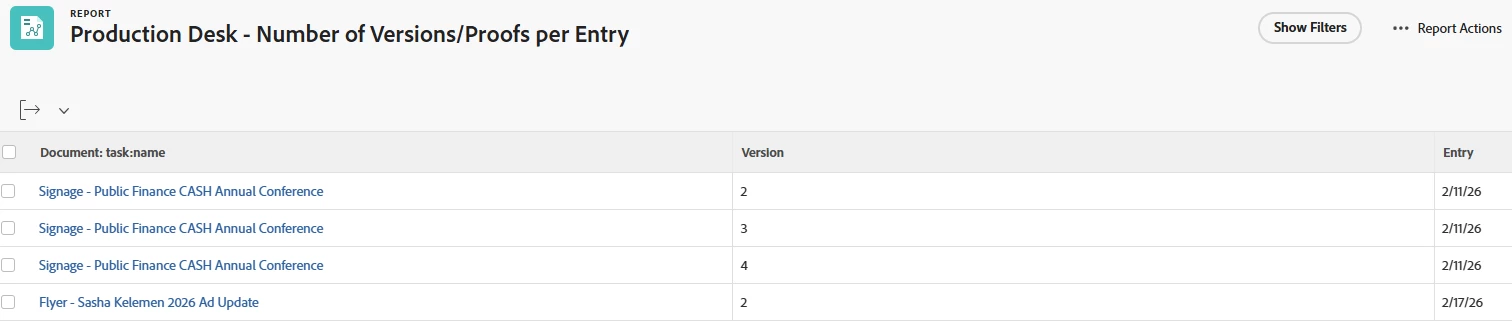
I've created a Document Version report that is capturing the information I need to see (number of versions or proofs per task), but am hoping to streamline it a bit. Instead of Document:task:name showing up multiple times for each Version, I only want to see the total number of versions. For example, in the current report, I only need to see the third line (Signage - Public Finance CASH Annual Conference, 4, 2/11/26) rather than lines 1-3. Is there a way to modify the report to do this? I appreciate any insight! 


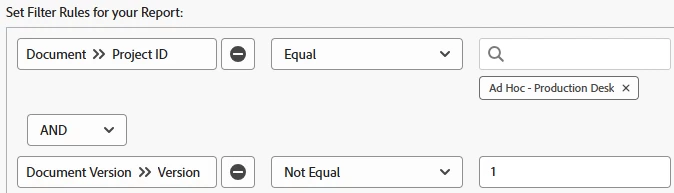
My current filters:
 

    Best answer by KellieGardner

    if you add a filter for Is Current Version = true then it will only show you the most recent version with the version count. 


    So in your example, you’d get one line for Signage - Public Finance with the version number of the most recent version loaded. 

    2 replies

    RowvillBh1
    Level 5
    March 6, 2026

    Keep your current grouping intact and add another column in your report with the following code - 


    aggregator.displayformat=val
    aggregator.function=count
    aggregator.namekey=task:name
    aggregator.valuefield=task:name
    aggregator.valueformat=val
    displayname=# of versions
    linkedname=task
    namekey=view.relatedcolumn
    namekeyargkey.0=task
    namekeyargkey.1=name
    querysort=task:name
    shortview=true
    valuefield=task:name
    valueformat=HTML
     

    BridgetHaAuthor
    Level 2
    March 6, 2026

    Thank you for that! I tried adding another column with that code, but no data is showing up in the column - it’s blank. See below.


    KellieGardner
    Community Advisor and Adobe Champion
    KellieGardnerCommunity Advisor and Adobe ChampionAccepted solution
    Community Advisor and Adobe Champion
    March 9, 2026

    if you add a filter for Is Current Version = true then it will only show you the most recent version with the version count. 


    So in your example, you’d get one line for Signage - Public Finance with the version number of the most recent version loaded. 

    BridgetHaAuthor
    Level 2
    March 9, 2026

    This did the trick! Thank you so much - I really appreciate it. 

    KellieGardner
    Community Advisor and Adobe Champion
    Community Advisor and Adobe Champion
    March 9, 2026

    Glad it worked and gave you the results you needed.