
Document approvals to show in a nested column on a task report | Community
Skip to main content
KellieGardner
Community Advisor
Community Advisor
January 26, 2026
Solved

Document approvals to show in a nested column on a task report

  • January 26, 2026
  • 1 reply
  • 57 views

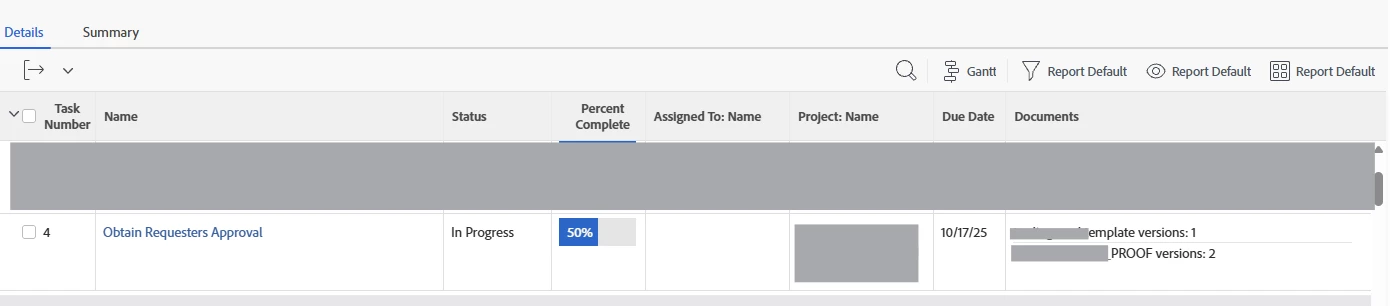
The Ask: Create a task a report that shows me the approval task in the workflow with all the task data. Then show me an indicator if there are documents pending approval. (customer uses document approvals)


Is this possible on a task level report? I can get the names of the documents but no dice on the approval status of those documents. 


listdelimiter=<hr>
listmethod=nested(project.documents).lists
name=Documents
stretch=0
type=iterate
valueexpression=CONCAT({name}," versions: ",{lastVersionNum})
valueformat=HTML


Best answer by skyehansen

@KellieGardner Whoops nevermind. I just realized that you were looking for any document in the PROJECT rather than a document in the specific task that you were pulling up. So you won’t be able to build a collection view of another collection (the example given in the knowledge article is, “you cannot display all the assignees on each task in a project report. You can only display the primary assignee on each task in a project view.”. Similar to this -- since I see “approvals” (DOCAPL) are a collection on the document, you cannot pull in project.documents (a collection) and then report on document approvals (a collection of that collection).


Otherwise normally, i would have had you try {document.approvals}.lists on a task report -- but that just searches inside your tasks.

1 reply

skyehansen
Community Advisor and Adobe Champion
January 27, 2026

The knowledge I’m currently working off is contained here:


If the customer is currently using legacy doc approvals, they should shortly be switched over to new / unified doc approvals  -- so, might be pointless to try anything using classic reporting. But let me know for sure about what the customer’s using -- and if you know if they are slated for transition.

KellieGardner
Community Advisor
Community Advisor
January 27, 2026

Legacy approvals and they aren’t using Canvas Dashboards.

KellieGardner
Community Advisor
Community Advisor
January 27, 2026

Also not slated to transition to new approvals as of now.