Custom task field that is a URL but shows a label not the full URL | Adobe Higher Education
Skip to main content
Level 2
November 14, 2024
Respondido

Custom task field that is a URL but shows a label not the full URL

  • November 14, 2024
  • 2 respostas
  • 1450 Visualizações

Hi team,

I use Power Apps to automate many of the tasks that we have as part of our projects. To help users access the app direct from Workfront, I have created a custom calculated task field that stings together a URL that will open the app on the page needed with the project loaded. 

The issue is, the URL is long and takes up a lot of room. 

Is there a way I can have this URL behind text such as "Go To Power App". Like you would if you were doing HTML (<a href="url">Go To Power App</a>)

The calculation I am using is...

Can I display this URL on each task as  "Go To Power App"?
 
Thanks for your help. 
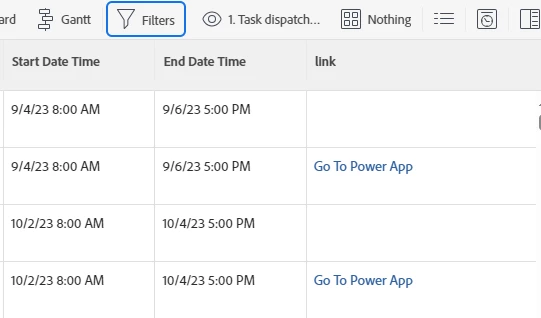
Melhor resposta por Rafal_Bainie

that will be your code:

displayname=link link.url=customDataLabelsAsString(YOUR CALCULATED FIELD) textmode=true valueexpression=IF(ISBLANK({DE:YOUR CALCULATED FIELD}),"","Go To Power App") valueformat=HTML

Calculated field is where you put your concatenation, but it seems you have this piece figured out.

you will get something like this:

hope this helps

2 Respostas

Srinija_N
Level 7
November 14, 2024

You can create a custom Descriptive text field with your desired label and add the hyperlink on a custom form as below


and it would appear as a hyperlink to click on the custom form in the object details


Then, you have to add this custom form to a specific task and create a view or add on your existing views with this custom field to have simple and quick view of this URL.

EricSa7Autor
Level 2
November 14, 2024

Hi Sri,

Can the URL in your solution be dynamic and built from data within the system, or does it need to be hardcoded as static text? 

Cheers, 

Rafal_Bainie
Community Advisor
Community Advisor
November 14, 2024

My first question would be where you want to display this, because answer may be different.

Do you want to have this in report? in custom field in task/issue/project details page?

EricSa7Autor
Level 2
November 14, 2024

Hi Rafal,

I am looking to display this in the task list on a project. 

Cheers, 

lgaertner
Level 9
March 4, 2025

Hi Rafal, 

I did some playing and found out how to add the code to a view. 

You are a legend. 

Thanks, 


Hello @ericsa7 ,

How did you finally solve this?
Unfortunately the code is not working on my instance.


Thanks in advance.


Regards

Lars