Custom Column Reporting - Calculated Fields | Community
Skip to main content
Level 2
March 2, 2025
Solved

Custom Column Reporting - Calculated Fields

  • March 2, 2025
  • 2 replies
  • 1637 views

Hello!


I am having trouble with a DATEDIFF calculated column on a task report. One column is a calculated date field on a custom form field on the task level (Go Live Date Task Level) and the other is the actual completion date of the task (Actual Completion Date). When editing in text mode, none of my attempts produce a successful result. All results are blank, is what I am trying to accomplish possible? 
This post is no longer active and is closed to new replies. Need help? Start a new post to ask your question.
Best answer by KatelynnKe2

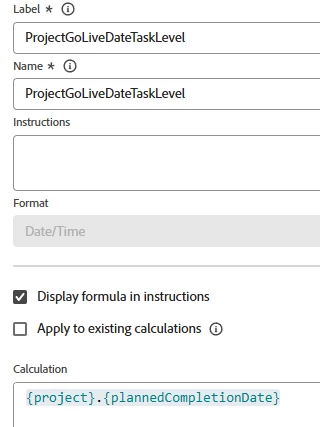
Question: what is the calculation in the field "ProjectGoLiveDateTaskLevel" ?
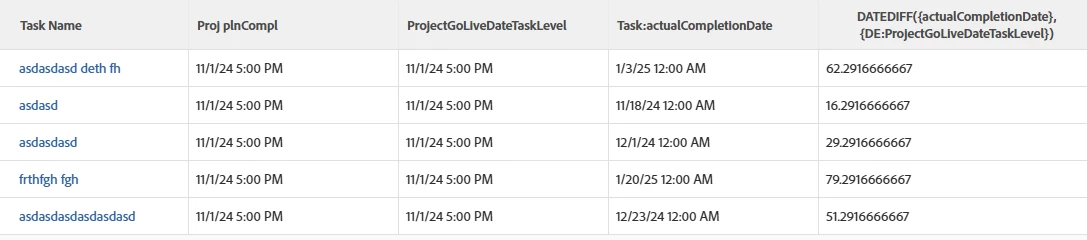
I'm trying to build what you have - the diff works for me. 
You could try deleting the report and starting over; I've seen some glitches where the report editor seems in a bad state and starting over with the exact same column - worked. 


the calculated column:

valueexpression=DATEDIFF({actualCompletionDate}, {DE:ProjectGoLiveDateTaskLevel}) valueformat=string displayname=DATEDIFF({actualCompletionDate}, {DE:ProjectGoLiveDateTaskLevel})


using the calc field


Success! Removing the spaces from the custom form and then using that syntax resolved the issue. Thank you!

2 replies

Sven-iX
Community Advisor
Community Advisor
March 2, 2025

Hi @katelynnke2 

The calculated field needs to be of Date or Date/Time type - sadly this can only be set when you first create the field. 


If the calc field is defined as Text, I get weird results, because here (EMEA) the calc field shows the day coming before month. 
And when WF converts this to a date it does it wrong


Level 2
March 2, 2025

@sven-ix thank you for your response, my calculated field is set up as a date field. I’m unsure why the DIFF column returns no value. 

Sven-iX
Community Advisor
Community Advisor
March 2, 2025

can you print out the 2 fields you're trying to compare like i did in the screenshot? 
and share your calculation. 
Hard to diagnose blindly

KellieGardner
Community Advisor
Community Advisor
March 3, 2025

Not sure what your text mode formula is or your data in the columns you are calculating, but I would check there is a difference in the days you are pulling into your calculation?


Is Go Live Date Task Level different than Actual Completion Date?

DATEDIFF

Returns the number of days between the two dates, taking into account the start and the end days of the period selected as well as the time stamps on those days. For example, if the start time of the start date is 3 PM, the start day is not counted as a full day.

The expression is formatted as follows:

DATEDIFF(date1, date2)


It might be helpful to share what your data is that you are using to help validate but the formula in the column should look something like this:


displayname=Week Day Difference textmode=true valueexpression=WEEKDAYDIFF({date1},{date2}) valueformat=HTML CopyToggle Text Wrapping
Level 2
March 3, 2025

Hi Kellie, 


Thank you for your response, please see the screenshots below. For the task at the bottom that is complete, there is a calculated field on a custom form that is providing a date that the task should be completed by. I want to have a column that provides the number of days early or late the task was completed. I am new to workfront so appreciate any resources or redirection if this is not the way to accomplish this. 


Thank you!

Report:


Compliance Column:

Sven-iX
Community Advisor
Community Advisor
March 3, 2025

Hi @katelynnke2 this looks good... 


I assume the field ProjectGoLiveDateTaskLevel is a field on the task: Can you try adding "DE:" just after the curly bracket, in front of "ProjectGoLiveDateTaskLevel"