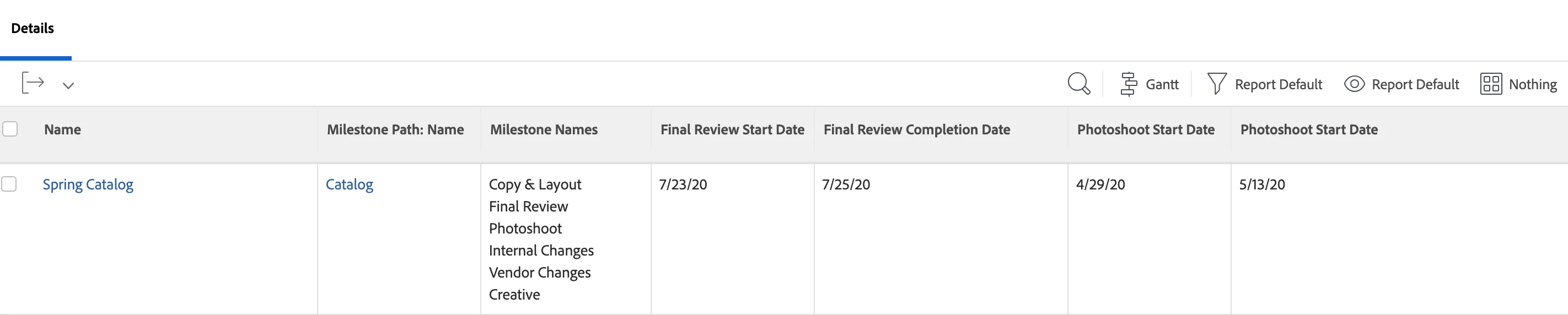
@jordanbray You can - it would just require a handful of custom text mode collection columns on a project report. If you add the following text mode column to your project report, this will show you all the names of the milestones within that project (basically the details of the milestone path):
displayname=Milestone Names
listdelimiter=<p>
listmethod=nested(milestonePath.milestones).lists
textmode=true
type=iterate
valuefield=name
valueformat=HTML
The reason you want to add this column in first, is that you'll need the names of all the milestones to create custom columns for the start and end dates.
To get the planned start date of Milestone 1 (you'll want to swap the text in bold for the name of your actual milestone), use the following text mode. If you prefer actual start date, be sure to swap that as well.
displayname=Milestone 1
listdelimiter=<p>
listmethod=nested(tasks).lists
textmode=true
type=iterate
valueexpression=IF({milestone}.{name}="Milestone 1",{plannedStartDate})
valueformat=HTML
To get the planned completion date for Milestone 1, here is the text mode for that column:
displayname=Milestone 1
listdelimiter=<p>
listmethod=nested(tasks).lists
textmode=true
type=iterate
valueexpression=IF({milestone}.{name}="Milestone 1",{plannedCompletionDate})
valueformat=HTML
You will need to create 2 columns for each milestone, so this can be a little time consuming, but should pull in the relevant data you need. Let me know if you have any questions!
It would look something like this at the end: