Can you set display rules on reports that are directly linked to display logic in a custom form?
I have a custom form that has display logic to display specific trainings that are required based on the department that was chosen in a field. Ex If Dept A is chosen Training A, Training B and Training F are required.
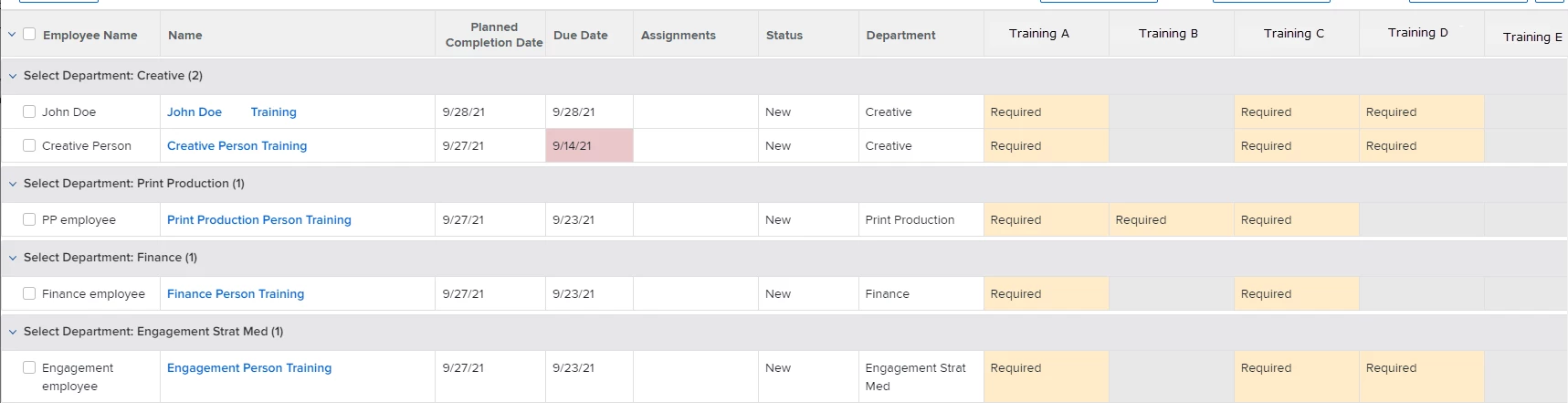
I then created a report that would show all of the possible trainings and added a display rule to change the color of the field if it was required. I set it to be gray if it was blank (indicating that training was not needed by this user), Green once it was marked complete. The only way I could get it to turn yellow of required was by adding the option of required in the form and making the requestor check required for all of the trainings that displayed for them. (Not ideal) I tried setting required as the default but that made all of the trainings (even the ones the display logic hid) on the report.
Does anyone know of a way to make a display rule in a report to only apply to the fields that were shown using the display logic in a custom form?
Below is an image of the report and how I want it to display, I am just looking for a way that doesn't require them to check required in the form since the display logic already only displays the ones that are required. Hopefully that makes sense.