Calendar Customization | Community
Skip to main content
Level 4
March 4, 2021
Question

Calendar Customization

  • March 4, 2021
  • 1 reply
  • 516 views

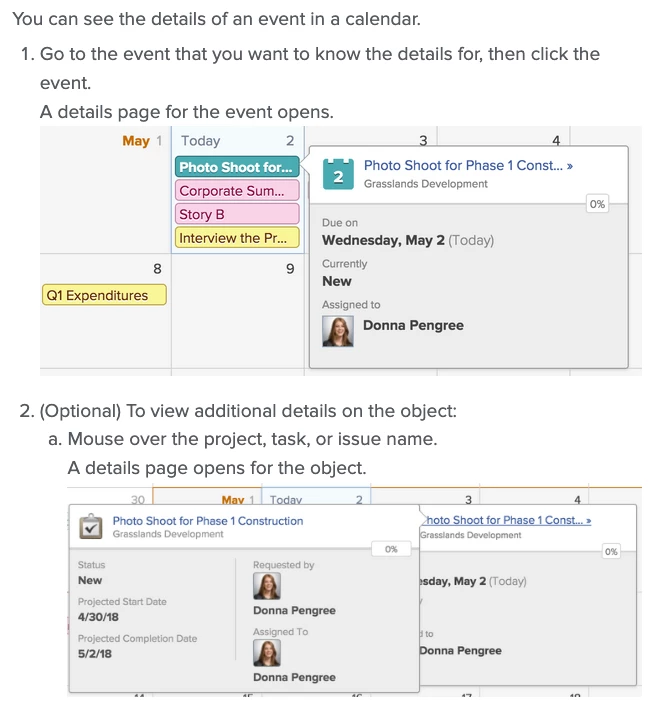
We have a calendar that we want to use company wide. I have built the calendar to display all of the tasks that I need it to. They want to share this calendar with users that do not have access to the projects BUT they want them to be able to see specific information by hovering/clicking on the calendar entry. I looked up all the information I could find on calendars but don't see where I can customize what fields display in those pop-ups. (Attached image is what I am referring to). Does anyone know if there is a way to customize that OR if there is an add-on feature that would accomplish this?
This post is no longer active and is closed to new replies. Need help? Start a new post to ask your question.

1 reply

Doug_Den_Hoed_AtAppStore
Community Advisor
Community Advisor
March 4, 2021

Hi Tracy,

Not that I am aware of within Workfront, but on the add-on side, I invite you to consider our Editorial Calendar solution, which (as the videos show in action) allows you to tailor the options shown and click to navigate to the underlying location (e.g. Portfolio, Program, Project, Task, etc.). If you'd like to then discuss it, you're welcome to email me at doug.denhoed@atappstore.com.

Regards,

Doug