
Best way to set up tasks with variable durations | Community
Skip to main content
MoniqueEvans
Community Advisor
Community Advisor
February 5, 2026
Question

Best way to set up tasks with variable durations

  • February 5, 2026
  • 5 replies
  • 100 views

Hey hey Workfronters!

I’m working on bringing a new team into Workfront and need your advice/expertise. What’s the best way to set up a task with a varying duration?

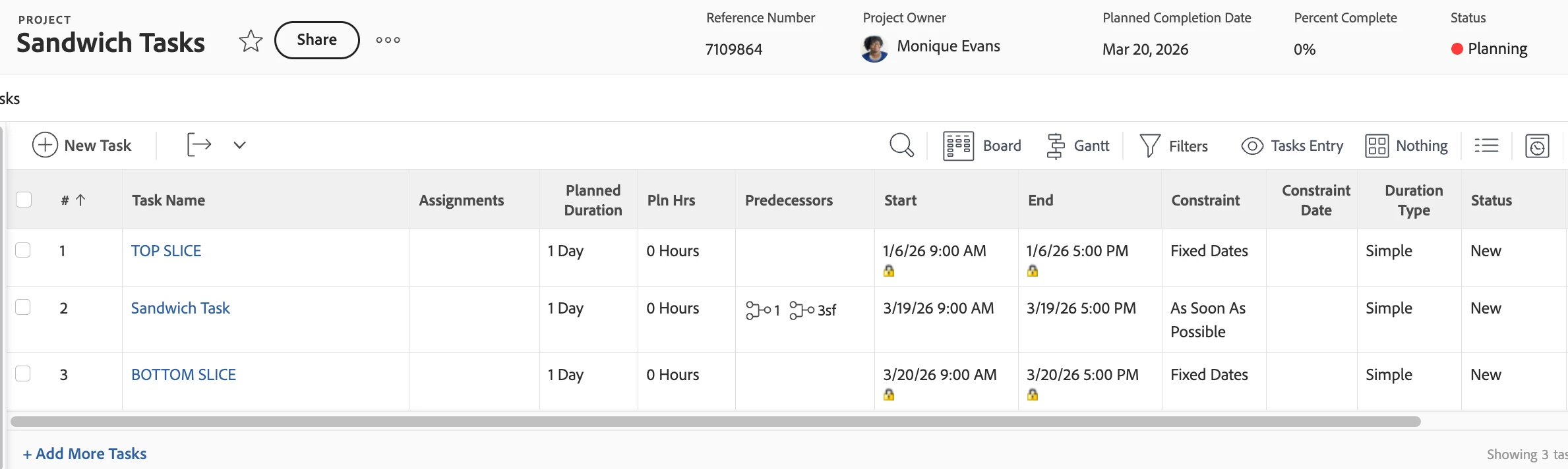
For example: Task A has a fixed date. Task C has a fixed date. Task B needs to start on Task A’s due date and finish on Task C’s start date. The duration will flux as the fixed dates are edited. I’ve tried various predecessors and duration types but nothing is quite giving me what I need.
 

5 replies

Patrick-antegma
Level 4
February 5, 2026

Hi ​@MoniqueEvans,


Task C is not really a predecessor of Task B, it’s a successor.

As Task B has the constraint “As Soon As Possible”, it is using the Start Date and the Duration to calculate the End Date. There is no dynamic duration calculation based on Start Date and End Date.

It’s either StartDate + Duration => EndDate or EndDate - Duration => StartDate.


Your problem is that the Constraint Type of Task C is the overwriting the predecessor definition.


The hierarchy in Workfront is essentially:

  1. Task Constraints (highest priority — can override dependencies)
  2. Predecessor relationships
  3. Duration Type calculations


MoniqueEvans
Community Advisor
Community Advisor
February 9, 2026

Thanks Patrick! As you can imagine, this is just one screenshot of many attempts.

If I set the bottom slice with a pred of the sandwich task I still can’t drive the date to operate independent of the duration. Unfortunately it seems I need a new task predecessor relationship of “between” or a way to set independent must start on and must finish on constraints.

NoahMa5
Level 1
February 6, 2026

Maybe: A Fusion automation that watches for changes to the date fields in Tasks A or C and updates the dates in Task B to match? You could identify Tasks A and C via the Template Task IDs. This assumes a standard template yada yada. 

Patrick-antegma
Level 4
February 6, 2026

I think if you want to build this generically it gets quite complex as this is only an example. Especially as the relationship between them is defined on the same task entity which you also start to manipulate

Level 2
February 6, 2026

Hey Monique, 


This may not be completely the answer, but it might be a start. 


  1. For Task A, set Task Constraint to Must Finish On. then set the date.
  2. For Task C, set Task Constraint to Must Start On, then set date.
  3. For Task B, set Predecessor to Task A. You can set Task C Predecessor to Task B, but this won’t function properly since you set Task C to Must Start On.
  4. Manually adjust duration of Task B to align with Task A End Date and Task C Start Date. This will need to be monitored as other adjustments to the overall Project Schedule could put the two fixed dates out of alignment.

Bonus: With End On set, if you change the duration of Task A, it will act as a work back. With Start On set, if you change the duration it will push all following Tasks forward in time. 


The wild card is going to be Task B. 

Did this help? Did I win?

MoniqueEvans
Community Advisor
Community Advisor
February 9, 2026

Thanks Joaquin!! LOL Not a winner but also not a loser. 😆

I really like this idea as a work around but I’m afraid it may be too complicated for the team to replicate consistently. They are brand new to Workfront but also very new to project management concepts. Until now they’ve been managing everything in a spreadsheet where you can easily make a cell equal another cell. To mimick that as much as possible while they get up to speed I might have to go with fixed dates.

Manually calculating the duration between dates gets a bit tricky when the spand is 50+ business days and increasingly so with various holidays coming in depending on how the dates fall

Level 2
February 9, 2026

Poo! I thought at least I’d get a ribbon. :-)


For clarity’s sake, does the Sandwich Task NEED to be exact in Duration? Or is this something that the team would like to have as much time as possible (which tends to be the last 2-3 days before Planned Completion Date anyways, in my experience)? 


The reason I ask, some times project management can get bogged down by the details, when these may not be as important as originally thought. The solution can sometimes present itself when we let loose the constraints a bit. 

What we know based on your questions; Top Slice has a fixed end date. This date also triggers the start of the Sandwich Task. Bottom Slice has a fixed start date. Sandwich “floats” between the slices (ok, no I’m hungry)

What we don’t know, how much Duration does the Sandwich Task really need? What happens the the Bottom Slice Task if we take more time on Sandwich Task? 

I think you can achieve what you want based fixed end and start dates with a couple extra tweaks

  1. Set a standard SLA for your Sandwich Task based on legacy info. i.e. it usually takes 10 biz days.
  2. Add to this is a custom View in the Project Task List (of course you can adjust all of this to your specific needs). 
    1. Highlight in Green the Planned Completion Date of the Sandwich Task when it is equal to or greater than 3 days from the Start Date of Bottom Slice Task.
    2. Highlight in Yellow the Planned Completion Date of the Sandwich Task when it is between 2 days and 1 day before the Start Date of Bottom Slice Task.
    3. Highlight in Red the Planned Completion Date of the Sandwich Task when it is equal to or after the Start Date of Bottom Slice Task.
  3. PMs (or project owners) will only need to adjust things that are in Red. Hopefully, less than 10% of these Sandwich-style task relationships. 

And lastly, thank you for this suggestion. It’s really making my PM brain fire on all circuits. 


What ever you decide, I would love to hear your solution. 


Best,

Joaquin

kautuk_sahni
Community Manager
Community Manager
February 17, 2026

@MoniqueEvans Quick follow-up! Were you able to get this issue sorted out? If you did, please consider posting the solution you used so others can learn from it. And if any of the replies above were helpful—whether they fully solved your problem or just pointed you toward the right fix—marking one as accepted helps future community members find solutions more easily. Closing the loop here makes a real difference for everyone.

Kautuk Sahni
KellieGardner
Community Advisor
Community Advisor
February 20, 2026

Unfortunately, I don’t believe this is possible because of how Workfront uses durations. It can’t "stretch" the duration of a task automatically based solely on a predecessor's timeline. Workfront primarily adjusts the start date of a successor to match the finish date of a predecessor.


Sounds like a possible scenario for Fusion?