
Best way to set up tasks with variable durations | Community
Skip to main content
MoniqueEvans
Community Advisor
Community Advisor
February 5, 2026
Question

Best way to set up tasks with variable durations

  • February 5, 2026
  • 3 replies
  • 52 views

Hey hey Workfronters!

I’m working on bringing a new team into Workfront and need your advice/expertise. What’s the best way to set up a task with a varying duration?

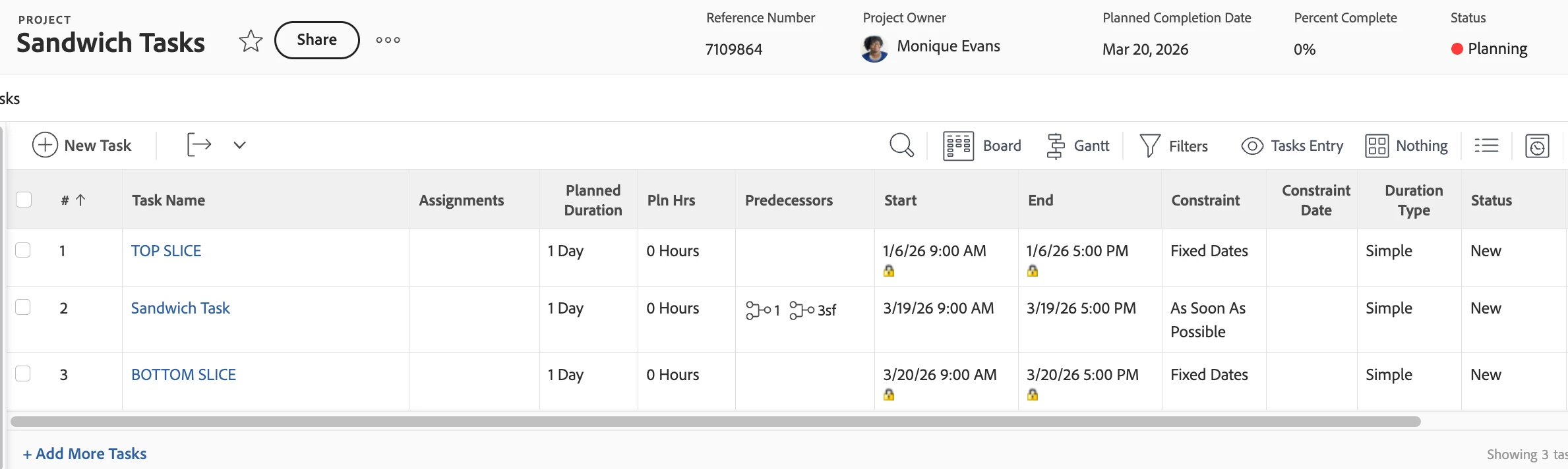
For example: Task A has a fixed date. Task C has a fixed date. Task B needs to start on Task A’s due date and finish on Task C’s start date. The duration will flux as the fixed dates are edited. I’ve tried various predecessors and duration types but nothing is quite giving me what I need.
 

3 replies

Patrick-antegma
Level 4
February 5, 2026

Hi ​@MoniqueEvans,


Task C is not really a predecessor of Task B, it’s a successor.

As Task B has the constraint “As Soon As Possible”, it is using the Start Date and the Duration to calculate the End Date. There is no dynamic duration calculation based on Start Date and End Date.

It’s either StartDate + Duration => EndDate or EndDate - Duration => StartDate.


Your problem is that the Constraint Type of Task C is the overwriting the predecessor definition.


The hierarchy in Workfront is essentially:

  1. Task Constraints (highest priority — can override dependencies)
  2. Predecessor relationships
  3. Duration Type calculations


NoahMa5
Level 1
February 6, 2026

Maybe: A Fusion automation that watches for changes to the date fields in Tasks A or C and updates the dates in Task B to match? You could identify Tasks A and C via the Template Task IDs. This assumes a standard template yada yada. 

Patrick-antegma
Level 4
February 6, 2026

I think if you want to build this generically it gets quite complex as this is only an example. Especially as the relationship between them is defined on the same task entity which you also start to manipulate

Level 2
February 6, 2026

Hey Monique, 


This may not be completely the answer, but it might be a start. 


  1. For Task A, set Task Constraint to Must Finish On. then set the date.
  2. For Task C, set Task Constraint to Must Start On, then set date.
  3. For Task B, set Predecessor to Task A. You can set Task C Predecessor to Task B, but this won’t function properly since you set Task C to Must Start On.
  4. Manually adjust duration of Task B to align with Task A End Date and Task C Start Date. This will need to be monitored as other adjustments to the overall Project Schedule could put the two fixed dates out of alignment.

Bonus: With End On set, if you change the duration of Task A, it will act as a work back. With Start On set, if you change the duration it will push all following Tasks forward in time. 


The wild card is going to be Task B. 

Did this help? Did I win?