Attempting to calculate "expected percent complete". If a task is 14 days in length and we're on day 7, we would want the field to return 50%. | Community
Skip to main content
March 12, 2021
Solved

Attempting to calculate "expected percent complete". If a task is 14 days in length and we're on day 7, we would want the field to return 50%.

  • March 12, 2021
  • 1 reply
  • 734 views

Of course, this does not account for task weight and resourcing among other things but that is fine for now. I've tested both DATEDIFF calculations on their own and they function, so the issue is when this all comes together and divides.

The first DATEDIFF pulls the difference between today and the planned start date, let's say that's 7 days. The second DATEDIFF pulls the difference between the end date and start date, let's say that's 14 days. I'm then trying to divide the result of the first DATEDIFF into the result of the second...7 into 14 to get .5, which I will then convert to 50%.

Again, the DATEDIFFS are functioning, so in my testing I have 7 and I have 14, but the division yields 7.416666667 rather than .5 and I cannot for the life of me determine why that is the case.

The valueexpression so far is below...any assistance from some fresh eyes would be much appreciated -

valueexpression=ROUND(DIV(ABS(DATEDIFF({plannedStartDate},$$TODAY))),(DATEDIFF({plannedCompletionDate},{plannedStartDate})),2)
This post is no longer active and is closed to new replies. Need help? Start a new post to ask your question.
Best answer by imgrund

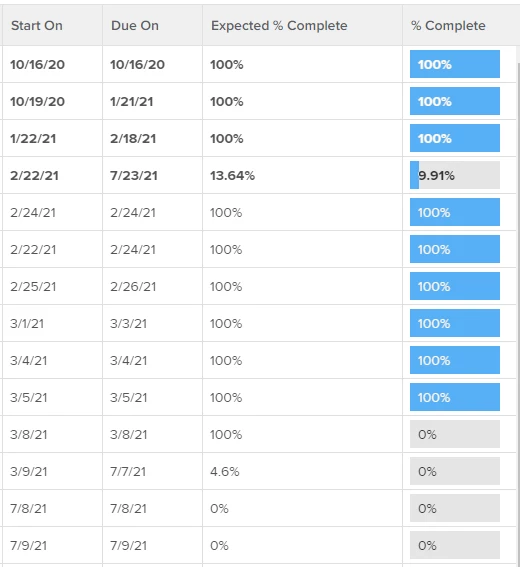
Hi - I have something like this but it is just for Work Days.

displayname=Expected % Complete

textmode=true

valueexpression=IF({plannedStartDate}<$$TODAY,IF(ROUND(((WEEKDAYDIFF({plannedStartDate},$$TODAY)+1)/(WEEKDAYDIFF({plannedStartDate},{plannedCompletionDate})+1)*100),2)>100,"100%",CONCAT(ROUND(((WEEKDAYDIFF({plannedStartDate},$$TODAY)+1)/(WEEKDAYDIFF({plannedStartDate},{plannedCompletionDate})+1)*100),2),"%")),"0%")

valueformat=HTML

I know it is a little long, I went a little over the top and added in IF statements where if the Start On was greater than or equal to today, it just put 0%. And if the calculation was over 100%, just to say 100%.

Hope this works for you.

1 reply

imgrund
Adobe Employee
imgrundAdobe EmployeeAccepted solution
Adobe Employee
March 14, 2021

Hi - I have something like this but it is just for Work Days.

displayname=Expected % Complete

textmode=true

valueexpression=IF({plannedStartDate}<$$TODAY,IF(ROUND(((WEEKDAYDIFF({plannedStartDate},$$TODAY)+1)/(WEEKDAYDIFF({plannedStartDate},{plannedCompletionDate})+1)*100),2)>100,"100%",CONCAT(ROUND(((WEEKDAYDIFF({plannedStartDate},$$TODAY)+1)/(WEEKDAYDIFF({plannedStartDate},{plannedCompletionDate})+1)*100),2),"%")),"0%")

valueformat=HTML

I know it is a little long, I went a little over the top and added in IF statements where if the Start On was greater than or equal to today, it just put 0%. And if the calculation was over 100%, just to say 100%.

Hope this works for you.

March 15, 2021

Anthony, much appreciated! This is a big help, I was able to get the field working.