
Aggreage (MAX) of a date using a valueexpression with an IF statement to select dates | Community
Skip to main content
GrahamJarrett
Level 4
May 23, 2023
Solved

Aggreage (MAX) of a date using a valueexpression with an IF statement to select dates

  • May 23, 2023
  • 1 reply
  • 765 views

I want to get a column in a task report that puts the MAX date in when the task meets a criteria.  Ultimately I want a series of columns that grab the date off of a different task. I was trying a basic example but I never seem to get a date appearing in my aggregate…See simple example below


aggregator.displayformat=atDate

aggregator.function=MAX

aggregator.namekey=entryDate

aggregator.valueexpression=IF({wbs}=1,{entryDate})

aggregator.valueformat=atDate

displayname=

linkedname=direct

namekey=entryDate

querysort=entryDate

textmode=true

valueexpression=IF({wbs}=1,{entryDate})

valueformat=atDate
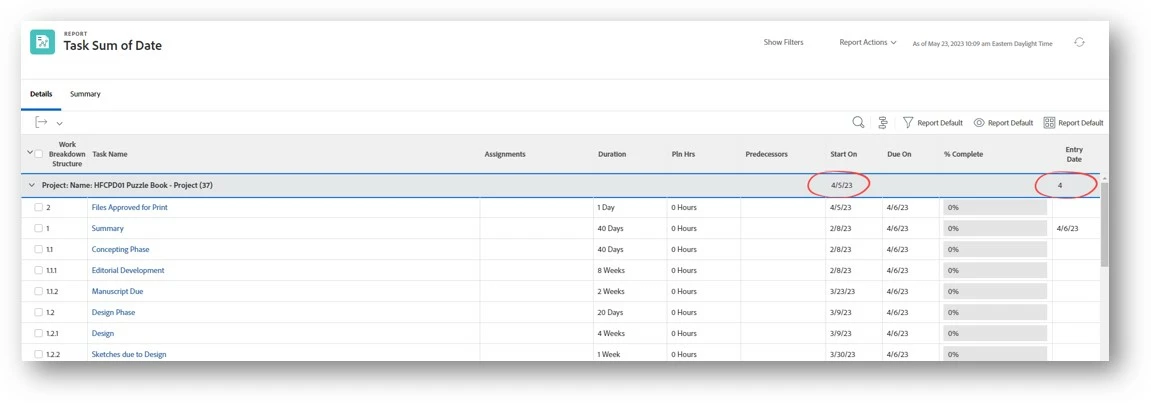
 

I am sure you used to be able to do this but it does not like it now. The aggregator on the regular column gets the "Whoops something went wrong" message.
This post is no longer active and is closed to new replies. Need help? Start a new post to ask your question.
Best answer by Doug_Den_Hoed__AtAppStore


Hi @grahamjarrett,


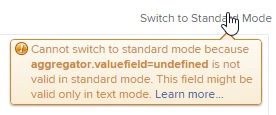
When I tried to switch what you've provided back to standard mode, I noticed this warning: 

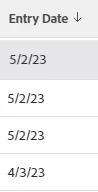
Changing .valueexpression to .valuefield then (no surprise) did not recognize the formula, so instead, I deleted all the textmode, switched to standard mode, selected Entry Date, then on the Advanced options, chose "Max", which resulted as (sorted desc) follows:


So...closer; but whether an aggregator is (still) smart enough to also handle an IF statement remains to be seen (and something I don't recall doing, myself).


Regards,

Doug


1 reply

Doug_Den_Hoed__AtAppStore
Community Advisor
Doug_Den_Hoed__AtAppStoreCommunity AdvisorAccepted solution
Community Advisor
May 23, 2023


Hi @grahamjarrett,


When I tried to switch what you've provided back to standard mode, I noticed this warning: 

Changing .valueexpression to .valuefield then (no surprise) did not recognize the formula, so instead, I deleted all the textmode, switched to standard mode, selected Entry Date, then on the Advanced options, chose "Max", which resulted as (sorted desc) follows:


So...closer; but whether an aggregator is (still) smart enough to also handle an IF statement remains to be seen (and something I don't recall doing, myself).


Regards,

Doug


GrahamJarrett
Level 4
May 23, 2023

Thanks Doug, yes my other column highlighted showed exactly the same potential... but not there in the IF statement.