How to use prior field value as minDate in datepicker | Community
Skip to main content
Level 2
June 13, 2024
Solved

How to use prior field value as minDate in datepicker

  • June 13, 2024
  • 3 replies
  • 827 views

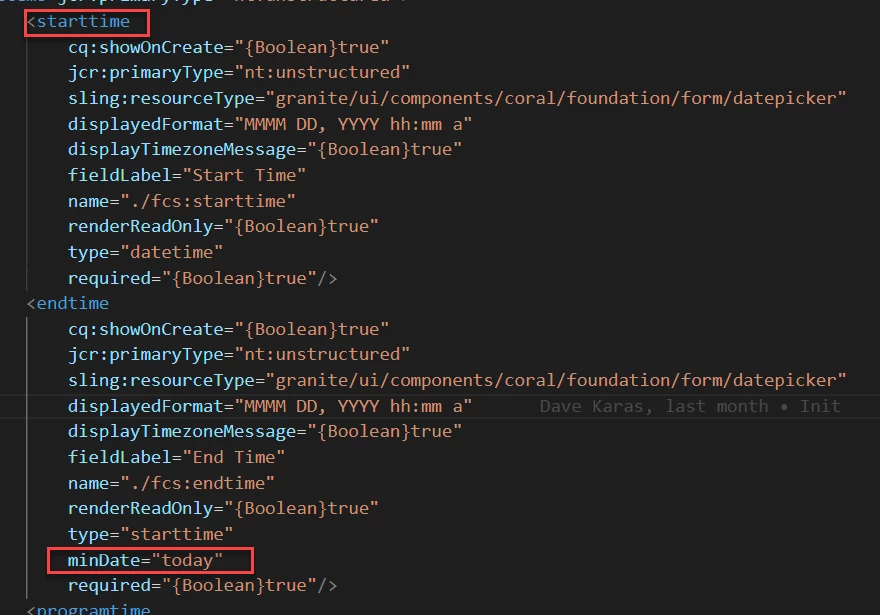
I would like to use the entered value of startime as the minimum date in endtime's minDate field.  Is this possible and if so how?


This post is no longer active and is closed to new replies. Need help? Start a new post to ask your question.
Best answer by HrishikeshKagne

Hi @bethen5 ,

To use the prior field value as the `minDate` in a datepicker, you can use JavaScript to dynamically set the `minDate` property based on the value of the prior field. Here's an example of how you can achieve this:

HTML:
```html
<label for="starttime">Start Time:</label>
<input type="text" id="starttime" name="starttime">

<label for="endtime">End Time:</label>
<input type="text" id="endtime" name="endtime">
```

Javascript&colon;
```javascript
// Get the input elements
var starttimeInput = document.getElementById('starttime');
var endtimeInput = document.getElementById('endtime');

// Add event listener to the starttime input
starttimeInput.addEventListener('change', function() {
// Get the value of the starttime input
var starttimeValue = starttimeInput.value;

// Set the minDate of the endtime input to the starttime value
endtimeInput.min = starttimeValue;
});
```

In this example, we listen for the `change` event on the starttime input field. When the value of the starttime input changes, we retrieve the value and set it as the `minDate` property of the endtime input field. This ensures that the endtime input field will only allow dates that are equal to or greater than the selected starttime.

Make sure to adjust the code according to your specific HTML structure and datepicker library that you are using.

3 replies

Harwinder-singh
Community Advisor
Community Advisor
June 13, 2024
HrishikeshKagne
Community Advisor
HrishikeshKagneCommunity AdvisorAccepted solution
Community Advisor
June 14, 2024

Hi @bethen5 ,

To use the prior field value as the `minDate` in a datepicker, you can use JavaScript to dynamically set the `minDate` property based on the value of the prior field. Here's an example of how you can achieve this:

HTML:
```html
<label for="starttime">Start Time:</label>
<input type="text" id="starttime" name="starttime">

<label for="endtime">End Time:</label>
<input type="text" id="endtime" name="endtime">
```

Javascript&colon;
```javascript
// Get the input elements
var starttimeInput = document.getElementById('starttime');
var endtimeInput = document.getElementById('endtime');

// Add event listener to the starttime input
starttimeInput.addEventListener('change', function() {
// Get the value of the starttime input
var starttimeValue = starttimeInput.value;

// Set the minDate of the endtime input to the starttime value
endtimeInput.min = starttimeValue;
});
```

In this example, we listen for the `change` event on the starttime input field. When the value of the starttime input changes, we retrieve the value and set it as the `minDate` property of the endtime input field. This ensures that the endtime input field will only allow dates that are equal to or greater than the selected starttime.

Make sure to adjust the code according to your specific HTML structure and datepicker library that you are using.

Hrishikesh Kagane
kautuk_sahni
Community Manager
Community Manager
June 19, 2024

@bethen5 Did you find the suggestion helpful? Please let us know if you require more information. Otherwise, please mark the answer as correct for posterity. If you've discovered a solution yourself, we would appreciate it if you could share it with the community. Thank you!

Kautuk Sahni