References to word or pdf documents in DITA causes broken link | Community
Skip to main content
ravir73578276
Level 3
January 6, 2023
Solved

References to word or pdf documents in DITA causes broken link

  • January 6, 2023
  • 1 reply
  • 946 views

I am using on premise AEM service pack 12 with FMDITA 4.1.

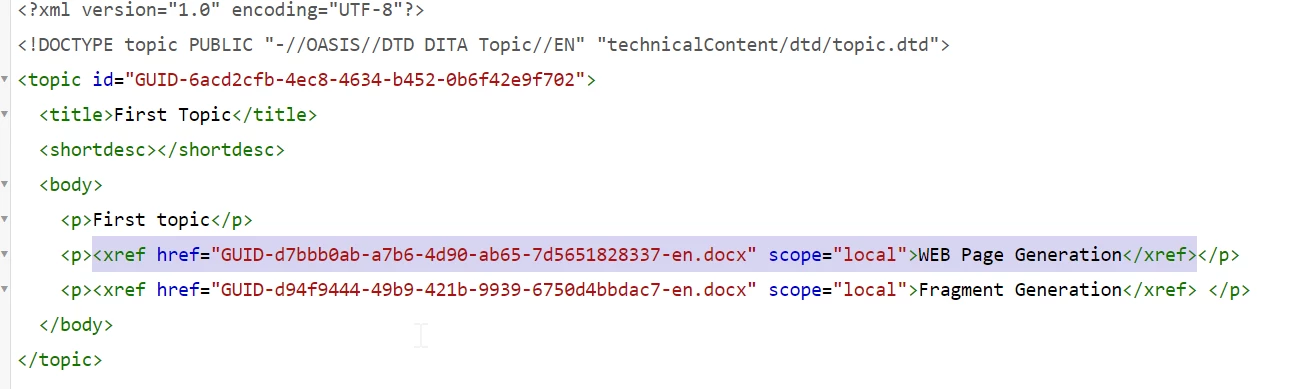
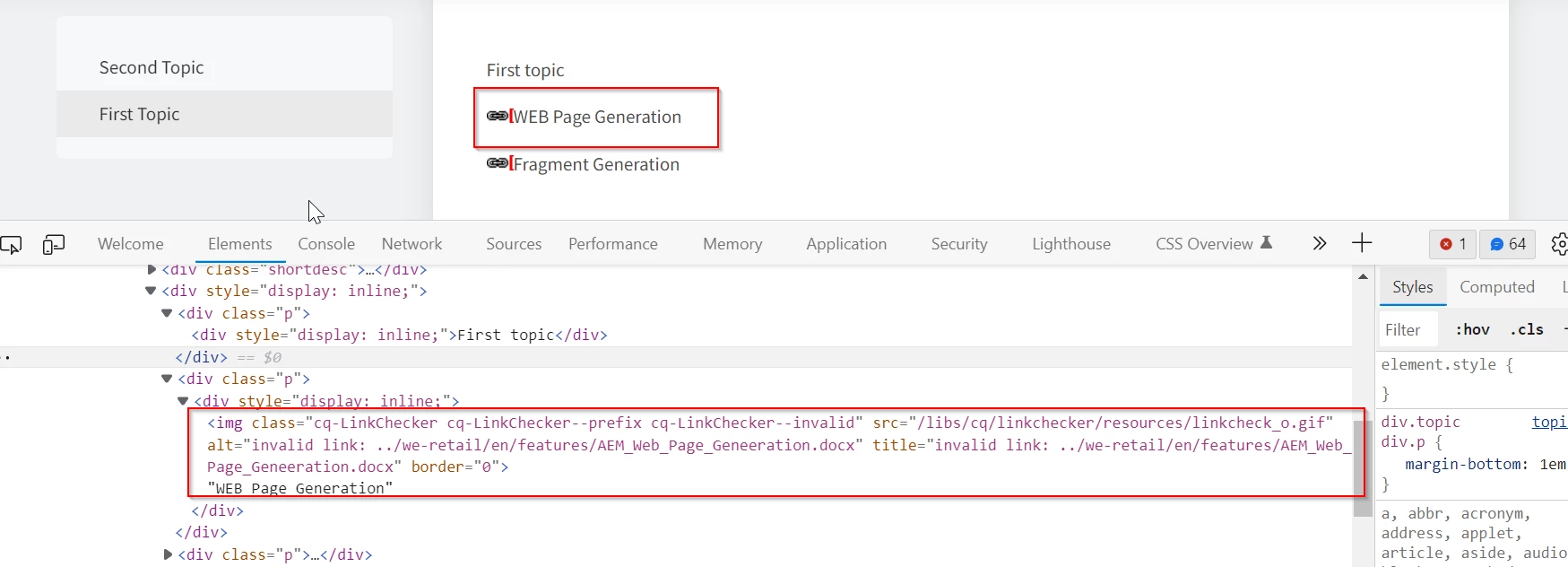
I am trying to add word and pdf documents as attachments to dita xml using cross reference. But after generating AEM SITE from dita , the path to the documents is not getting resolved and causes broken link.

Following are the screenshots:


How can this issue be resolved any idea?

@divrajsingh 


This post is no longer active and is closed to new replies. Need help? Start a new post to ask your question.
Best answer by DivrajSingh

@ravir73578276 : If you need references to non-dita assets to work as link to assets when rendering them on AEM Site page, you need to do following:

  1. While authoring such links you need to ask authors to add an attribute "format" having appropriate value like "docx" to identify that this link is special (see [A])
  2. And before you publish the content to AEM Site, you need to add a rule in "elementmapping.xml" to indicate the publishing process to handle this differently, see [B]. With this configuration the links to docx type files will point to their original loction in AEM Assets. (note that when you update elementmapping.xml you need to follow additional notes given in Installation and Configuration guide page 106)
  3. Then you can try publishing the map to AEM Site - it should work as you expect then

[A]: authored xref with format attribute

<xref href="GUID-8e29cf2b-fa8c-4c5e-8f8f-a6c54491d33f.docx" format="docx" scope="local"> </xref>


[B]: snippet for elementmapping.xml to enable links to non-dita assets to work on AEM Sites

<ditaelement>

    <name>xref</name>

    <class>- topic/xref</class>

    <componentpath>fmdita/components/dita/link</componentpath>

    <type>COMPOSITE</type>

    <target>para</target>

    <textprop>text</textprop>

    <xpath><![CDATA[//xref[@format='docx']]]></xpath>

    <attributemap>

      <attribute from="href" to="link" ispath="true" rel="SOURCE" />

      <attribute from="format" to="format" />

      <attribute from="scope" to="scope" />

    </attributemap>

</ditaelement>


1 reply

DivrajSingh
Adobe Employee
DivrajSinghAdobe EmployeeAccepted solution
Adobe Employee
January 6, 2023

@ravir73578276 : If you need references to non-dita assets to work as link to assets when rendering them on AEM Site page, you need to do following:

  1. While authoring such links you need to ask authors to add an attribute "format" having appropriate value like "docx" to identify that this link is special (see [A])
  2. And before you publish the content to AEM Site, you need to add a rule in "elementmapping.xml" to indicate the publishing process to handle this differently, see [B]. With this configuration the links to docx type files will point to their original loction in AEM Assets. (note that when you update elementmapping.xml you need to follow additional notes given in Installation and Configuration guide page 106)
  3. Then you can try publishing the map to AEM Site - it should work as you expect then

[A]: authored xref with format attribute

<xref href="GUID-8e29cf2b-fa8c-4c5e-8f8f-a6c54491d33f.docx" format="docx" scope="local"> </xref>


[B]: snippet for elementmapping.xml to enable links to non-dita assets to work on AEM Sites

<ditaelement>

    <name>xref</name>

    <class>- topic/xref</class>

    <componentpath>fmdita/components/dita/link</componentpath>

    <type>COMPOSITE</type>

    <target>para</target>

    <textprop>text</textprop>

    <xpath><![CDATA[//xref[@format='docx']]]></xpath>

    <attributemap>

      <attribute from="href" to="link" ispath="true" rel="SOURCE" />

      <attribute from="format" to="format" />

      <attribute from="scope" to="scope" />

    </attributemap>

</ditaelement>