Map-level Search and Replace is returning 0 results all the time | Community
Skip to main content
Level 4
May 5, 2025
Solved

Map-level Search and Replace is returning 0 results all the time

  • May 5, 2025
  • 2 replies
  • 534 views

Hello,

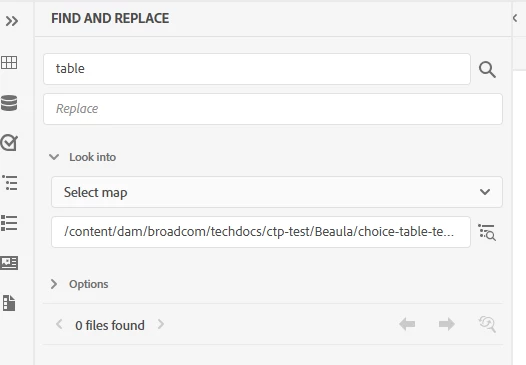
Map-level Search and Replace is returning 0 results all the time. Our UUID version AEM Guides (4.6.0.3).


I tried below steps.

1. reindexed the /oak:index/lucene

2. reindexed /oak:index/damAssetLucene

Best answer by Beaula123

Hi @divrajsingh ,

/oak:index/damAssetLucene/tika node has "config.xml" causing the index to not include any assets with mime type (dc:format) "application/xml" to not be included in the index, this results in the query for referenced dita content to return zero results.


Added DefaultParser for <mime>application/xml</mime> fixed the issue and it actually extract and index the dita content. After reindexing the damAssetLucene with updated oak:index/damAssetLucene/tika/config.xml fixed the issue. Now the search and replace functionality returning the results. 


Thank you..
2 replies

AmitVishwakarma
Community Advisor
Community Advisor
May 8, 2025

Hi @beaula123 ,

Root Cause (Most Common):

AEM Guides Search and Replace depends heavily on DITA Map parsing and indexing. If:

  - The map is not associated with a DITA-OT map type, or

  - References within the map are broken or incomplete, or

  - The search engine configuration isn't detecting UUID-based maps,

then the tool will fail silently and show “0 files found”.

Steps to Fix:

1. Confirm DITA Map Association

Ensure the selected map is correctly typed as a DITA Map.

Go to CRXDE: /content/dam/broadcom/techdocs/ctp-test/Beaula/choice-table-test.ditamap

Confirm that it has this property:

jcr:primaryType = dam:Asset dc:format = application/dita+xml; format=map

If not, right-click in CRXDE and update the dc:format manually to:

application/dita+xml; format=map

2. Ensure Map Contains Valid References

  - Open the map in Web Editor and confirm it successfully references topics.

  - Broken references (red exclamation) will prevent indexing.

3. Reindex Map Content from AEM Guides UI

  - Go to Tools → AEM Guides → Content Indexing

  - Select the DITA map in question and click “Reindex Map”

4. Check and Restart the Async Indexing Job

Sometimes background jobs get stuck. Do the following:

  - Go to: http://<host>:<port>/system/console/status-slingjobs

  - Look for any stuck/failed jobs related to DITA or indexing.

  - Clear and restart them if needed.

5. Check Lucene Query Limits

Sometimes Lucene result limits can truncate queries:

  - Go to /system/console/configMgr

  - Look for "Apache Jackrabbit Oak QueryEngineSettingsService"

  - Increase the limit:

  - Query Limit: 500000

    - Read Limit: 500000

    - Save and test again.

6. Enable Debug Logs Temporarily

If still stuck, enable logs for detailed output:

  - Log level: DEBUG

  - Class: com.adobe.fmdita.search

Use /system/console/slinglog to do this.

Regards,
Amit

DivrajSingh
Adobe Employee
Adobe Employee
May 20, 2025

@beaula123 : can you check on any/some of the topics of the map (in jcr:content) if following properties are getting added after post processing:

 - guidesParentMaps

 - guidesDirectParentMaps


If not follow the steps given in upgrade instructions see section "Steps to reindex existing content" 

And also check if the configuration "Disable guidesParentMaps Processing" is set - if yes then you need to uncheck this config under com.adobe.fmdita.config.ConfigManager

Beaula123AuthorAccepted solution
Level 4
May 20, 2025

Hi @divrajsingh ,

/oak:index/damAssetLucene/tika node has "config.xml" causing the index to not include any assets with mime type (dc:format) "application/xml" to not be included in the index, this results in the query for referenced dita content to return zero results.


Added DefaultParser for <mime>application/xml</mime> fixed the issue and it actually extract and index the dita content. After reindexing the damAssetLucene with updated oak:index/damAssetLucene/tika/config.xml fixed the issue. Now the search and replace functionality returning the results. 


Thank you..