How can I display <topicmeta> from a map to Native PDF Output? | Community
Skip to main content
Level 4
June 27, 2024
Solved

How can I display <topicmeta> from a map to Native PDF Output?

  • June 27, 2024
  • 1 reply
  • 998 views

Hi there,


I'm wondering if there is a way to get a <topicmeta> tag to show up on output through Native PDF. Currently it looks like the output template is ignoring it. How can I get it to show?


Thanks in advance!

Josh
This post is no longer active and is closed to new replies. Need help? Start a new post to ask your question.
Best answer by Surbhi_Maheshwari

Hi Josh,


Do you want to show a value from topicmeta e.g. author in your native PDF output?

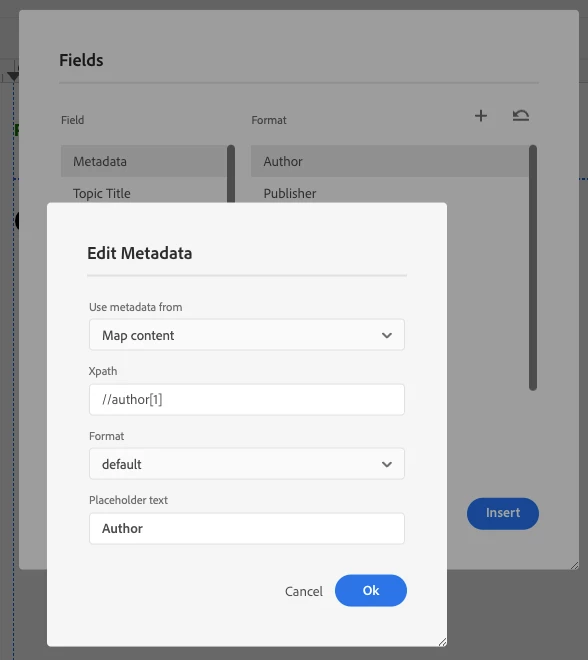
If yes, there is an option to insert that in page layout of PDF template. From top toolbar, you can insert Fields > metadata > select the one you want to insert (select Map content from drop down in your case).

In generated PDF output you will see the value of let's say author element from topicmeta of ditamap.

PFA screenshot below:


Thanks and Regards,
Surbhi Maheshwari

1 reply

Surbhi_MaheshwariAdobe EmployeeAccepted solution
Adobe Employee
June 27, 2024

Hi Josh,


Do you want to show a value from topicmeta e.g. author in your native PDF output?

If yes, there is an option to insert that in page layout of PDF template. From top toolbar, you can insert Fields > metadata > select the one you want to insert (select Map content from drop down in your case).

In generated PDF output you will see the value of let's say author element from topicmeta of ditamap.

PFA screenshot below:


Thanks and Regards,
Surbhi Maheshwari

Level 4
June 27, 2024

Thanks so much for your quick reply, Surbhi! 🙂

I should have clarified - my apologies!

What I mean by <topicmeta> in maps is this:

I know this probably isn't the best use of DITA, but unfortunately this scenario is present in our legacy content.

Is there any easy way to get this to show, or is it necessary to make these into topics?

Thanks again!

Josh