
Grab the title of a tag from asset metadata in Native PDF | Community
Skip to main content
rkody
Level 3
July 24, 2024
Solved

Grab the title of a tag from asset metadata in Native PDF

  • July 24, 2024
  • 2 replies
  • 799 views

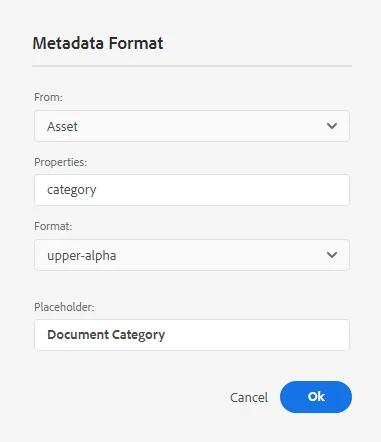
Is there any way to grab the tag title in a native pdf field? I have a custom metadata field on my asset called category, and it is a tag field. When rendering the pdf I get the full path to the tag, but I want to display the title instead.

i.e. The below displays "PROJECT:DOCUMENT-TYPE/DOCUMENT-TYPE" and I want it to display "Document Type Title"
 

This post is no longer active and is closed to new replies. Need help? Start a new post to ask your question.
Best answer by Surbhi_Maheshwari

Yes, you will need to keep the value you want in output i.e. text as value in crx/de.

Please give it a try and let me know how it goes.

2 replies

Adobe Employee
July 25, 2024

Hi,


In your case whatever value you have set in Category will be coming in Native PDF output. 

Can you share a screenshot of this Category asset metadata property? 

Also please refer to https://experienceleague-review.corp.adobe.com/docs/experience-manager-guides/using/install-guide/on-prem-ig/output-gen-config/config-native-pdf-publish/design-page-layout.html . Go to "Add fields and metadata" section. You will find various ways you can use metadata from ditamaps and topics.


Thanks and Regards,
Surbhi Maheshwari

rkody
rkodyAuthor
Level 3
July 25, 2024

Yes I have that property set up to be a tag.


Metadata schema:

On the Asset:

CRXDE:


It sounds like I will have to just use a text property in the schema and manually add the document type instead of using tags.

Surbhi_MaheshwariAdobe EmployeeAccepted solution
Adobe Employee
July 25, 2024

Yes, you will need to keep the value you want in output i.e. text as value in crx/de.

Please give it a try and let me know how it goes.

kautuk_sahni
Community Manager
Community Manager
August 1, 2024

@rkody Did you find the suggestions from users helpful? Please let us know if you require more information. Otherwise, please mark the answer as correct for posterity. If you've discovered a solution yourself, we would appreciate it if you could share it with the community. Thank you!

Kautuk Sahni