
'Table Of Contents' header not wrap into second line in assembler service | Community
Skip to main content
Wells_Sri
Level 2
March 9, 2021
Solved

'Table Of Contents' header not wrap into second line in assembler service

  • March 9, 2021
  • 1 reply
  • 943 views

Please find my ddx below for assembler service to generate 'Table Of Contents', The header section of the TOC not wrapping into second line. Please find screenshot. any help ?


"<?xml version="1.0" encoding="UTF-8"?> <DDX xmlns="http://ns.adobe.com/DDX/1.0/"> <PDF result="out.pdf"> <TableOfContents includeInTOC="true" bookmarkTitle="_SourceTitle" toc-margin-top="70pt"> <PageSize width="612pt" height="792pt"/> <Header><Left><StyledText><p font-family="Verdana" font-size="28pt" text-align="left">Wells Fargo Merchant Services Terms and Conditions</p></StyledText></Left></Header> <TableOfContentsEntryPattern> <StyledText> <p font-family="Verdana" font-size="9pt"> <_BookmarkTitle/><leader leader-pattern="dotted"/> <_BookmarkPageCitation/></p> </StyledText> </TableOfContentsEntryPattern> </TableOfContents> <PDF source="sourceDoc"> <NoForms/> <NoXFA/> </PDF> </PDF> <StyleProfile name="headerStyle"> <Header> <Left> <StyledText> <p>_SourceTitle</p> </StyledText> </Left> </Header> 
</StyleProfile> <DocumentInformation result='info.xml' source='out.pdf'/> </DDX>"
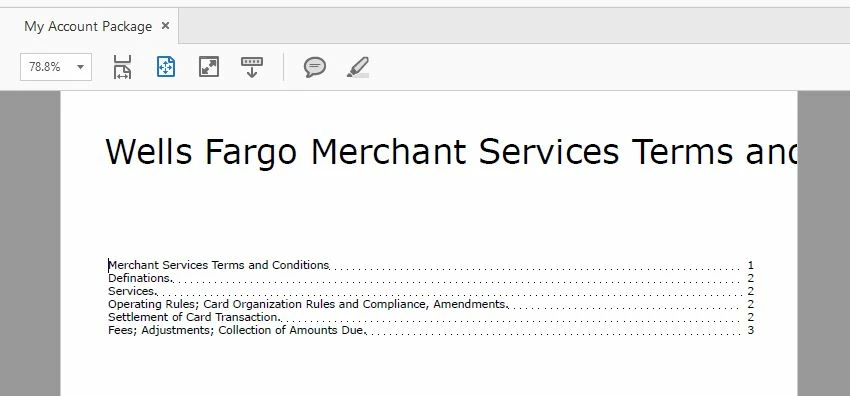


This post is no longer active and is closed to new replies. Need help? Start a new post to ask your question.
Best answer by Kosta_Prokopiu1

There is no auto-wrap here. What you can do is split the line by a line feed and set the xml:space option to "preserve".


<DDX xmlns="http://ns.adobe.com/DDX/1.0/" xmlns:xml="http://www.w3.org/XML/1998/namespace" >
<PDF result="out.pdf">
<TableOfContents includeInTOC="true" bookmarkTitle="_SourceTitle" toc-margin-top="70pt">
<PageSize width="612pt" height="792pt"/>
<Header>
<Left>
<StyledText xml:space="preserve">
<p font-family="Verdana" font-size="28pt" text-align="left">Wells Fargo Merchant Services
Terms and Conditions</p>
</StyledText>
</Left>
</Header>
<TableOfContentsEntryPattern>
<StyledText>
<p font-family="Verdana" font-size="9pt">
<_BookmarkTitle/>
<leader leader-pattern="dotted"/>
<_BookmarkPageCitation/>
</p>
</StyledText>
</TableOfContentsEntryPattern>
</TableOfContents>
<PDF source="sourceDoc">
<NoForms/>
<NoXFA/>
</PDF>
</PDF>
<StyleProfile name="headerStyle">
<Header>
<Left>
<StyledText>
<p>_SourceTitle</p>
</StyledText>
</Left>
</Header>
</StyleProfile>
<DocumentInformation result="info.xml" source="out.pdf"/>
<?ddx-source-hint name="sourceDoc"?>
</DDX>

1 reply

Kosta_Prokopiu1
Adobe Employee
Kosta_Prokopiu1Adobe EmployeeAccepted solution
Adobe Employee
March 9, 2021

There is no auto-wrap here. What you can do is split the line by a line feed and set the xml:space option to "preserve".


<DDX xmlns="http://ns.adobe.com/DDX/1.0/" xmlns:xml="http://www.w3.org/XML/1998/namespace" >
<PDF result="out.pdf">
<TableOfContents includeInTOC="true" bookmarkTitle="_SourceTitle" toc-margin-top="70pt">
<PageSize width="612pt" height="792pt"/>
<Header>
<Left>
<StyledText xml:space="preserve">
<p font-family="Verdana" font-size="28pt" text-align="left">Wells Fargo Merchant Services
Terms and Conditions</p>
</StyledText>
</Left>
</Header>
<TableOfContentsEntryPattern>
<StyledText>
<p font-family="Verdana" font-size="9pt">
<_BookmarkTitle/>
<leader leader-pattern="dotted"/>
<_BookmarkPageCitation/>
</p>
</StyledText>
</TableOfContentsEntryPattern>
</TableOfContents>
<PDF source="sourceDoc">
<NoForms/>
<NoXFA/>
</PDF>
</PDF>
<StyleProfile name="headerStyle">
<Header>
<Left>
<StyledText>
<p>_SourceTitle</p>
</StyledText>
</Left>
</Header>
</StyleProfile>
<DocumentInformation result="info.xml" source="out.pdf"/>
<?ddx-source-hint name="sourceDoc"?>
</DDX>

Wells_Sri
Wells_SriAuthor
Level 2
March 10, 2021
This heading text(i.e. Wells Fargo Merchant Services Terms and Conditions) is dynamic value from front-end app. How can i split a line dynamically ?