Remove "Add Row" and "Delete Row" buttons when the document is signed. | Adobe Higher Education
Skip to main content
Level 2
February 22, 2024
Respondido

Remove "Add Row" and "Delete Row" buttons when the document is signed.

  • February 22, 2024
  • 1 resposta
  • 663 Visualizações

Hello!


I will preface this first as I am very much a novice at coding. I'm taking some classes, but it's very much a work in progress for me. 


I have an Adobe form that has buttons on it that will allow the user to add a row if they need to add more information. For example, if there is more than one evaluator on a performance evaluation. Right now, the form is set up to only be visible on the screen, meaning that the buttons will disappear when it prints. So we are having to "print as pdf" to save a copy that does not have the buttons. 

I was wondering if there is a way to make the buttons disappear once the form is signed? Everyone has to use electronic signatures to sign. I used the "postSign" function, but when I test it I get the following error:
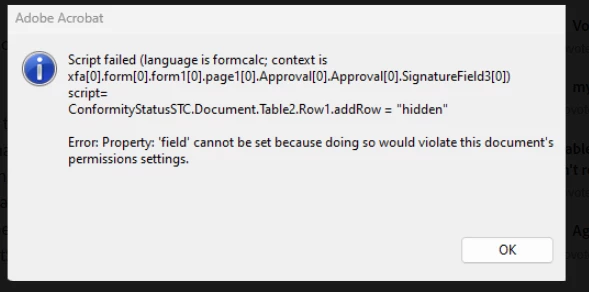
 

Alternatively, if I use the "preSign" option, the buttons don't go away. 😞


I feel like I'm probably missing a step, or that there is a better way to do it. 


Thanks!

Este tópico foi fechado para respostas.
Melhor resposta por sudhansh

@mav_s The XFA spec suggests:


The preSign event fires when a signature is about to be applied. A script triggered by this event

has the chance to make fields read-only or (in an interactive context) issue a custom dialog. If the

script is marked to be run only at the server, the data is sent to the server with an indication that it

should run the associated script before performing the rest of te processing.

After successfully applying a signature the postSign event fires. A script triggered by this event

has the chance to make fields read-only, issue a custom dialog, or submit the signed data to a

host. After a failed or cancelled attempt to apply a signature a postSign event also fires to allow

clean-up code to run.


So, you cannot show/hide fields on pre/post Sign events. For more details:

[1] XFA Spec:  https://www.pdfa.org/norm-refs/XFA-3_3.pdf (Page : 394)

[2] PreSign event:  https://help.adobe.com/en_US/AEMForms/6.1/DesignerScriptingBasics/WS92d06802c76abadb39b5236b129f6917ab6-7f72.2.html

[3] PostSign event: https://help.adobe.com/en_US/AEMForms/6.1/DesignerScriptingBasics/WS92d06802c76abadb39b5236b129f6917ab6-7f74.2.html 

1 Resposta

sudhansh
Adobe Employee
sudhanshAdobe EmployeeResposta
Adobe Employee
February 28, 2024

@mav_s The XFA spec suggests:


The preSign event fires when a signature is about to be applied. A script triggered by this event

has the chance to make fields read-only or (in an interactive context) issue a custom dialog. If the

script is marked to be run only at the server, the data is sent to the server with an indication that it

should run the associated script before performing the rest of te processing.

After successfully applying a signature the postSign event fires. A script triggered by this event

has the chance to make fields read-only, issue a custom dialog, or submit the signed data to a

host. After a failed or cancelled attempt to apply a signature a postSign event also fires to allow

clean-up code to run.


So, you cannot show/hide fields on pre/post Sign events. For more details:

[1] XFA Spec:  https://www.pdfa.org/norm-refs/XFA-3_3.pdf (Page : 394)

[2] PreSign event:  https://help.adobe.com/en_US/AEMForms/6.1/DesignerScriptingBasics/WS92d06802c76abadb39b5236b129f6917ab6-7f72.2.html

[3] PostSign event: https://help.adobe.com/en_US/AEMForms/6.1/DesignerScriptingBasics/WS92d06802c76abadb39b5236b129f6917ab6-7f74.2.html