OSGi Bundle Conflict: PrintChannelService Legacy vs Cloud Package Mismatch in AEMaaCS | Community
Skip to main content
Level 1
January 28, 2026
Question

OSGi Bundle Conflict: PrintChannelService Legacy vs Cloud Package Mismatch in AEMaaCS

  • January 28, 2026
  • 2 replies
  • 36 views

Hi everyone,

I am migrating an AEM Forms (ICC) project to AEM as a Cloud Service. My bundle is failing to start and remains in the "Installed" state due to a dependency conflict.

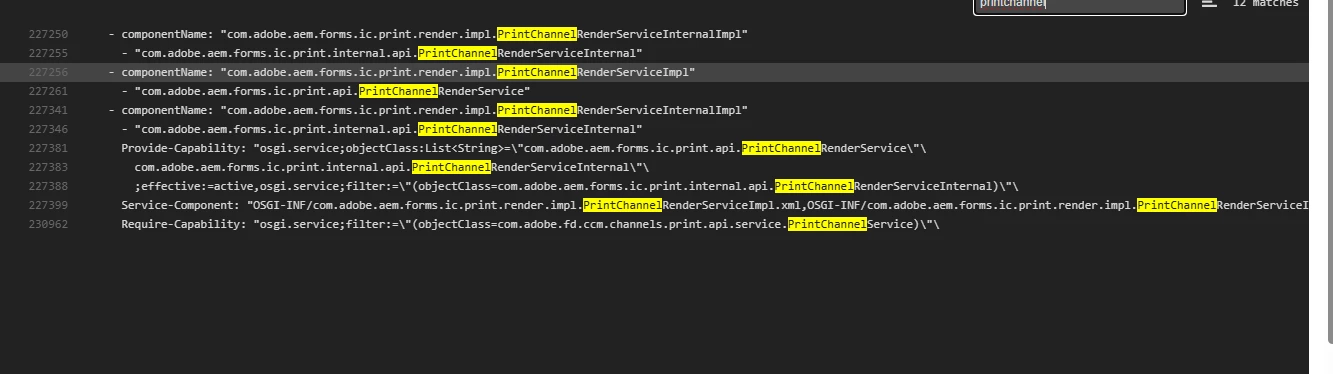
The Error: Looking at the bundle status in the Cloud console, I see the following mismatch:

  • The Server provides: com.adobe.aem.forms.ic.print.api.PrintChannelRenderService
  • My Bundle requires: com.adobe.fd.ccm.channels.print.api.service.PrintChannelService

The Blocker: I need to update my Java code to use the new com.adobe.aem.forms package names. However, I am unable to find the correct Maven dependency/library to include in my project. I have tried adding aem-forms-sdk-api to my pom.xml, but Maven returns a "Not Found" error for the artifact in the Adobe public repository (https://repo.adobe.com/nexus/content/groups/public).

Questions:

  1. What is the correct Maven dependency and version to use for AEM Forms Cloud Service to access the com.adobe.aem.forms.ic.print.api package?
  2. Is there a specific repository I should be using other than the public Adobe one to get the Forms-specific SDK?

I have attached a screenshot of the bundle requirements mismatch for reference. Thank you!
 

2 replies

AmitVishwakarma
Community Advisor
Community Advisor
January 28, 2026

Hi ​@ManishaMa2 ,

You’re mixing on‑prem / legacy ICC APIs with the new Forms Cloud APIs. On AEMaaCS, the old com.adobe.fd.ccm.channels.print.api.service.PrintChannelService is not available, and there is no public Maven SDK that exposes internal Forms Cloud bundles like com.adobe.aem.forms.ic.print.api.*.

So:

  • You cannot fix this by adding a Maven dependency for PrintChannelService.
  • You must refactor your code to use the new service types that actually exist on Cloud, and wire them via OSGi @Reference, not by importing a missing package.

What’s happening

Your bundle manifest (from bnd) contains:

Require-Capability:
osgi.service;filter:="(objectClass=com.adobe.fd.ccm.channels.print.api.service.PrintChannelService)"

 But the Cloud environment only provides:

Provide-Capability:
osgi.service;objectClass="com.adobe.aem.forms.ic.print.api.PrintChannelRenderService"

So Felix can’t resolve your bundle => stays in Installed.

This mismatch is because you’re still importing on‑prem API (com.adobe.fd.*) while Cloud exposes newer com.adobe.aem.forms.ic.print.* services.


How to fix your bundle

1. Stop importing the legacy service interface.

Remove any imports/OSGi references to:

com.adobe.fd.ccm.channels.print.api.service.PrintChannelService

2. Switch your code to use the Cloud service that actually exists, for example:

import com.adobe.aem.forms.ic.print.api.PrintChannelRenderService;

@Component(service = MyService.class)
public class MyService {

@Reference
private PrintChannelRenderService printChannelRenderService;

// use printChannelRenderService here...
}

Adjust usage based on the updated API (method signatures will differ from the old PrintChannelService).

3. Let bnd generate imports; don’t hard‑code Import-Package for this API:

<bnd><![CDATA[
Import-Package: javax.annotation;version=0.0.0,*
]]></bnd>

After you compile against the correct interface, bnd will generate an Import-Package for com.adobe.aem.forms.ic.print.api, and Felix can wire it to the existing bundle in AEMaaCS.

You do not embed or deploy the Forms print bundle yourself,  it’s already part of the platform.

Thanks,
Amit

Level 1
January 29, 2026

Hi Amit,

Thank you for the very clear explanation about the mismatch between the legacy com.adobe.fd and the new com.adobe.aem.forms.ic.print.api services. That makes perfect sense why the bundle is stuck in 'Installed.'

However, I’m a bit confused about how to actually implement your fix. You mentioned that:

  1. I should switch my code to use PrintChannelRenderService.
  2. But you also said there is 'no public Maven SDK that exposes these internal Forms Cloud bundles.'

If there is no public Maven SDK for these classes, how can I get my Java code to compile? Currently, when I try to add the import for com.adobe.aem.forms.ic.print.api.PrintChannelRenderService, my IDE (and Maven) cannot find the class, so the build fails.

Is there a specific dependency I should be using for 'provided' scope just for compilation? Or is there a 'Forms' version of the AEM Cloud SDK that contains these specific APIs?

I want to follow your advice and refactor the code, but I'm stuck on how to build the project without the API being available in Maven. Any guidance on what to put in my POM to allow this to compile would be really helpful!

Thanks again!

abhilashy577678
Level 2
January 30, 2026

@ManishaMa2  - Let me know if you found some solution around for your issue. 


Also some inputs needed from you let me know if we can connect over email or linkedin. We are starting to migrated adaptive On Prem forms to cloud. need some information around it. It would be helpful. 

Thanks,

Email - ysabhi7@gmail.com 

LinkedIn - https://www.linkedin.com/in/abhilash-y-s-7a3323109