Not able to insert attachment in Adaptive Form using FDM (Form Data Model) | Community
Skip to main content
November 20, 2023
Solved

Not able to insert attachment in Adaptive Form using FDM (Form Data Model)

  • November 20, 2023
  • 3 replies
  • 1099 views

Hi Team,


Currently we are developing Adaptive form has attachment fields in adaptative form not able to persist the attachment as Binary (ex: PDF) to Database using FDM (Form Data Model)


Adaptive form using FDM (Form Data Model)
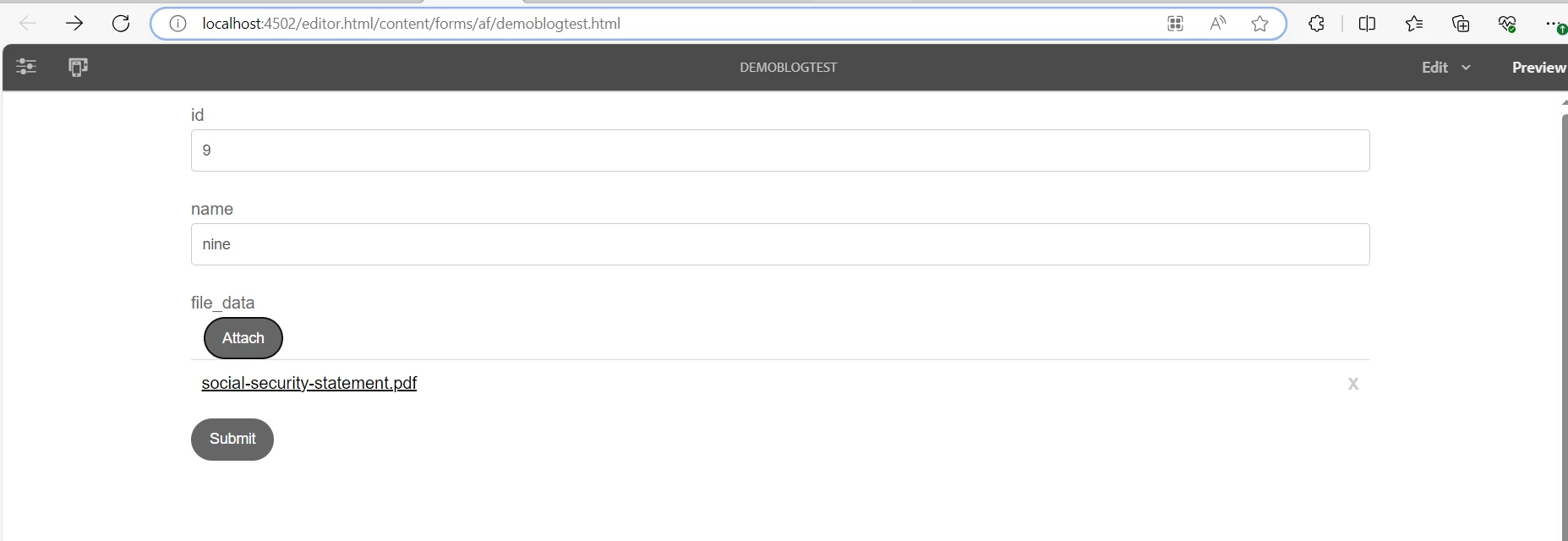


Log Snippet:


19.11.2023 21:05:45.656 *INFO* [[0:0:0:0:0:0:0:1] [1700449545525] POST /content/forms/af/demoblogtest/jcr:content/guideContainer.af.internalsubmit.jsp HTTP/1.1] org.apache.sling.scripting.javascript.helper.SlingGlobal [ Envjs/1.6 (Rhino; U; Windows 10 amd64 10.0; en-US; rv:1.7.0.rc2) Resig/20070309 PilotFish/1.2.13 ]
19.11.2023 21:05:45.805 *INFO* [[0:0:0:0:0:0:0:1] [1700449545525] POST /content/forms/af/demoblogtest/jcr:content/guideContainer.af.internalsubmit.jsp HTTP/1.1] com.adobe.aemds.guide.internal.impl.utils.JsonSchemaUtils Value isn't compliant with JSON Schema. It should be string.
19.11.2023 21:05:45.805 *INFO* [[0:0:0:0:0:0:0:1] [1700449545525] POST /content/forms/af/demoblogtest/jcr:content/guideContainer.af.internalsubmit.jsp HTTP/1.1] com.adobe.aemds.guide.internal.impl.utils.JsonSchemaUtils Value isn't compliant with JSON Schema. It should be integer.
19.11.2023 21:05:45.999 *INFO* [[0:0:0:0:0:0:0:1] [1700449545869] POST /content/forms/af/demoblogtest/jcr:content/guideContainer.af.submit.jsp HTTP/1.1] org.apache.sling.scripting.javascript.helper.SlingGlobal [ Envjs/1.6 (Rhino; U; Windows 10 amd64 10.0; en-US; rv:1.7.0.rc2) Resig/20070309 PilotFish/1.2.13 ]
19.11.2023 21:05:46.223 *INFO* [[0:0:0:0:0:0:0:1] [1700449545869] POST /content/forms/af/demoblogtest/jcr:content/guideContainer.af.submit.jsp HTTP/1.1] org.apache.sling.scripting.javascript.helper.SlingGlobal [ Envjs/1.6 (Rhino; U; Windows 10 amd64 10.0; en-US; rv:1.7.0.rc2) Resig/20070309 PilotFish/1.2.13 ]
19.11.2023 21:05:46.452 *ERROR* [[0:0:0:0:0:0:0:1] [1700449545869] POST /content/forms/af/demoblogtest/jcr:content/guideContainer.af.submit.jsp HTTP/1.1] com.adobe.aem.dermis.util.ValueUtil Unexpected value found for type binary
19.11.2023 21:05:46.453 *ERROR* [[0:0:0:0:0:0:0:1] [1700449545869] POST /content/forms/af/demoblogtest/jcr:content/guideContainer.af.submit.jsp HTTP/1.1] com.adobe.aem.dermis.util.ValueUtil Unexpected value found for type binary
19.11.2023 21:05:46.461 *ERROR* [[0:0:0:0:0:0:0:1] [1700449545869] POST /content/forms/af/demoblogtest/jcr:content/guideContainer.af.submit.jsp HTTP/1.1] com.day.cq.wcm.core.impl.WCMDebugFilter Error during include of SlingRequestPathInfo: path='/content/forms/af/demoblogtest/jcr:content/guideContainer', selectorString='post', extension='jsp', suffix='null'


Database (table is inserted but not binary file i.e PDF)
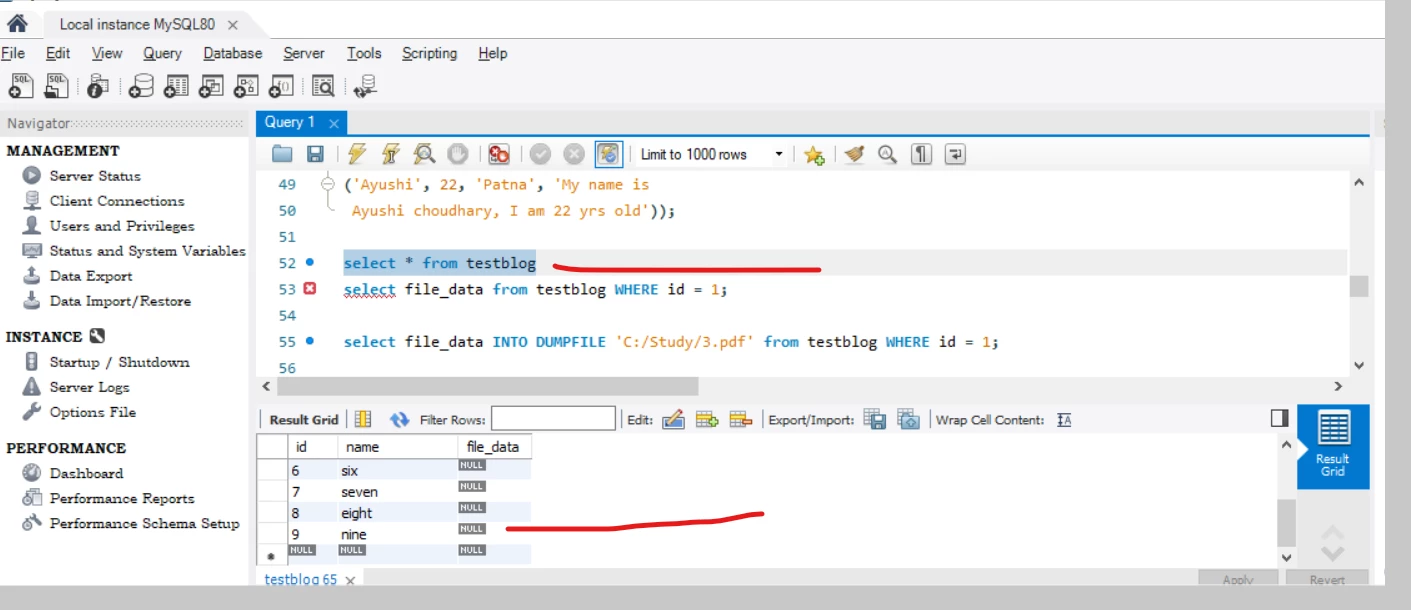
 

Regards

Vara

This post is no longer active and is closed to new replies. Need help? Start a new post to ask your question.
Best answer by A_H_M_Imrul

@vara_prasada_raoan1 

Though I am not 100% sure about the request body that you are sending to the db insertion service or if you are using anything custom, however it more depends how you are reading the data in the backend (byte array, InputStream etc.) before insertion. One example can be similar to the following (just to clarify understanding about your implementation): 


@WebServlet("/upload") @MultipartConfig public class FileUploadServlet extends HttpServlet { protected void doPost(HttpServletRequest request, HttpServletResponse response) throws ServletException, IOException { Part filePart = request.getPart("file"); // Assumes the form field is named "file" InputStream fileContent = filePart.getInputStream(); byte[] fileBytes = fileContent.readAllBytes(); // Read the file content into a byte array try { Class.forName("com.mysql.cj.jdbc.Driver"); // Load the MySQL JDBC driver Connection conn = DriverManager.getConnection("jdbc:mysql://localhost:3306/your_database", "username", "password"); String sql = "INSERT INTO files_table (file_data) VALUES (?)"; PreparedStatement statement = conn.prepareStatement(sql); statement.setBytes(1, fileBytes); // Insert the file data as bytes statement.executeUpdate(); conn.close(); response.getWriter().println("File inserted into the database successfully"); } catch (Exception e) { e.printStackTrace(); response.getWriter().println("Error inserting file into the database"); } } }


you can share more insight about your current implementation for better assistance.

3 replies

A_H_M_Imrul
Community Advisor
A_H_M_ImrulCommunity AdvisorAccepted solution
Community Advisor
November 20, 2023

@vara_prasada_raoan1 

Though I am not 100% sure about the request body that you are sending to the db insertion service or if you are using anything custom, however it more depends how you are reading the data in the backend (byte array, InputStream etc.) before insertion. One example can be similar to the following (just to clarify understanding about your implementation): 


@WebServlet("/upload") @MultipartConfig public class FileUploadServlet extends HttpServlet { protected void doPost(HttpServletRequest request, HttpServletResponse response) throws ServletException, IOException { Part filePart = request.getPart("file"); // Assumes the form field is named "file" InputStream fileContent = filePart.getInputStream(); byte[] fileBytes = fileContent.readAllBytes(); // Read the file content into a byte array try { Class.forName("com.mysql.cj.jdbc.Driver"); // Load the MySQL JDBC driver Connection conn = DriverManager.getConnection("jdbc:mysql://localhost:3306/your_database", "username", "password"); String sql = "INSERT INTO files_table (file_data) VALUES (?)"; PreparedStatement statement = conn.prepareStatement(sql); statement.setBytes(1, fileBytes); // Insert the file data as bytes statement.executeUpdate(); conn.close(); response.getWriter().println("File inserted into the database successfully"); } catch (Exception e) { e.printStackTrace(); response.getWriter().println("Error inserting file into the database"); } } }


you can share more insight about your current implementation for better assistance.

February 1, 2024

I am also facing this issue guys, i have a website https://sarkaribuzzer.com/ and now i want to have an app using firebase and due to some issue it still now working.

Adobe Employee
November 20, 2023
kautuk_sahni
Community Manager
Community Manager
November 23, 2023

@vara_prasada_raoan1 Did you find the suggestions from users helpful? Please let us know if more information is required. Otherwise, please mark the answer as correct for posterity. If you have found out solution yourself, please share it with the community.

Kautuk Sahni