need drop down choice to be copied to another row | Community
Skip to main content
Level 5
June 25, 2023
Solved

need drop down choice to be copied to another row

  • June 25, 2023
  • 1 reply
  • 765 views

Good day,

This may be an easy question, but I cannot get it to work.  I would like to choose from a drop-down list and have my choice enter a word in a different row.  Example:  The drop-down list choice in row 1 is "cell phone".  When chosen, the word "smartphone" would be automatically entered in row 3.  Row 3 is a text field.  It would be appreciated if someone can help me and provide a script.  I tried using the action builder and it doesn't work.  Row 3 still stays blank.

 

This post is no longer active and is closed to new replies. Need help? Start a new post to ask your question.
Best answer by SivakumarKanoori

@islandgirl23 

Yes it can be done.


suppose you have 

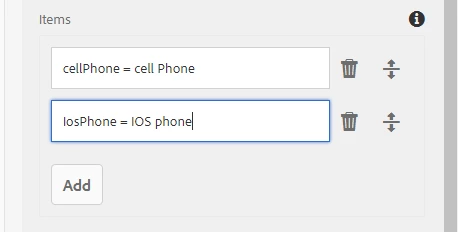
1) dropdown field -> name of the field is phoneType

2) Text filed -> name of the field mobileType


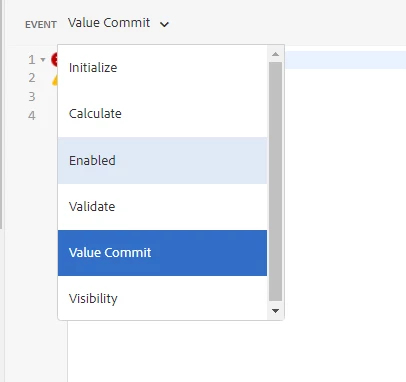
open rule editor of the dropdown field and select the value commit and write below js:


if(this.value =="cellPhone"){

mobileType.value="smartphone"; 

 or  

guideBridge.resolveNode(mobileType).value="smartPhone";

}


1 reply

SivakumarKanoori
Community Advisor
SivakumarKanooriCommunity AdvisorAccepted solution
Community Advisor
June 27, 2023

@islandgirl23 

Yes it can be done.


suppose you have 

1) dropdown field -> name of the field is phoneType

2) Text filed -> name of the field mobileType


open rule editor of the dropdown field and select the value commit and write below js:


if(this.value =="cellPhone"){

mobileType.value="smartphone"; 

 or  

guideBridge.resolveNode(mobileType).value="smartPhone";

}


Thanks,Siva
Level 5
July 4, 2023

Good day,

I did not check off that this was correct.....FYI I'm using Designer.  There is no "Value Commit" event to choose from.  What event should I choose?