Looking for help with repeating table rows and subform | Adobe Higher Education
Skip to main content
November 19, 2013
解決済み

Looking for help with repeating table rows and subform

  • November 19, 2013
  • 12 の返信
  • 8124 ビュー

I’m hoping someone might be able to help me figure out how to accomplish some things with a repeating table subform in a form I’m building.  I’ve attached the file here. 

https://workspaces.acrobat.com/?d=2nUNZuTf2T4tsdSykMTlXw

I have a table (AssessChart1Table) it set up on pg 7 (Analysis) and have built in buttons(AddRowAssesChart1 and DeleteRowAssesChart1) so the user can add or delete additional rows of data as needed. 

The problem is that the user also enters data going across in the header row (AssessChart1HeaderRow1) of this table.  There are 10 columns available; however, they may need to add more data than that. Therefore, I made a button (AddMoreCourses) for the user to click to add another instance of the table subform (AssessEvalChart1) and also undo the adding of the subform with this button (UndoAddMoreCourses).

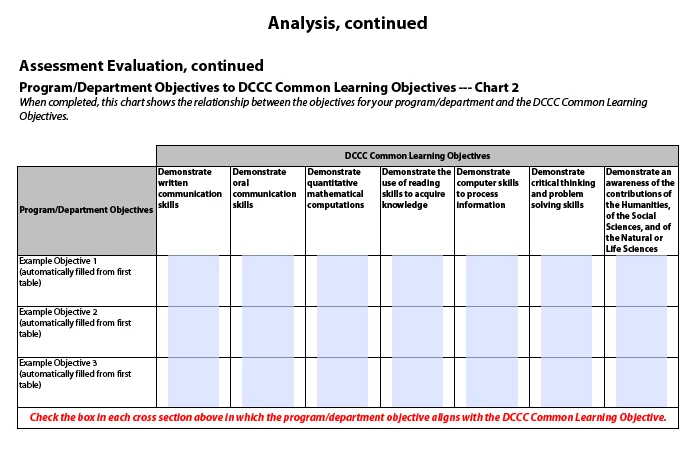
In addition, I have it setup that whatever data the user enters into the cell (Prog-DeptObjChart1) cell of that table gets automatically transferred to another table (AssessChart2Table),  cell (Prog-DeptObjChart2), which is located on the next page (AnalysisCont1).

All of the above works fine except that whenever the user presses the button (AddMoreCourses) I don’t want it to automatically fill in the text field cells that are copied over from (AssesChart1HeaderRow3) because I need the user to be able to enter different values in lieu of adding more columns to fit their data.  Additionally, I would like the values from the cells in the left column to repeat though because these values won’t change. Currently the values from the cells in the left column that carry down to (AssessChart2Table) get messed up on (AssessChart2Table) anytime I the user pushes Add More Courses button or Undo Add More Courses button.

In summary the tables would look like the attached screenshots:
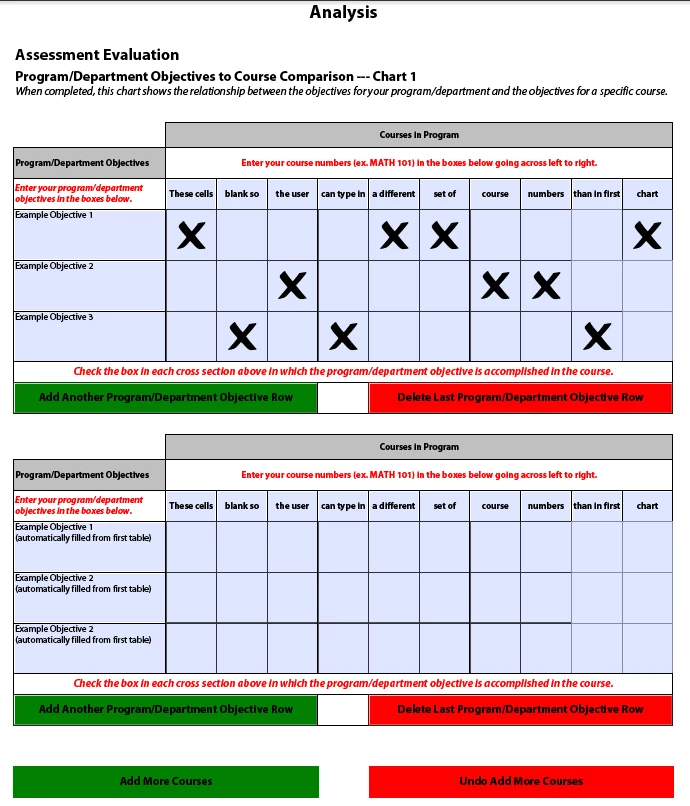
:

Any help would be so greatly appreciated.  I am not experienced with Livecycle Designer.  The form I've built by reading examples and forums. 

In case you need this, I'm using Livecycle Designer v. 9.0.0.2.20120627.2.874785 on a Windows 7 Pro platform.

Thank you!

このトピックへの返信は締め切られました。
ベストアンサー jasotastic81

They'll need to copy over in a similar way as the other rows did. I would suggest on the exit event for the Prog-DeptObjChart1 field, add code that copies the rawValue from it to the second chart. Your code has something there, now, but it doesn't take into account that there will be multiple instances of the same row.

So, in your action builder, add another result to the AddRowAssessChart1.click condition: Add a new instance of AssessChart2Row1.

Then in the exit event for Prog-DeptObjChart1, add this code.

xfa.resolveNode("AnalysisCont1.AssessEvalChart2.AssessChart2Table.AssessChart2Row1["+this.parent.index+"].Prog-DeptObjChart2").rawValue = this.rawValue;

Now when you exit the field you typed in, the text is copied to Chart2.

12 の返信

jasotastic81
Level 8
November 21, 2013

2nd one first. Add code to set the fields to readOnly. I added this line to the click event for the add courses button inside the for loop.

xfa.resolveNode("AssessEvalChart1["+newChartIndex+"].AssessChart1Table.AssessChart1Row1["+i+"].Prog-DeptObjChart1").access = "readOnly"

Back to the 1st problem. You could add a line in the click event to add the row to each table that has been created. I haven't worked that one out, yet...

Figitout作成者
November 22, 2013

Ok, that code worked great for the read only.  Thank you!

So for that first problem...I should further say that it would need to be able to not only add a row to the repeating subform after the repeat subform is invoked, but also delete a row and update any changes made in the objectives column.

So if user clicks to add another row, it would do so in both places and the repeat subform would then update with the text that is typed into the newly created objective cell on the original table.  Same for deleting a row and same for if a user changes the text in any objective cell after the repeat subform is invoked.

Once again, thanks so much for your help!