If/Else Multiple Conditions - or Switch?? | Adobe Higher Education
Skip to main content
July 8, 2011
Respondido

If/Else Multiple Conditions - or Switch??

  • July 8, 2011
  • 13 respostas
  • 9542 Visualizações

Am posting new info on a topic I posted in the wrong category (http://forums.adobe.com/thread/873889?tstart=0) in the hopes that moving it to correct category and providing new info will help.  My form has a value field, and based on the values, radio buttons would be checked accordingly.  The below working code is set as JavaScript on the calculate event of the radio box in question.  All is well so far, it works fine.

The next step am trying to accomplish is that there is another radio box where they would check the Type - A, B or C.  Except for a Type B, the below is in effect.  However, if Type B is selected, regardless of value below, the classification should ALWAYS be set to "1".  So a value of 1,000,000 AND marked as Type B would be classification 1, for example.

I believe the address of the radio group I need to test against is:

form1.sfrmMain.sfrmMainSub1.sfrmMain2.tbMainInfo.Row4[8].sfrmIdeaCAT.rType.rawValue;

But when I try to set a variable in below to use it in the code, it makes the other code not work.  Any ideas how to approach this - is there a simpler way?  Have checked into switch statements but have not been successful in converting below.  Any ideas would be appreciated, thank you.

WORKING CODE:

var myVal = form1.sfrmMain.sfrmMainSub1.sfrmMain2.tbMainInfo.rowEstimates.tblEstimates.Row1.sfrmEstimates.nSavings.rawValue;
var myClass = form1.sfrmMain.rSavClass.rawValue;

if(myVal >= 1000 && myVal <= 9999)
{
myClass ="1";
}
else
if(myVal >= 10000 && myVal <= 24999)
{
myClass ="2";
}
else
if(myVal >= 25000 && myVal <= 99999)
{
myClass="3";
}
else
if(myVal >= 100000 && myVal <= 999999)
{
myClass="4";
}
else
if(myVal >= 1000000)
{
myClass="5";
}
else
{
myClass="0";
}

Este tópico foi fechado para respostas.
Melhor resposta por Niall_O_Donovan

Hi,

Here is the form back to you: http://www.assuredynamics.com/wp-content/uploads/2011/07/2011-07-11-ShareVersion_Form.pdf

I will delete the link once you have the form.

There were a few issues:

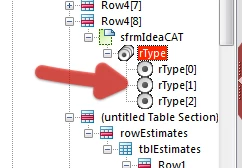
The rType radio buttons were all named the same as the exclusion group, so this is why it was resolving the node. I have renamed them:

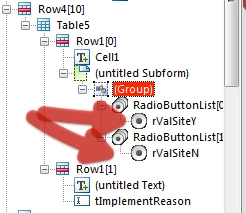
On the issue of radio buttons, there were three Yes/No questions where the choices were not in an exclusion group. I have paired these:

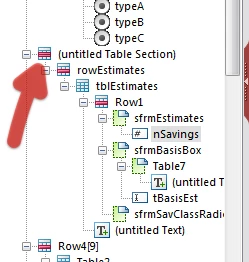
Objects, like nSavings were in unnamed containers, which makes scripting difficult (need to resolve the node):

In the script you are declaring a variable, which has the value of the object that contains the script. Then you are referring to that variable in order to set the value of the object. This is akin to the getField() method in Core/AcroForm JavaScript, but will NOT work here. Instead I have referred to the object using "this.rawValue".

The final script is here:

var myVal = sfrmMainSub1.sfrmMain2.tbMainInfo.section1.rowEstimates.tblEstimates.Row1.sfrmEstimates.nSavings.rawValue;

var myType = xfa.resolveNode("sfrmMainSub1.sfrmMain2.tbMainInfo.Row4[8].sfrmIdeaCAT.rType").rawValue;

// first check if Type B

if (myType === "2")

{

     this.rawValue = "1";

}


// then work through savings levels

else if (myVal >= 1000 && myVal <= 9999)

{

     this.rawValue ="1";

}

else if (myVal >= 10000 && myVal <= 24999)

{

     this.rawValue ="2";

}

else if (myVal >= 25000 && myVal <= 99999)

{

     this.rawValue ="3";

}

else if (myVal >= 100000 && myVal <= 999999)

{

     this.rawValue ="4";

}

else if (myVal >= 1000000)

{

     this.rawValue ="5";

}

else

{

     this.rawValue ="0";

}

I have made the saving classification checkboxes a light grey, so as to indicate that the user does not click these choices. I have also set the Type to Calculated - Read Only in the Object > Value palette.

Lastly, I have changed around the script for the Project Number-Year. Basically the way it was set up if a form that was filled in this year (2011), was opened next year, the reference would automatically change to Project Number-2012. I have changed it to always used the year from the submitted date.

I hope that this is now working for you,

Niall

13 Respostas

July 12, 2011

Got the form, thank you so much, yes, that is exactly how I was needing it to behave.  I sure have a lot to learn, the form is very helpful to understand what I was doing wrong with my radio buttons and naming containers.  Also, in looking at your code and logic, I was making things way too complicated - first you checked to see if Type B was '2' before running the other value checks.

Thank you for catching the problem with the year, too, I hadn't thought about that, but am sure it would have cropped up next year, and appreciate your help very much.

Thank you, Cathy

Niall_O_Donovan
Level 10
July 12, 2011

You are welcome Cathy.

I have removed the form and you can edit your post above to remove the original link.

Niall

July 12, 2011

Done, thank you very much, Niall.