Solved
Using container component with Universal Editor in AEM Sites
I’m currently using the Universal Editor in AEM Sites.
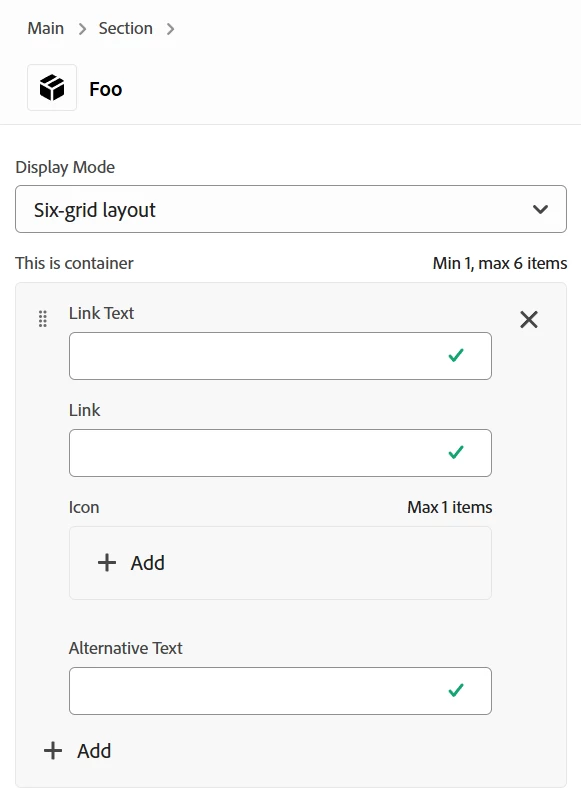
I have a select component that determines which layout to use.
When I switch to the "Six-grid layout", a container component appears, allowing the user to add multiple items inside it.
At this point, I’m not using any custom JavaScript or CSS.
My issue is that the values inside the container item do not appear in the view or the rendered HTML.
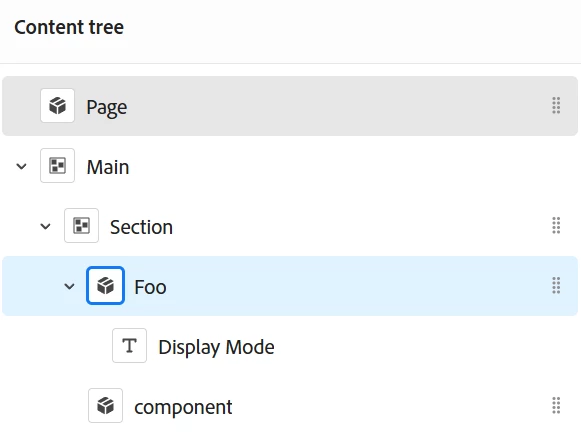
Additionally, the content tree shows a component that I didn’t define, and I’m not sure where it’s coming from.
Can anyone help me identify whether there’s something wrong with my definition file, or if I’m missing a required configuration?
{
  "definitions": [
    {
      "title": "Foo",
      "id": "foo",
      "plugins": {
        "xwalk": {
          "page": {
            "resourceType": "core/franklin/components/block/v1/block",
            "template": {
              "name": "Foo",
              "model": "foo"
            }
          }
        }
      }
    }
  ],
  "models": [
    {
      "id": "foo",
      "fields": [
        {
          "component": "select",
          "name": "displayModeSelect",
          "label": "Display Mode",
          "valueType": "string",
          "options": [
            {
              "name": "Six-grid layout",
              "value": "six-grid layout select"
            },
            {
              "name": "Text layout",
              "value": "text layout select"
            }
          ]
        },
        {
          "component": "container",
          "label": "This is container",
          "name": "container1",
          "valueType": "string",
          "condition": {
            "===": [
              {
                "var": "displayModeSelect"
              },
              "six-grid layout select"
            ]
          },
          "multi": true,
          "validation": {
            "minSize": 1,
            "maxSize": 6
          },
          "fields": [
            {
              "component": "text",
              "label": "Link Text",
              "name": "linkText",
              "valueType": "string"
            },
            {
              "component": "text",
              "label": "Link",
              "name": "link",
              "valueType": "string"
            },
            {
              "component": "reference",
              "label": "Icon",
              "name": "Icon",
              "valueType": "string"
            },
            {
              "component": "text",
              "label": "Alternative Text",
              "name": "iconAlternativeText",
              "valueType": "string"
            }
          ]
        },
        {
          "component": "text",
          "label": "Text layout",
          "name": "SearchBarText",
          "valueType": "string",
          "condition": {
            "===": [
              {
                "var": "displayModeSelect"
              },
              "text layout select"
            ]
          }
        }
      ]
    }
  ],
  "filters": []
}