Typeahead functionality in AEM dropdown component | Community
Skip to main content
Level 3
June 3, 2022
Solved

Typeahead functionality in AEM dropdown component

  • June 3, 2022
  • 1 reply
  • 1290 views

Hi Team ,

 We have a long list of dropdown values in our component .So , we would like to integrate the  typeahead function in the dropdown to filter out the list to get to the one that the content author wants to select .Could anyone please help me with any references or ideas on it .


Thanks in Advance!

 

This post is no longer active and is closed to new replies. Need help? Start a new post to ask your question.
Best answer by lukasz-m

Hi @keerthi97,

If I good understand you need this functionality in authoring interface. There are few options you could consider.

  1. You can use OOTB coral2 autocomplete widget. It is deprecated however it's still used in some AEM OOTB functionalities - so I think it could be considered as a short term option. The implementation of this widget can be found under: /libs/granite/ui/components/coral/foundation/form/autocomplete
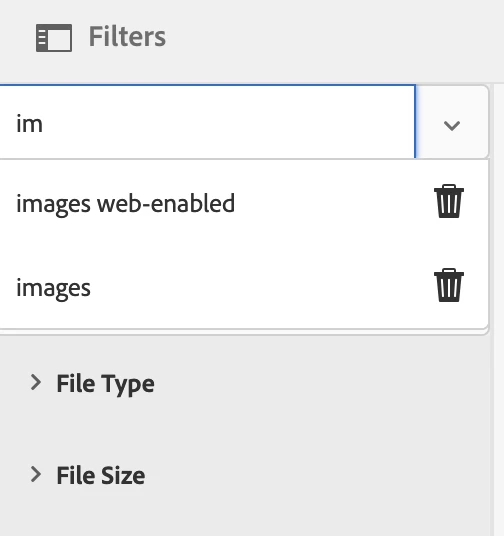
    Example of usage, can be find under /libs/dam/content/searchpanel/header/items/savedsearchesfield, and this is how it looks in action - this is Saved Searches option in DAM filters:
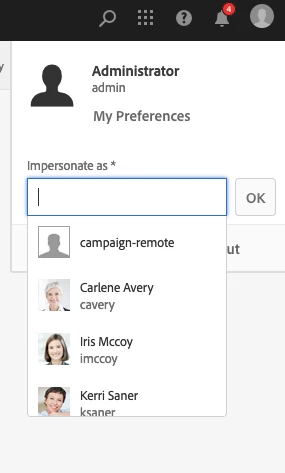
  2. The other, long term option (and recommended) will be to create custom widget base on foundation-autocomplete. As an implementation example you can refer to authorizable autocomplete, code can be found under /libs/granite/ui/components/coral/foundation/authorizable/autocomplete. Usage can be find in top right corner when you trying to use Impersonate as option.

1 reply

lukasz-m
Community Advisor
lukasz-mCommunity AdvisorAccepted solution
Community Advisor
June 5, 2022

Hi @keerthi97,

If I good understand you need this functionality in authoring interface. There are few options you could consider.

  1. You can use OOTB coral2 autocomplete widget. It is deprecated however it's still used in some AEM OOTB functionalities - so I think it could be considered as a short term option. The implementation of this widget can be found under: /libs/granite/ui/components/coral/foundation/form/autocomplete
    Example of usage, can be find under /libs/dam/content/searchpanel/header/items/savedsearchesfield, and this is how it looks in action - this is Saved Searches option in DAM filters:
  2. The other, long term option (and recommended) will be to create custom widget base on foundation-autocomplete. As an implementation example you can refer to authorizable autocomplete, code can be found under /libs/granite/ui/components/coral/foundation/authorizable/autocomplete. Usage can be find in top right corner when you trying to use Impersonate as option.