sync from prod to stage, without overriding the pages in stage | Adobe Higher Education
Skip to main content
Ricky99999
Level 4
June 13, 2022
해결됨

sync from prod to stage, without overriding the pages in stage

  • June 13, 2022
  • 1 답변
  • 645 조회

Hi All, 


QA team and authors are creating a lot UAT pages in stage under below path for testing new upcoming go-live 

/content/project/siteA/, 

/content/project/siteB, 

And busines team creating pages in prod under same path very frequently, we have basic auth for this in prod, so business user creates and test. 


Authors asking for a content sync for same nodes from prod to stage for newly pages created. 


But when we do content sync the same node will over-ride in stage. But authors and QA team need content sync for newly created prod pages to stage and as well as all the UAT pages should remain in stage. UAT pages are created random location in stage and in prod business also creating the pages randomly. 


Can anyone help here for incremental content sync without over -riding pages in stage. 


Simply I need all the pages from prod to stage for above paths and all the stage pages also should be available for QA team after content sync


Thanks for the inputs



이 주제는 답변이 닫혔습니다.
최고의 답변: Anmol_Bhardwaj

Hi @ricky99999 ,

You just need to change the merge mode of the package

Steps to change the filter mode

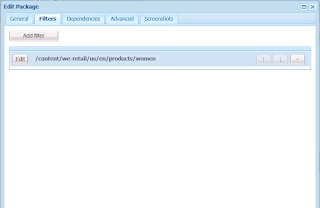
Create the package with the required path through the AEM package manager(http://localhost:8080/crx/packmgr/index.jsp) and download to the local file system


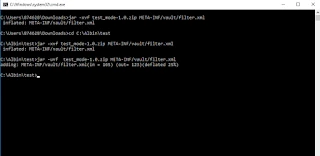
Unzip the package zip file on your computer(execute through command prompt or terminal) — jar -xvf test_mode-1.0.zip META-INF/vault/filter.xml

Open the file META-INF/vault/filter.xml in a text editor.

Add mode=”merge” to the <filter …> tag, the merge mode should be added to all the required filters defined in filter.xml:

<?xml version=”1.0" encoding=”UTF-8"?>
<workspaceFilter version=”1.0">
<filter root=”xxxxx” mode=”merge” >
<exclude pattern=”xxxxx” />
</filter>
<filter root=”xxxx” mode=”merge”/>
</workspaceFilter>

e.g

<?xml version=”1.0" encoding=”UTF-8"?>
<workspaceFilter version=”1.0">
<filter root=”/content/we-retail/us/en/products/men” mode=”merge” />
</workspaceFilter>

Re-zip the modified package contents so it includes the filter.xml changes — jar -uvf test_mode-1.0.zip META-INF/vault/filter.xml


Upload the modified package to target server through package manager— the filter changes(“merge” mode) will make sure the target server changes are not overwritten.

1 답변

Anmol_Bhardwaj
Community Advisor
Community Advisor
June 14, 2022

Hi @ricky99999 ,

You just need to change the merge mode of the package

Steps to change the filter mode

Create the package with the required path through the AEM package manager(http://localhost:8080/crx/packmgr/index.jsp) and download to the local file system


Unzip the package zip file on your computer(execute through command prompt or terminal) — jar -xvf test_mode-1.0.zip META-INF/vault/filter.xml

Open the file META-INF/vault/filter.xml in a text editor.

Add mode=”merge” to the <filter …> tag, the merge mode should be added to all the required filters defined in filter.xml:

<?xml version=”1.0" encoding=”UTF-8"?>
<workspaceFilter version=”1.0">
<filter root=”xxxxx” mode=”merge” >
<exclude pattern=”xxxxx” />
</filter>
<filter root=”xxxx” mode=”merge”/>
</workspaceFilter>

e.g

<?xml version=”1.0" encoding=”UTF-8"?>
<workspaceFilter version=”1.0">
<filter root=”/content/we-retail/us/en/products/men” mode=”merge” />
</workspaceFilter>

Re-zip the modified package contents so it includes the filter.xml changes — jar -uvf test_mode-1.0.zip META-INF/vault/filter.xml


Upload the modified package to target server through package manager— the filter changes(“merge” mode) will make sure the target server changes are not overwritten.