Indexing issue when trying to get a node name matching a value from JCR | Community
Skip to main content
Adobe Champion
August 25, 2022
Solved

Indexing issue when trying to get a node name matching a value from JCR

  • August 25, 2022
  • 1 reply
  • 805 views

I have the below query to get a image node from an instance over 1 million assets 


type=dam:Asset

path=/content/dam/company/product-assets

nodename=test.tif

p.limit=-1


XPATH Query

/jcr:root/content/dam/company/product-assets//element(*, dam:Asset)
[
(fn:name() = 'test.tif')
]


SQL2

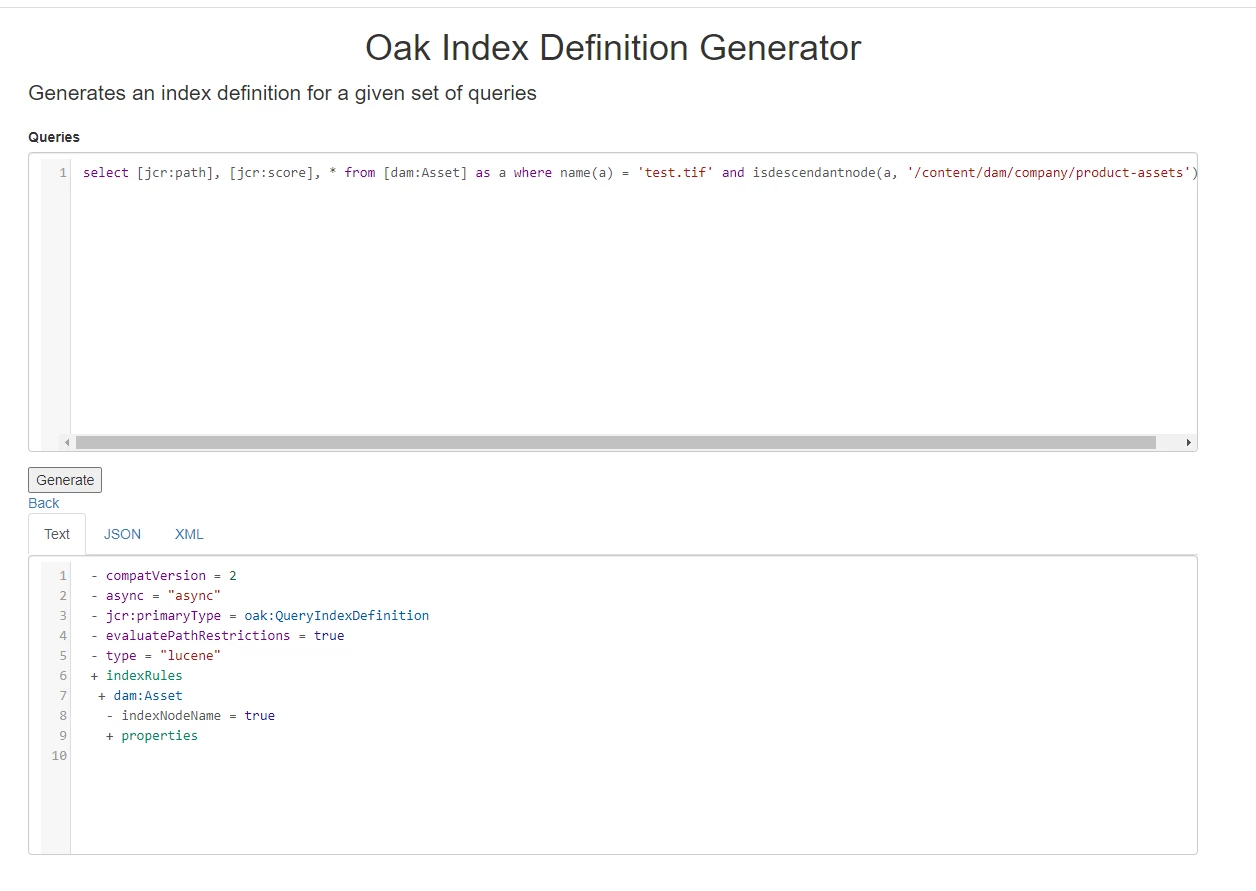
select [jcr:path], [jcr:score], * from [dam:Asset] as a where name(a) = 'test.tif' and isdescendantnode(a, '/content/dam/company/product-assets')


This gives me node traversal error. Can someone help me how I can recreate this query or how to index fn:name?


Below is what the oak generation tool gave definition for creating index and this is still in place But still it gives indexing error.



This post is no longer active and is closed to new replies. Need help? Start a new post to ask your question.
Best answer by Anmol_Bhardwaj

Try this 

path= /content/dam/company/product-assets
property = jcr:primaryType
property.name = dam:Asset
fulltext = test.tif
p.limit=-1

As there is already an index for fulltext you should not get any traversal error, if you still get the same error. I would suggest adding an addtional identifier to the query.

1 reply

Anmol_Bhardwaj
Community Advisor
Anmol_BhardwajCommunity AdvisorAccepted solution
Community Advisor
August 29, 2022

Try this 

path= /content/dam/company/product-assets
property = jcr:primaryType
property.name = dam:Asset
fulltext = test.tif
p.limit=-1

As there is already an index for fulltext you should not get any traversal error, if you still get the same error. I would suggest adding an addtional identifier to the query.

P_V_NairAdobe ChampionAuthor
Adobe Champion
August 29, 2022

Hi @anmol_bhardwaj  Thanks for your time. But, if my understanding is correct, this query will search for the full text in the repo and return all results matching that text.tif. It will even list any property nodes containing that text instead of returning the correct matching node alone. So we might need to go for additional logic in the code to validate it. Is my understanding correct?


Anmol_Bhardwaj
Community Advisor
Community Advisor
September 7, 2022

fulltext will just look for certain fields like node name or jcr:title.

If you need to expand or restrict the nodes it searched for, you can use fulltext.relpath


fulltext.relPath is the relative path to search in (eg. property or subnode) eg. fulltext.relPath=jcr:content or fulltext.relPath=jcr:content/@cq:tags

You can also add wildcard to it example fulltext.relPath=jcr:content/*

This was you can restrict where and which nodes it searches.