Handle multilingual for dropdown label in content fragment | Community
Skip to main content
July 22, 2024
Solved

Handle multilingual for dropdown label in content fragment

  • July 22, 2024
  • 3 replies
  • 731 views

Hi all hope you guys have a good day,


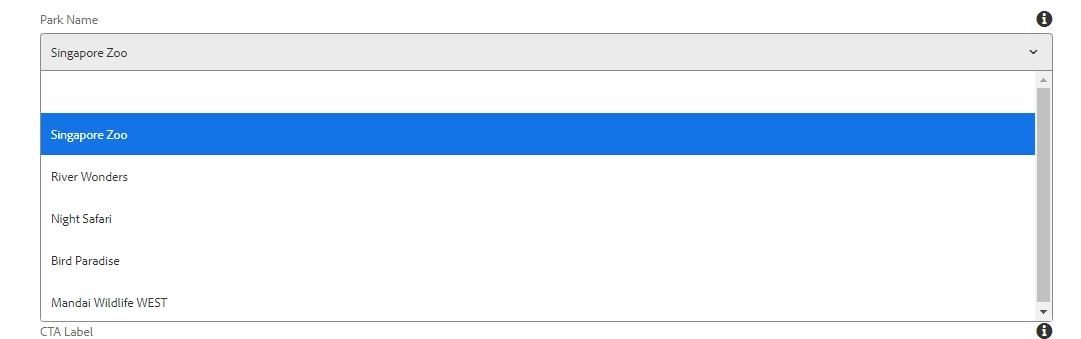
As the subject mention, currently in our AEM we have a content fragment template with an English dropdown label, and we would want to cater for other language (Mandarin for this case) without changing the original label. The reason for this is that we already have a lot of content fragment assets based on this template and manually change it would be a hassle. 
This post is no longer active and is closed to new replies. Need help? Start a new post to ask your question.
Best answer by EstebanBustamante

Hi, 

I am not sure if I understood correctly, but if you meant to translate "Park Name" from your dialog, you could use i18n to achieve that, here is a good resource explaining this: https://www.nextrow.com/blog/adobe-experience-manager/usecase-il8n-converting-components-based-userpreference. 


Hope this helps.

3 replies

EstebanBustamante
Community Advisor and Adobe Champion
EstebanBustamanteCommunity Advisor and Adobe ChampionAccepted solution
Community Advisor and Adobe Champion
July 22, 2024

Hi, 

I am not sure if I understood correctly, but if you meant to translate "Park Name" from your dialog, you could use i18n to achieve that, here is a good resource explaining this: https://www.nextrow.com/blog/adobe-experience-manager/usecase-il8n-converting-components-based-userpreference. 


Hope this helps.

Esteban Bustamante
kautuk_sahni
Community Manager
Community Manager
July 23, 2024

@muhammad_afiqzu Did you find the suggestion helpful? Please let us know if you require more information. Otherwise, please mark the answer as correct for posterity. If you've discovered a solution yourself, we would appreciate it if you could share it with the community. Thank you!

Kautuk Sahni
MonalikaKapoor
Adobe Employee
Adobe Employee
August 2, 2024

Hi,

To address the need for multilingual support in your AEM Content Fragment templates without changing the original labels, let's explore the options available:


  1. Custom Multifield with Language Support: Implement a custom multifield component that supports multiple languages. This would involve creating a custom dialog in your Content Fragment template where you can define labels for different languages.
  2. Overlaying the Template Dialog: Overlay the existing Content Fragment template dialog to include language-specific fields. For example, add a dropdown for English and another for Mandarin within the same dialog.
  3. Using AEM Translation Integration: Utilize AEM's translation integration [1] [2] capabilities to manage multilingual content. This involves using translation projects and connectors to automate the translation process. This provides a scalable and automated solution for managing multilingual content. It also integrates well with AEM's existing translation workflows.
  4. Customizing the Content Fragment Model: Extend your Content Fragment model to include language-specific fields. For example, create separate fields for English and Mandarin labels within the same model. [3][4] 


I hope this helps! 🙂

Regards,
Monalika Kapoor

[1] https://experienceleague.adobe.com/en/docs/experience-manager-cloud-service/content/headless/journeys/translation/configure-connector?
[2] https://experienceleague.adobe.com/en/docs/experience-manager-65/content/sites/administering/introduction/translation
[3] https://experienceleague.adobe.com/en/docs/experience-manager-65/content/assets/content-fragments/content-fragments-models
[4] https://experienceleague.adobe.com/en/docs/experience-manager-65/content/implementing/developing/extending-aem/customizing-content-fragments
[5] https://www.nextrow.com/blog/adobe-experience-manager/usecase-il8n-converting-components-based-userpreference
