Duplicate set of metadata properties in Property Picker when using Metadata Schema Form Editor (AEM 6.5.14.0)
Hi all,
I am fairly new to AEM and am trying to build a basic Schema form for assets that simplifies the "default" form for my users.
When I click on the checkbox icon in "Map to property" in a field's Settings, the Property Picker shows two complete metadata "folders," one nested inside the other:
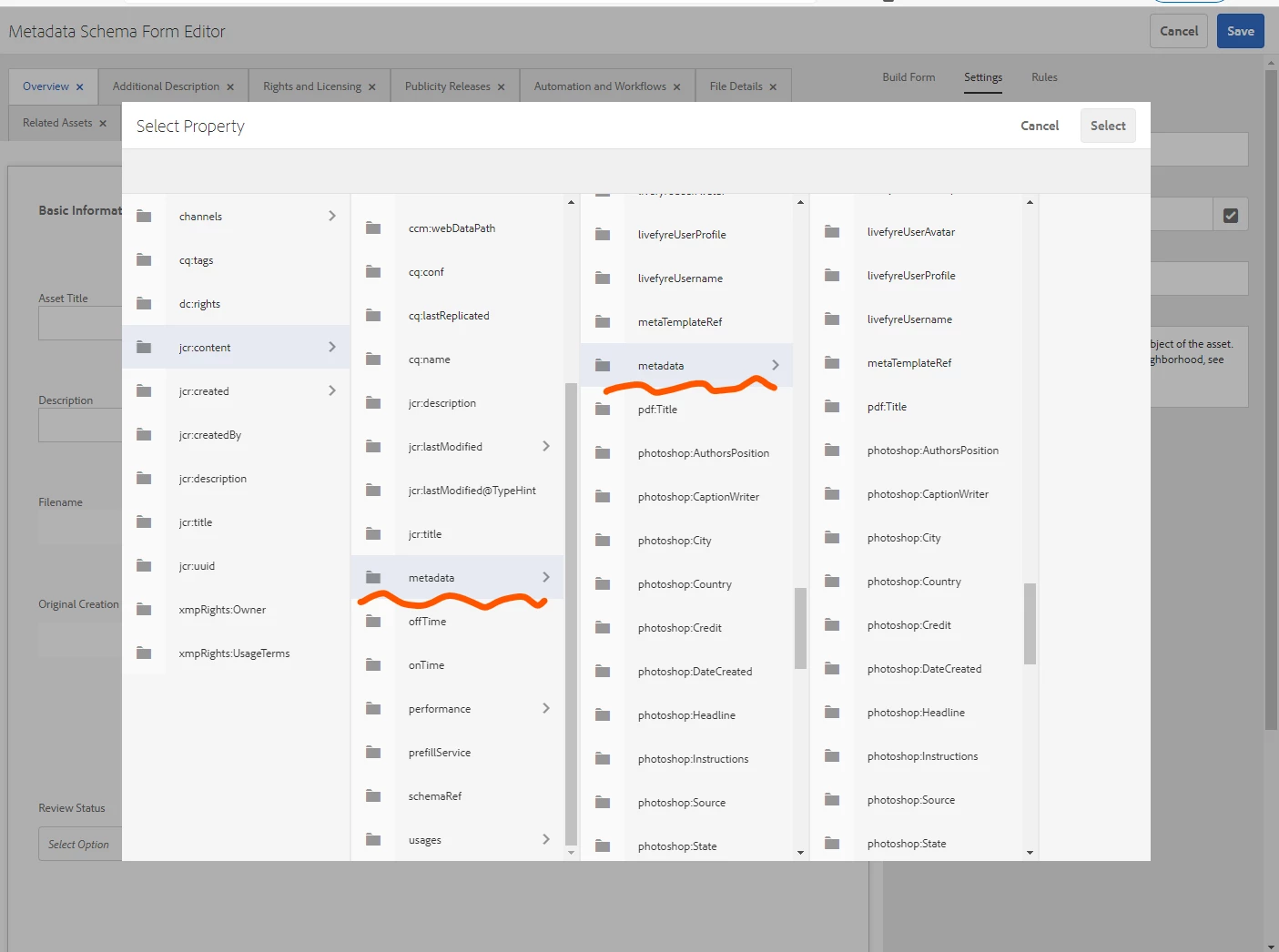
This doesn't look right to me -- I don't think the second, nested "metadata" folder should be there, since those properties would be written to .jcr:content/metadata/metadata/dc:title (or similar). If the duplicate properties aren't supposed to be there, I'd like to remove them from the Property Picker so that they aren't accidentally included in a schema or search form.
The only documentation I've been able to find is a brief mention in the Tips and limitations section of the Configure metadata functionality doc page, which says, "Property Picker displays properties that are used in schema editors and search forms. Property Picker does not pick metadata properties from an asset." How can I find where these duplicate properties are coming from or at least prevent them from showing up in Property Picker?