NWE: On the Request Level - Sharing a document. I only see the "Sharing" link under the ellipsis appearing next to the document name, on the document detail page. I do not see it in the document details summary tab. | Community
Skip to main content
Level 2
November 25, 2020
Solved

NWE: On the Request Level - Sharing a document. I only see the "Sharing" link under the ellipsis appearing next to the document name, on the document detail page. I do not see it in the document details summary tab.

  • November 25, 2020
  • 3 replies
  • 704 views

Is this the only way to access "Sharing" on the document level? It seems quite hidden.
This post is no longer active and is closed to new replies. Need help? Start a new post to ask your question.
Best answer by imgrund

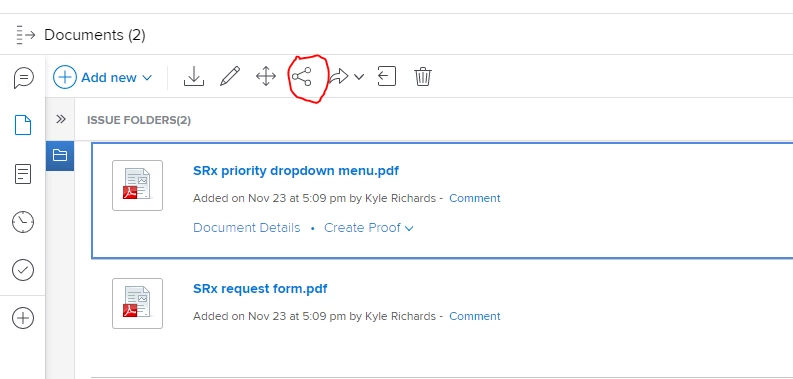
Hi Jeanette - the Share button isn't in the document summary panel, but when you click on the tile to get info on the summary panel, there is an icon on the top tool bar that you can click to share.

3 replies

imgrund
Adobe Employee
imgrundAdobe EmployeeAccepted solution
Adobe Employee
November 30, 2020

Hi Jeanette - the Share button isn't in the document summary panel, but when you click on the tile to get info on the summary panel, there is an icon on the top tool bar that you can click to share.

Level 2
November 30, 2020

Thanks Anthony. My early adopters find that "sharing" seems hidden in the new experience.

kynabaker16
Adobe Employee
Adobe Employee
November 30, 2020

Hi Jeanette,

Thank you for posting this! I know that our product team is actively watching for feedback about the new Workfront experience so if you give feedback in the product (Help> Give Feedback) or in the Innovation Lab (if you are an Authorized Support Contact), it will be reviewed quickly!

Thanks,

Kyna

Level 2
November 30, 2020

Hi Kyna,

Thanks for the suggestion. I just submitted this as feedback.