Is there a way for me to pull the following into a report: the date someone clicked on "Work on It" for an issue and the date that someone updates the issue to a certain status? | Community
Skip to main content
Level 2
January 25, 2021
Question

Is there a way for me to pull the following into a report: the date someone clicked on "Work on It" for an issue and the date that someone updates the issue to a certain status?

  • January 25, 2021
  • 3 replies
  • 2154 views

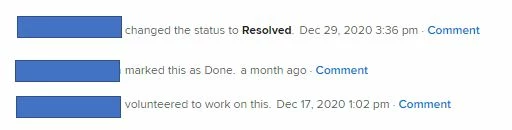
I can see in the Updates tab who clicked on Work on It (and the date) as well as who changed (and the date) the status of an issue. Below is a screenshot of the Updates tab. In this example, how can I pull the dates 12/17/2020 and 12/29/2020 into a report? Thank you!
This post is no longer active and is closed to new replies. Need help? Start a new post to ask your question.

3 replies

SamanthaIsin
Level 7
January 25, 2021

@Jeremy Flores‚ is/was working on a way to report on updates! Not sure if this would qualify in his report, but possibly! It isn't released yet I don't think, but perhaps he could give us an update.

Also, if you change the work on it button to the 'Start' button and then click the 'Start' then that is the date which is the 'Actual Start Date' which you can report on :)

jerflo
Adobe Employee
Adobe Employee
January 27, 2021

Thanks for looping me in @Samantha Isin‚. Yes, the new journal entry report would allow you to report on system updates, including the dates @Lynn Nguyen‚ is showing above. If all goes according to plan, I'm aiming to have this available in Preview the week of February 15th.

Level 3
January 28, 2021

Hi Jeremy,

Hope you're doing well. I would also love to be notified when this new Journal report is available; I could use it. Please add me to the DL. Thanks!

Steve

Kundanism
Level 10
February 4, 2021

Hi @Jeremy Flores‚

Please add me also when this report is available. That will be a great option while reporting.

Mvh

Kundan.

jerflo
Adobe Employee
Adobe Employee
February 4, 2021

Sounds good Kundan. I've added both you and Steven Hirsch. This report should provide some great value, but is not for the faint of heart 😉.

jerflo
Adobe Employee
Adobe Employee
March 1, 2021

Yes, of course. @Kundan Kumar‚ ‚ @Steven Hirsch‚ and @Ryan Brogneri‚ ‚Äî the new Journal Entry report is available in Preview now with plans to go to Production on Thursday, March 4th. The Journal Entry report will only display custom fields that have the "display changes on the update feed" setting enabled. This setting can be found in Setup > Custom Forms > then selecting the specific field > additional settings.

Another (new) way that you will be able to track changes to Custom Fields is using Audit Logs found within Setup > System. Hope this helps!

Level 2
March 5, 2021

Hello @Jeremy Flores

Will the Journal Fields ever be accessible via a Project-based (Type) Report? Thanks for your time.

jerflo
Adobe Employee
Adobe Employee
March 10, 2021

Hey Seth — Hopefully at some point in the future we would be able to do this, but unfortunately today our db structure doesn't allow it. We did consider this originally, though.

Level 2
March 10, 2021

Thanks for the reply and have a great day!