
How to report on projects that were live one a certain date | Community
Skip to main content
coledxn
Level 2
March 19, 2024
Solved

How to report on projects that were live one a certain date

  • March 19, 2024
  • 2 replies
  • 1030 views

Hello Workfront community,


I build monthly reports for our team using Workfront and would like to see how many projects had the in progress/live status on the last day of January and February this year. Is there a way to report on this retrospectively? I have a report set up to see how many live currently, but can't see how I'd report on how many live/in progress projects we had on the 29th Feb, for example. 


Thanks in advance for any advice! 

Cole Dixon

University of Leicester 
This post is no longer active and is closed to new replies. Need help? Start a new post to ask your question.
Best answer by KellieGardner

Hi Cole -


Workfront doesn't really keep timestamps of statuses for you to report on from a project report.


You have a couple of options though:


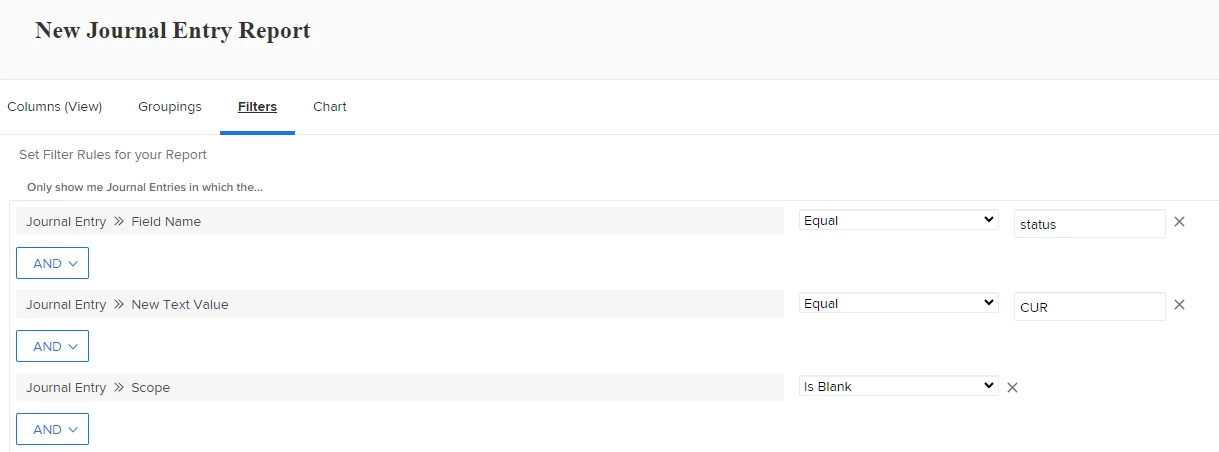
1) You could run a journal entry report to see a log of a status change entries from the system. Filter it for your specific status code you want to see and then determine your best grouping.


2) you could setup a calculated field to capture timestamps for easier reporting in the future. Couple of articles on that. https://experienceleaguecommunities.adobe.com/t5/workfront-questions/getting-timestamp-from-status-changes/m-p/466691#M753

https://experienceleague.adobe.com/en/docs/workfront/using/reporting/reports/calculated-custom-data/example-status-timestamp-in-calculated-field


3) I have reports that I have to run to find any project that was in the system during a certain time period. Might be valuable however, it doesn't filter to only show specific statuses at a specific time but rather any status for us during a time period including planning, on hold, etc. It pulls off of entry dates and completion dates. I can share that with you if you think it would be beneficial. 


2 replies

KellieGardner
Community Advisor
KellieGardnerCommunity AdvisorAccepted solution
Community Advisor
March 19, 2024

Hi Cole -


Workfront doesn't really keep timestamps of statuses for you to report on from a project report.


You have a couple of options though:


1) You could run a journal entry report to see a log of a status change entries from the system. Filter it for your specific status code you want to see and then determine your best grouping.


2) you could setup a calculated field to capture timestamps for easier reporting in the future. Couple of articles on that. https://experienceleaguecommunities.adobe.com/t5/workfront-questions/getting-timestamp-from-status-changes/m-p/466691#M753

https://experienceleague.adobe.com/en/docs/workfront/using/reporting/reports/calculated-custom-data/example-status-timestamp-in-calculated-field


3) I have reports that I have to run to find any project that was in the system during a certain time period. Might be valuable however, it doesn't filter to only show specific statuses at a specific time but rather any status for us during a time period including planning, on hold, etc. It pulls off of entry dates and completion dates. I can share that with you if you think it would be beneficial. 


Madalyn_Destafney
Community Advisor
Community Advisor
March 19, 2024

This is a tough one. An additional thought to Kellie's options. To at least get what went live in a specific timeframe, does your org typically turn projects Current the day they are opened (as opposed to hanging in Planning for longer than a day)? If so, you could pull a project report of projects entered X date or timeframe to get that side of the story (only if they go live same day as creation)...

If this helped you, please mark correct to help others : )
July 18, 2024

This sounds similar to a report I've been requesting for some time. We have 4 project coordinators who schedule projects on my team. I would love to have a report that can pull information like, how many projects did Jane schedule YTD, this month, a specific date etc.