Any guidance on Reminder Notifications? | Community
Skip to main content
Level 4
April 25, 2024
Question

Any guidance on Reminder Notifications?

  • April 25, 2024
  • 2 replies
  • 1291 views

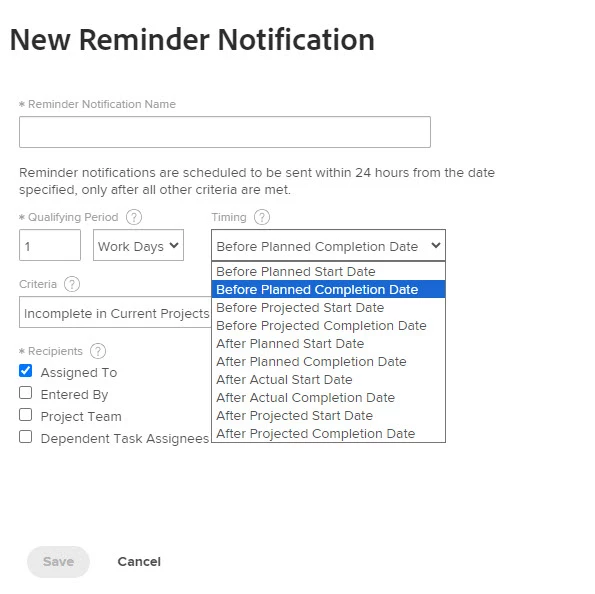
Does anyone have any insight or experience with enabling the Reminder Notifications, or can suggest any qualifying periods, timing, and criteria that have worked for you?  There's a push within our organization to trigger more reminder type notifications, specifically with the Projected Start/Completion Dates.  This is somewhat in part due to our organization not managing planned dates that closely, so projected dates are typically preferred as projects inevitably get off schedule.


Here's the interface in Workfront.  Just generally curious to hear what settings in this space have worked for you...?
This post is no longer active and is closed to new replies. Need help? Start a new post to ask your question.

2 replies

VicSellers
Community Advisor
Community Advisor
April 25, 2024

Hi @ryanbrogz1 - In my experience when it comes to notifications, reminder notifications are nice to turn on a day or two ahead of the date type you're using,

but I also found that navigating teams away from relying on email notifications and instead looking at dashboards has been really powerful. 


Email notifications can get lost easily, whereas a dashboard with reports can't be cleared until the work item is done. Most people don't want anything on their to-do list, so they become eager to check off the tasks. 


Just wanted to share! You might already being doing this even.

Level 4
April 25, 2024

Oh, the idea of pushing vs pulling of information, such as upcoming tasks, late tasks, or projects in progress will forever be a topic around here 😊. We have a growing number of "infrequent" users, maybe 25-50 tasks a year, if that.  Exploring these reminder notifications and setting them a day or two ahead seems like a good start.  Then maybe some day interval after the actual start date, to catch tasks that may be slipping a little.

VicSellers
Community Advisor
Community Advisor
April 25, 2024

Haha, totally understand. Well, hopefully the reminder notification does the trick!

Level 4
September 24, 2024

Just incase anyone stumbles on this sometime in the future, and closing the loop on myself.  We built out a series of reminders that hinge off the actual start date of a task, so they're reminders that tasks remain in progress.  This was the safest place to start for us.


There's also some finesse you must keep in mind if you're creating custom email templates.  Ex: if you build emails that are one day before a planned/projected start date that say "you're task is coming up" or one day before a planned/projected completion date that say "your task should be done tomorrow", the emails themselves still send if the task can't start or predecessors aren't complete.  So, use very generic wording in any custom email templates or you can risk sending false positive type emails which then creates confusion or recipients start to ignore them altogether.