
AEP audience based on two values of the same event attribute | Adobe Higher Education
Skip to main content
Pradeep-Jaiswal
Level 5
October 28, 2025
Respondido

AEP audience based on two values of the same event attribute

  • October 28, 2025
  • 2 respostas
  • 419 Visualizações

How do i create AEP audience where customer is having attributeA=123 as well as attributeA=234. attributeA is string(NOT an array) as part of event attribute and customer can have multiple event having different attributeA values.
Melhor resposta por SashankaBi1

Hi @pradeep-jaiswal

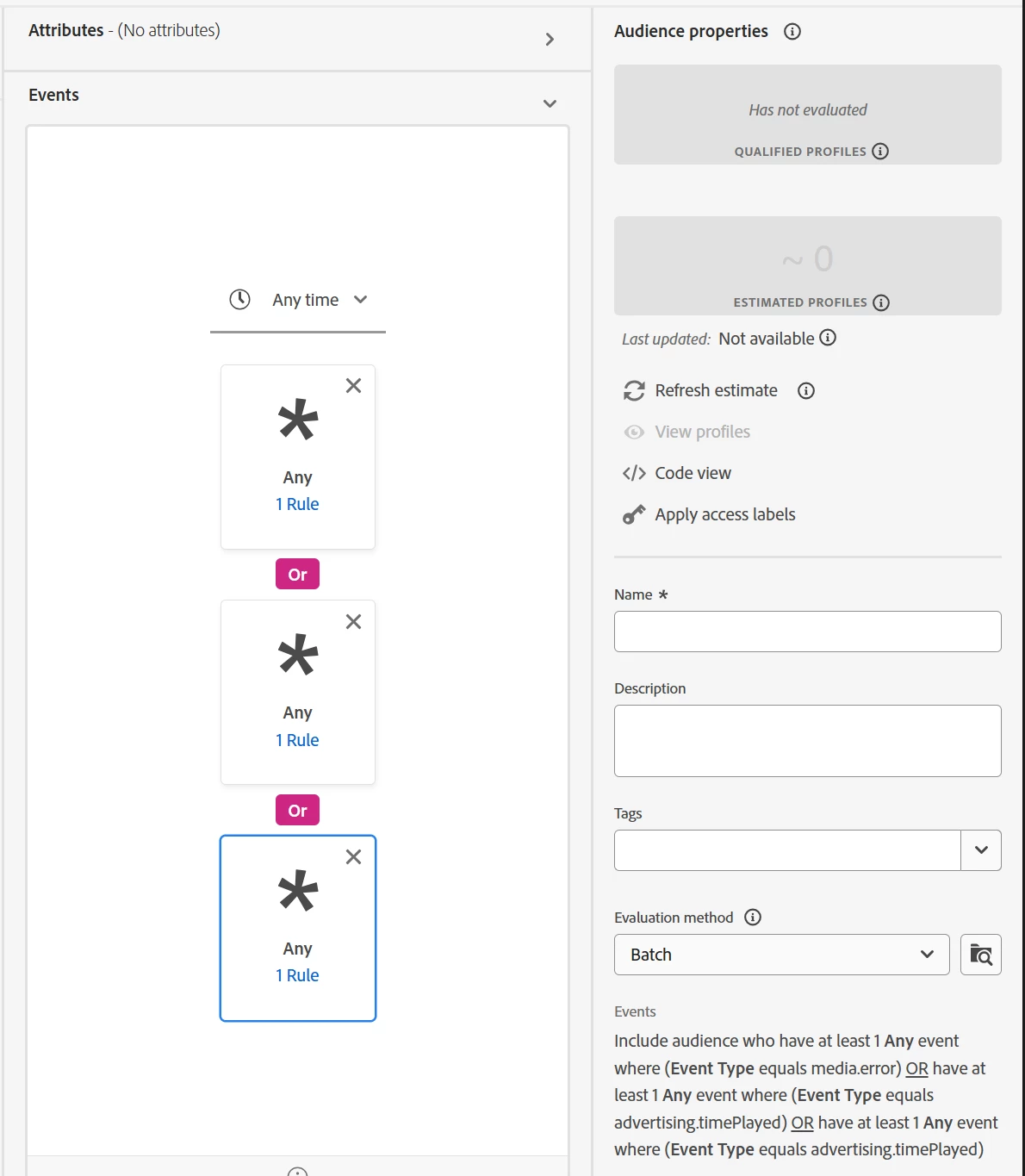
Since attributeA can have different values across multiple events for the same customer, the goal is to check if the customer has at least one event where attributeA = 123 and another event where attributeA = 234.

In Adobe Experience Platform Audiences, you can achieve this by creating multiple event conditions and combining them with AND logic as shown below. This ensures the audience includes profiles that have both types of events in their history.

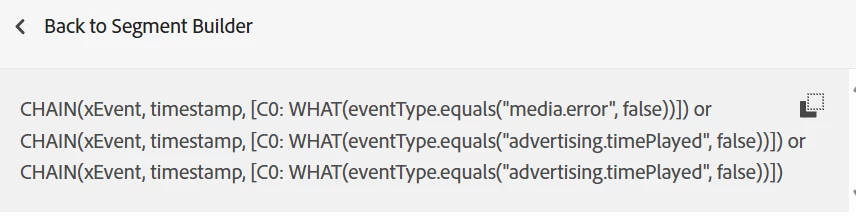
The above code is translated into the below code.

Hope this helps address your concern.

Thanks a lot.

Sashanka B

2 Respostas

SashankaBi1
SashankaBi1Resposta
Level 2
October 28, 2025

Hi @pradeep-jaiswal

Since attributeA can have different values across multiple events for the same customer, the goal is to check if the customer has at least one event where attributeA = 123 and another event where attributeA = 234.

In Adobe Experience Platform Audiences, you can achieve this by creating multiple event conditions and combining them with AND logic as shown below. This ensures the audience includes profiles that have both types of events in their history.

The above code is translated into the below code.

Hope this helps address your concern.

Thanks a lot.

Sashanka B

Pradeep-Jaiswal
Level 5
October 28, 2025

Adding one event below the one another does work, however I see a scalability problem here. These two events are not wrapped inside a container.


So I need to build another audience,

( attributeA=123 as well as attributeA=234 )

OR

( attributeA=456 as well as attributeA=567 )


I cant achieve that in single canvas, it seems I need to create one audience for 

( attributeA=123 as well as attributeA=234 )

and second audience for 

( attributeA=456 as well as attributeA=567 )


Then combine them inside third audience as

Audience1 OR Audience2


Just image if there are more And/OR operator required in the audience condition then each of them would require seperate audience as there is no container to wrap this ins UI.

( attributeA=123 as well as attributeA=234 )


Also in your screenshot you have shared CHAIN(xevent, timestamp....). where in the UI this view is present with heading 'back to segment builder' ?

SashankaBi1
Level 2
October 28, 2025

Hi @pradeep-jaiswal,

We know that complex audience logic is not a possible solution via the UI coding.

But that said, I did get success by creating the audiences using Postman API calls.

I would encourage using different combinations of capturing the script values as defined by the business conditions.


CHAIN(xEvent, timestamp, [C0: WHAT(_id.isNotNull() and eventType.equals("123", false) or _id.isNotNull() and eventType.equals("234", false)) COUNT(2) WHERE(C0.exists(C0.exists(eventType.equals("123", false) and ^.eventType.equals("234", false))))]) or CHAIN(xEvent, timestamp, [C0: WHAT(_id.isNotNull() and eventType.equals("456", false) or _id.isNotNull() and eventType.equals("567", false)) COUNT(2) WHERE(C0.exists(C0.exists(eventType.equals("456", false) and ^.eventType.equals("567", false))))])
 
Couple of points I would like to mention to creating the audience via PQL are:
1. the complete PQL should be in one line
2. the " must be preceded by '\' in the API script
 
 
Please do let me know if you find success doing so.
 
Thanks a lot
Sashanka B
GigiCotruta
Level 4
October 28, 2025

Hi, @pradeep-jaiswal , 


I think this is what you are looking for: 


Just drag the attributeA twice inside an event and change the "all" for "any". This way you will be registering all the events you need.