Ways to send push notifications excluding those who already received in same-day | Community
Skip to main content
Level 6
June 6, 2024
Solved

Ways to send push notifications excluding those who already received in same-day

  • June 6, 2024
  • 3 replies
  • 1035 views

Hi there,


What are some ways to send a push notification again in a journey excluding those who already received it? We have a marketing need where there was an issue with a journey, we need to urgently send another push out, but exclude those who already received it. We cannot wait 24 hours for a segment to refresh.


Thanks.
This post is no longer active and is closed to new replies. Need help? Start a new post to ask your question.
Best answer by IvanMi1

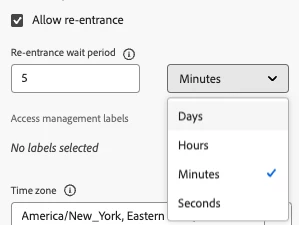
There was some good suggestions below on this thread already, but if you are just worried about triggering the same profile in the same journey within a 24 hr period you can control the Journey re-entrance timing in the Journey properties. This would gate the profile from being able to enter into the same journey. 


3 replies

DavidKangni
Community Advisor
Community Advisor
June 7, 2024

Hi,


This can be achieved via an on-demand evaluation where you can create a new segment job by making an API request to AEP


Adobe recommends to not abuse of it but anyway there is a mechanism to queue request on their end and if you're doing it a lot it will take more time to complete.


https://experienceleague.adobe.com/en/docs/experience-platform/segmentation/tutorials/evaluate-a-segment#on-demand-evaluation


Thanks,

David

David Kangni
akwanklAuthor
Level 6
June 11, 2024

Hi @davidkangni


My understanding with this is that the segment needs to be at least created 24 hours in advanced, is that not true? Does it mean i can create a new segment, and within an hour send an on-demand segment evaluation request, and then use it in AJO as soon as the evaluation is completed?


Thanks.

Mohan_Dugganab
Adobe Employee
Adobe Employee
June 11, 2024

One of the options to explore is Business rule where a daily frequency cap can be requested https://experienceleague.adobe.com/en/docs/journey-optimizer/using/configuration/frequency-rules#daily-frequency-cap


Also, take note of the below callout.


IvanMi1Adobe EmployeeAccepted solution
Adobe Employee
June 11, 2024

There was some good suggestions below on this thread already, but if you are just worried about triggering the same profile in the same journey within a 24 hr period you can control the Journey re-entrance timing in the Journey properties. This would gate the profile from being able to enter into the same journey.