Using an Attribute from Profiles in External Link field of Email | Community
Skip to main content
Level 2
June 25, 2025
Solved

Using an Attribute from Profiles in External Link field of Email

  • June 25, 2025
  • 2 replies
  • 330 views

All, 


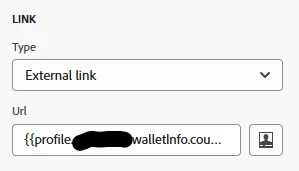
Question - I have an attribute as part of my Core Profile schema that I would like to use as the External Link of a CTA in an email.


I loaded a unique link in an attribute field. I the email when selecting the CTA, I chose External Link and chose the attribute field for personalization. When I send myself an email, the field does not respond like a CTA. I'm assuming this can't be done and that you actually need a link there.  


This post is no longer active and is closed to new replies. Need help? Start a new post to ask your question.
Best answer by Mayank_Gandhi

@montexho you can reference profile attribute values in the external link field of a CTA, using the personalization editor—for example: {{profile.uniqueLink}}

However:

  • The value in your profile attribute (e.g., uniqueLink) must be a fully qualified URL, i.e., start with http:// or https://.
  • If it does not, the link is not recognized as a real CTA: it won’t be clickable, tracked, or functional.

See Official Documentation > Missing link tracking in Adobe Journey Optimizer email journeys:

2 replies

Mohan_Dugganab
Adobe Employee
Adobe Employee
June 26, 2025
Mayank_Gandhi
Adobe Employee
Mayank_GandhiAdobe EmployeeAccepted solution
Adobe Employee
June 26, 2025

@montexho you can reference profile attribute values in the external link field of a CTA, using the personalization editor—for example: {{profile.uniqueLink}}

However:

  • The value in your profile attribute (e.g., uniqueLink) must be a fully qualified URL, i.e., start with http:// or https://.
  • If it does not, the link is not recognized as a real CTA: it won’t be clickable, tracked, or functional.

See Official Documentation > Missing link tracking in Adobe Journey Optimizer email journeys: