Segment deletion - basic house keeping need | Community
Skip to main content
Level 2
August 19, 2022
Solved

Segment deletion - basic house keeping need

  • August 19, 2022
  • 2 replies
  • 1228 views

Hi,

How can I delete a segment definition in AJO?

I can't find any delete option in the UI.

As a basic house keeping activity we want to delete segments that should no longer be used.

Also is there anyway of copying a segment to make it easier to create new variants.

Regards,

Richard.

This post is no longer active and is closed to new replies. Need help? Start a new post to ask your question.
Best answer by AtulChavan

Hi @richard_at_qantas ,

How to delete segment in AJO ? 
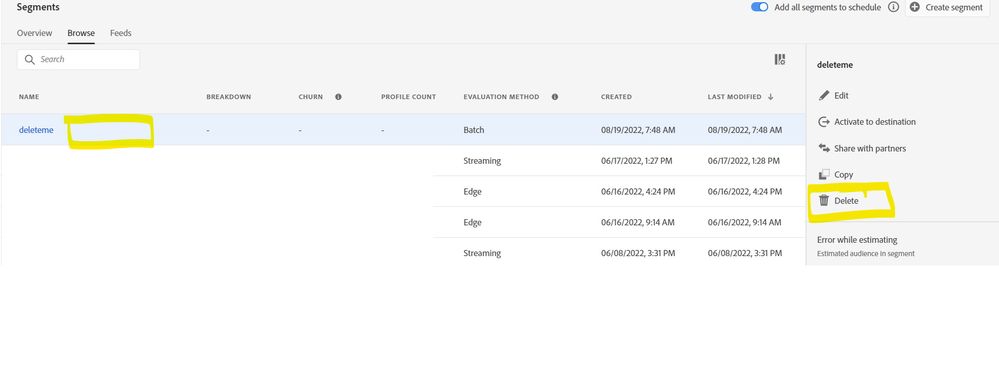
at home screen of segment under browse section just click/select any segment that you wish to delete [Dont click on segment name which would open its definition] and you get delete option on right pane. Please refer screenshot.

Still don't seen delete option ? 
here is permission levels defined and get yourself 'Manage Journeys' i.e. high level permission to enable yourself doing some hygiene activities.
https://experienceleague.adobe.com/docs/journey-optimizer/using/access-control/high-low-permissions.html?lang=en

How to copy segment ?
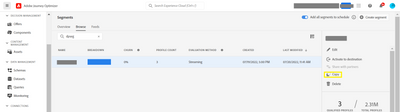
On same right pane post selection of segment you get copy option too [refer snapshot yellow highlighted rectangle]. Just click and it will take a moment to copy your existing segment and would create new segment having same definition with name as  "Existing name XXXX + 'copy' + timestamp". 


Hope this helps.


2 replies

Level 4
August 19, 2022

Don't klick on the segment name but instead somewhere nearby the name in the "cell". (Yeah UX rules!)

Then some "context menu" will show up.


Level 2
August 19, 2022

Thank you.

I was looking for the ... like we have on the journey and landing page lists.

I'll have to remember to wait longer for the screen to update when clinking on a row to allow time for the context window to update.

AtulChavan
Community Advisor
AtulChavanCommunity AdvisorAccepted solution
Community Advisor
August 19, 2022

Hi @richard_at_qantas ,

How to delete segment in AJO ? 
at home screen of segment under browse section just click/select any segment that you wish to delete [Dont click on segment name which would open its definition] and you get delete option on right pane. Please refer screenshot.


Still don't seen delete option ? 
here is permission levels defined and get yourself 'Manage Journeys' i.e. high level permission to enable yourself doing some hygiene activities.
https://experienceleague.adobe.com/docs/journey-optimizer/using/access-control/high-low-permissions.html?lang=en

How to copy segment ?
On same right pane post selection of segment you get copy option too [refer snapshot yellow highlighted rectangle]. Just click and it will take a moment to copy your existing segment and would create new segment having same definition with name as  "Existing name XXXX + 'copy' + timestamp". 


Hope this helps.


Level 2
August 19, 2022

Thank you.

I was looking for the ... like we have on the journey and landing page lists.

I'll have to remember to wait longer the the screen to update when clinking on a row to allow time for the context window to update.